











Whether you're a tech savvy person or a newbie to all types of web hosting (aka stable web hosting) solutions, disk space is a key influence on the way digital files are managed
From tiny bytes to massive terabytes, this article will delve into the intricate details of disk space to provide you with a comprehensive overview. We'll explain the definition of disk space, its functions, types, influencing factors, management tips, and key points for disk space considerations for different devices.
Your website's performance and access stability depends on choosing a reliable web hosting provider. In our well-curated list of web hosting service providers, you can find a quality choice that meets your needs.
Key Takeaways
- Disk space refers to the storage capacity provided by a physical hard disk drive (HDD) or solid state drive (SSD);
- Disk space is measured in bytes, kilobytes (KB), megabytes (MB), gigabytes (GB), terabytes (TB), and so on;
- Insufficient disk space can lead to performance degradation, file access failures and system instability;
- Effective disk space management includes regular cleanup, deletion of duplicate files, compression of files, use of external storage and cloud services;
- Proper disk space management improves system performance, increases storage capacity, optimizes file organization, prevents data loss, and meets future storage needs.
Understanding Disk Space
Disk space is a fundamental concept in the field of computing and plays a key role in digital data storage and management.
From the operating system to files and applications, all data is stored in disk space. Understanding how disk space works is critical to optimizing storage and ensuring smooth system operation.
How disk space works
Essentially, disk space is the medium (physical or virtual) used to store and retrieve digital data. It is the “designated storage area” for the operating system, applications, files, and other data - whether it is a traditional hard disk drive (HDD) or a solid state drive (SSD), disk space provides the capacity needed to hold the data.
By allocating specific sectors or blocks to data storage, disk space enables efficient organization and on-demand retrieval of data. Understanding the operating mechanism of disk space is the key to effective management and optimization of storage resources.
The operation of disk space involves physical storage media, file systems, file allocation, disk partitioning, virtualization and virtual disks, and disk space management, as described below:
1. Physical storage media
Disk space enables data storage through storage devices such as hard disk drives (HDDs) or solid state drives (SSDs). These devices contain either magnetic or electrical storage for thePlatters OrFlash memory chips 。
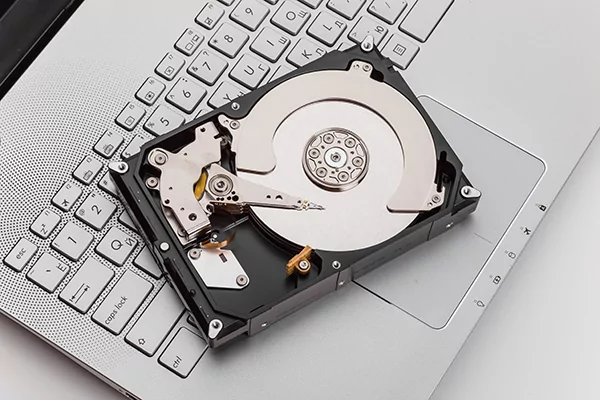
- Hard Disk Drive (HDD): viaSpinning Diskand read/write heads to store and retrieve data by magnetic recording;
- Solid State Drives (SSDs): viaflash chipand charge for high-speed data storage and retrieval.
Hard disk drives (HDDs) have the advantage of high capacity and low cost, but are slower and susceptible to mechanical failure; solid-state disk storage (SSD storage) is faster, more durable, and consumes less power, but is more costly and usually has less capacity than HDDs.
2. Documentation system
File systems provide the structure and rules for disk data management, defining how files are named, stored, and accessed. Common file systems include FAT32, NTFS, and ext4.
3. Allocation of documentation
Document allocation refers toThe process of allocating disk space for a file . When a file is created or saved, the operating system determines where the file is stored on the disk:
- Contiguous allocation: the file occupies consecutive blocks of disk;
- Fragmentation: Files are scattered and stored in different locations on the disk.
4. Disk partitioning
Disk partitioning is the process of separating thePhysical disks are divided into separate areas The process of. Each partition can have a separate file system, equivalent to a “separate storage entity”.
Partitioning enables better file organization, data isolation, and also supports the installation of multiple operating systems on a single disk.
5. Virtualization and virtual disks
Virtualization technology and virtual disks create “virtual environments” that enable abstraction and virtualized management of disk space. Virtual disks are files or disk images that emulate physical disks, providing storage capacity and management capabilities within a virtual machine.
6. Disk space management
Effective disk space management meansMonitor and optimize disk resource allocation and usage It includes operations such as disk cleanup, defragmentation, file compression, and setting quotas or storage policies to ensure efficient use of disk space.
Types of disk space
There are various types of disk space and each type is suitable for different scenarios. Depending on factors such as scalability, accessibility, and data organization needs, different computing environments will choose different types of disk space. The specific types are as follows:
1. Physical disk space
Physical disk space refers to the storage capacity provided by a physical hard disk drive (HDD) or solid state drive (SSD) installed directly in a computer or storage device, and represents the “actual physical space available for storing data.”
Physical disk space is usually measured in bytes, kilobytes (KB), megabytes (MB), gigabytes (GB), and terabytes (TB).
2. Virtual disk space
Virtual disk space is the “abstract storage capacity” of a physical storage device simulated by software, and is primarily used in virtualization technology -- virtual machines (VMs) are required to store data via virtual disks.
Virtual disk space can be allocated from physical disks or stored as “virtual disk images” in physical devices, which are divided into the following subcategories:
(1) Virtual machine disk space
specified inDisk space allocated for virtual machines in a virtualized environment . Each virtual machine has a separate virtual disk (in the form of a file or partition) that is used to store that virtual machine's operating system, applications, and data. The size of the virtual disk can be dynamically adjusted according to the needs of the virtual machine.
(2) Network Attached Storage (NAS) space
Network-attached storage (NAS) is a dedicated storage device or server connected to a network that provides “centralized storage that can be accessed by multiple devices over a network.”
NAS space refers to the storage capacity provided by such devices, which supports capacity expansion for shared use by multiple users or systems.
(3) Cloud storage space
Cloud storage refers to storing data inRemote servers accessible via the Internet in. The storage capacity provided by cloud storage service providers is cloud storage space, which is characterized by high scalability, easy access and high flexibility, and users or enterprises can obtain the corresponding capacity according to their needs.
(4) Partitioning disk space
Partitioning means dividing a physical disk intoMultiple independent areas operation, each partition is equivalent to a “standalone storage device” when in use. Partitioned disk space, i.e., the allocated storage capacity for each partition, serves the following main purposes:
- Organize the data;
- Install multiple operating systems;
- Create separate storage areas in a single physical disk for different purposes.
Factors affecting disk space
The amount of disk space required for data storage is affected by a number of factors that vary depending on the type of data, file format, storage technology, and user habits, as described below:
1. Size and number of documents
The size and number of files directly determine disk space requirements: the larger and more numerous the files, the more storage space they take up.
For example, multimedia files such as high-definition videos, large databases, and complex 3D models are typically larger in file size than text documents or simple images.
2. File compression and encryption
- File compression: analyzing data patterns and removing redundant information through compression algorithms canReduce file size This saves disk space;
- File encryption: When encrypting a file for security purposes, the file size may increase due to the addition of encrypted metadata.
Whether or not files are compressed or encrypted directly affects the overall efficiency of disk space usage.
3. File formats and compression rates
There are differences in the compression capabilities of different file formats: some image or video formats use theAdvanced compression algorithms The compression rate can be high (i.e., smaller file sizes); however, there are some formats that prioritize quality over compression efficiency, resulting in larger file sizes.
When estimating disk space requirements, you need to consider the files used by thea specific formatand its corresponding compression ratio.
4. Multimedia and high-definition content
Multimedia files such as video, audio, and high-definition images usually require more disk space due to their own complexity and large file size.
High resolution as technology evolves,high level and deep media files are becoming more prevalent, further increasing storage requirements; in addition, multimedia files containing multiple tracks and layers (e.g., multichannel audio, composite images) take up more disk space.
5. Data backup and version control
The application of a data backup strategy or version control system can significantly affect disk space usage: regularly backing up data orStoring multiple versions of a file This can lead to duplication of data storage and increased storage requirements - especially when using incremental or differential backups, where each backup or version takes up additional space.
When estimating the disk space required for backups and version control, you need to considerBackup frequency , old version retention cycles) and the size of the incremental changes.
6. Operating systems and applications
The operating system and installed applications can take up a lot of disk space:
- Operating systems have minimum storage requirements and disk space usage can increase further after installing updates or patches;
- Applications (especially those with large installation files or those that generate temporary files) can also consume disk space.
7. Temporary documentation and caching
Temporary files and caches generated by the operating system and applications also affect disk space: these files are used to store temporary data while the program is running and to cache frequently used data to improve performance, but over time, temporary files and caches accumulate and take up a lot of disk space.
8. User data and personal documents
User-generated data (e.g., personal files, documents, images, videos, downloaded content) directly consumes disk space. The size and amount of user data depends on theIndividual usage habits andData storage method -- For example, users who work with large media files or do a lot of data processing need more disk space to store files.
9. Disk space management approach
Management techniques for disk space can affect the efficiency of its use, for example:
- Regular disk cleanup (deletion of useless files and temporary data);
- Disk defragmentation (optimizing how files are stored on the disk).
Proper management recovers “wasted space” and ensures efficient utilization of storage resources. It is generally recommended that at least 10% of free disk space be reserved at all times for optimal performance.
Disk space consideration points for different devices
The disk space requirements of different devices vary. Combining the characteristics and usage scenarios of each type of device, you can more reasonably plan disk space requirements, select storage expansion options, and develop efficient management strategies. The details are as follows:
1. Personal computers (desktop and laptop)
Personal computers offer a variety of disk space options, including traditional hard disk drives (HDDs) and solid state drives (SSDs). Their disk space considerations need to be focused on:
- Required for operating systems, application software, personal files and multimedia contentStorage capacity ;
- Scenarios such as gaming, multimedia production, and specialized software may require additional disk space.
Such devices usually support upgrading or adding storage devices to facilitate future expansion of storage capacity.
2. Mobile devices (smartphones and tablets)
Mobile devices usually have limited storage capacity due to their size. Consideration of disk space needs to be a combination of built-in storage capacity and user habits:
- Mobile apps, photos, videos, and downloaded content can quickly take up storage space;
- Some mobile devices are available through cloud storage services orExternal storage devices (e.g. microSD card, external hard disk)Expanded storage capacity.
3. Servers and data centers
Servers and data centers need to store large amounts of data and have a very high demand for disk space. This needs to be taken into account when planning:
- that meets the needs of the connected device, user or applicationTotal Storage Capacity ;
- Key influencing factors: number and capacity of hard disks or SSDs, RAID redundancy mechanisms for data protection, performance requirements, data backup strategy.
4. Network-attached storage (NAS) versus storage area network (SAN)
NAS and SAN systems provide networked, centralized storage for multiple devices, and their disk space planning needs to be focused around “serving the storage needs of multiple devices”:
- Number of users, data sharing needs,Expected growth in data volume ;
- Core elements: scalability, performance, data backup, data protection mechanisms (e.g., mirroring, striping).
5. Embedded systems (IoT devices, smart home appliances)
Embedded systems such as IoT devices and smart appliances have limited storage capacity due to their small size. Disk space considerations need to be balanced between “storage efficiency”, “device functionality” and “cost”:
- Storage needs are usually related to device usage, such as storing firmware, application data, sensor readings, or logs;
- Some embedded systems will rely on cloud storage for data offloading and access to save local storage.
6. Game consoles
Disk space on a game console is mainly used for installing games, downloading additional content and saving game archives. With the increasing size of modern games, disk space planning is especially important for gamers to pay attention to:
- The size of the game installation package, the number of games to be stored;
- Additional storage options (e.g. external hard disk, SSD)availability;
- Efficient management tips: uninstall infrequently used games, use cloud storage to optimize available storage space.
Practical tips for disk space management
Efficient management of disk space is key to maintaining system performance and optimizing storage resource utilization. The following are specific management tips:
1. Periodic disk clean-up
Delete temporary files, system cache, and other useless data on a regular basis through the disk cleanup utility that comes with your operating system or through third-party software. This canReclaim valuable disk space to avoid useless files from taking up storage resources.
2. Identification and deletion of duplicate documents
Duplicate files can unnecessarily take up a lot of disk space. Duplicate files can be located and deleted using a specialized duplicate-file finder or file management software, which removes redundant data byFree up disk space 。
3. Compressing files and folders
With the help of ZIP, RAR and other file compression tools, compression of large files or folders can significantly reduce the size of files and save disk space. Note: Some file formats (e.g. compressed images, videos) have limited compression space and are not suitable for re-compression.
4. Migration of data to external or network storage
Moving infrequently used data (such as large media files, archived files, and low-frequency access documents) to an external hard drive, SSD, or network attached storage (NAS) frees up disk space on your primary storage device. When using external or network storage, be aware thatDevelop a sound backup strategy , ensuring data integrity.
5. Utilization of cloud storage
Cloud storage services are an important complementary solution for storing and accessing files. Uploading files to the cloud storage provider's servers and retaining only those files locally that need to be accessed frequently or used offline can free up local disk space without affecting data accessibility. When choosing cloud storage, you need to focus on data security and prioritize service providers with a good reputation.
6. Managing installed applications
Regularly check and manage installed apps in the system: uninstall useless or infrequently used apps to free up the disk space they take up; for some apps, consider using lightweight or web-based versions instead to reduce the storage footprint.
7. Monitoring disk space usage
Real-time tracking of disk space occupation through the system's own tools or third-party disk monitoring software. Abnormal growth of disk space can be detected in time, which makes it easy to take quick countermeasures such as cleaning and migrating.
8. Setting disk quotas
In a multi-user system, by setting disk quotasLimit disk space usage per user This prevents individual users from over-consuming storage resources and ensures fair use of disk space by all users.
9. Planning for future storage growth
Predict future storage needs in advance, combining data growth trends, introduction of new applications or new file types, system updates and upgrades, etc., to reserve sufficient disk space and reduce the need for frequent disk space adjustments or capacity expansion.
concluding remarks
Disk space is a core component of computer storage and determines the amount of digital data that can be stored - whether it's on a physical hard disk drive (HDD) or a solid-state drive (SSD), it plays a key role in file and application management and system performance.
Understanding disk space is fundamental to efficient storage management: it helps users assess storage needs, plan for future growth, and develop strategies to optimize disk space utilization. System stability can be maintained through proper management of disk space,Improve performance , creating an organized storage environment that meets data storage needs.
Recommendations for further action
After understanding the definition of disk space and its impact on online file storage, you can refer to the following practical steps to carry out your actions:
- Evaluate the amount of web hosting storage capacity you need for your website to run smoothly;
- Choose the right program from the current mainstream hosting providers;
Extended Reading - Useful Resources
common problems
1. What problems can insufficient disk space cause?
Insufficient disk space can cause a variety of problems: system performance degradation, applications can not run properly, file saving or access failure; in addition, it may not be able to install new software or system updates, and in serious cases, it will lead to system instability or even crash.
2. Can I free up disk space by recovering deleted files?
Usually, deleted files are first moved to the Recycle Bin (or Waste Paper Basket), where they can be recovered; however, after the Recycle Bin (or Waste Paper Basket) is emptied, the files will be permanently deleted. If you need to free up disk space, it is recommended to use a disk cleanup utility or simply delete files and folders you no longer need.
3. How do I determine which files are taking up the most disk space?
You can use disk space analysis tools or file management software to get detailed reports or visual data on disk usage and quickly locate the files or folders that take up the most space. These tools can help you prioritize the cleanup of highly occupied files and efficiently free up disk space.
4. Can I increase the disk space of the device?
- Desktop: Storage can usually be expanded by adding an internal hard disk or SSD;
- Laptops: limited internal upgrade options, but external storage or cloud storage is available;
- Some mobile devices and embedded systems: storage capacity is fixed and not expandable.
5. What are the consequences of not managing disk space effectively?
Failure to properly manage disk space can lead to system crashes, data loss, and performance disruptions; you may also be unable to install software updates or new applications; in addition, it can become difficult to organize and locate files, which reduces work efficiency.
 English