











The CPU (Central Processing Unit) is the core component of a server, responsible for storing data, processing information, hosting web pages, and interpreting instructions. Essentially, it serves as the “brain” of the system, playing a crucial role in completing various tasks and ensuring the continuous operation of the server.
Key Takeaways
- The CPU is responsible for processing tasks and parsing instructions, such as hosting web pages, performing database queries, and so on.
- Intel and AMD are the two major CPU manufacturers, and their CPUs differ in specifications, features, and performance.
- When choosing a CPU for a server, consider factors such as clock frequency, number of cores, power consumption, and motherboard compatibility.
What is a CPU?
The CPU, also known as the server processor, is an important part of the server, and its main functions include parsing instructions and handling various tasks -- such as hosting web pages, performing database queries, and controlling factory equipment.
The processor is called the “thinking center” of the device, and the instructions it executes directly affect the server's responsiveness, stability, computing power and overall performance. At the same time, it has the ability to handle more complex workloads, specifically:
- deal withE-mail transmission
- managerialFile Sharing
- fulfillmentDatabase transactions
- make superiorNetwork traffic routing for devices
- Connect and controlMultiple machines in a factory production line
- fulfillmentUHLC
CPU History
Dedicated server CPUs have evolved over the years. in the 1980s, bare metal servers used basic desktop-level configurations with 256MHz CPUs and 2GB of disk space. with the development of virtual hosting services, rack-mounted servers gradually replaced bare metal servers, and specification performance increased dramatically. at the beginning of the twenty-first century, blade servers were introduced, followed by the rise of virtualization technology. At the beginning of the 21st century, the Blade Server emerged, followed by the rise of virtualization technology, and cloud computing gradually became mainstream.
The landmark Unified Computing System (UCS) technology lays the foundation for faster, more efficient computing. The technology consolidates server, storage and network resources into a virtualized pool of server resources, enabling faster, more efficient computing through automated hardware provisioning and application-oriented architecture.
How Server CPUs Work

When you hit a key on the keyboard, the corresponding character is instantly displayed on the screen - a latency-free process that is made possible by the CPU's high-speed processing of commands.
Behind the seemingly simple “instant display”, the CPU actually goes through a series of complex steps to achieve smooth processing of instructions. The following is the basic process by which the CPU accomplishes a task:
1. Fetch
The process begins with the CPU readingmachine commandaddress of the instruction, followed by retrieving the corresponding data from main memory, working memory, or cache. The CPU then parses the instruction and determines the direction of the next operation.
2. Decode
The CPU converts instructions into its own recognizablebinary code, and the corresponding circuit is loaded. After that, the instructions are further converted to assembly language to prepare them for subsequent execution.
3. Execute
CPU byExecution of technical algorithms and calculationsCompletes instruction processing and generates output data.
4. Storage
Eventually, the CPU stores the output data to theRAMCenter.
The CPU repeats the above four stages cyclically: after the current instruction is executed, the next instruction is selected and processed immediately. The execution order of the instructions is determined by the scheduler, and this mechanism ensures the smooth and efficient operation of the system.
CPU Advantages
The CPU is the “power core” of the server, taking on key responsibilities such as memory management, data processing and security.
If you are planning to improve server performance, investing in CPU upgrades is one of the important directions. The specific advantages are listed below:
1. Memory management and optimization
The CPU has excellent memory management capability, which can support the server to run more programs and store more data at the same time to avoid the problem of memory shortage.
2. High-performance performance
The CPU is designed to handle large-scale data and can respond quickly to user requests, effectively guaranteeing the smoothness and efficiency of website operation.
3. Data protection and security
CPU Cache Based Side Channel Attacks(CPU cache-based side-channel attacks have become a major threat to computer security and privacy protection. Attackers can collect information about the running behavior of the target program, leak sensitive data or execution logic, and then steal confidential information.
However, the CPU itself is equipped with a variety of security features to keep your data safe, including protection against viruses and malware, a built-in anti-theft mechanism, and more.
draw attention to sth.: To ensure the safe and stable operation of computers, it is recommended to understand how software and hardware work together. You can start with basic steps such as installing the latest system updates, following secure coding practices, and mastering the use of hardware features.
4. High compatibility
CPUs can be adapted to a wide range of servers and equipment and are easy to install and configure. Regardless of the type of server you use, you can usually find a compatible server processor.

CPU Specifications
In the past, CPU selection was simple because of the limited number of models available; today, CPU specifications are becoming more complex - covering multiple dimensions such as number of processor cores, cache size, clock frequency, number of threads, and so on, making selection significantly more difficult.
Current CPUs are still categorized as entry-level, mid-level, and enterprise, with different levels applicable to different scenarios:
- Entry-level processors: for small businesses, home labs and individual hobbyists
- Intermediate Processor:: Suitable for medium-sized organizations with some requirement for computing power
- Enterprise Processors: Highest performance for ultra-high-load computing scenarios such as AI/ML, cryptocurrency mining, etc.
Main types of CPUs
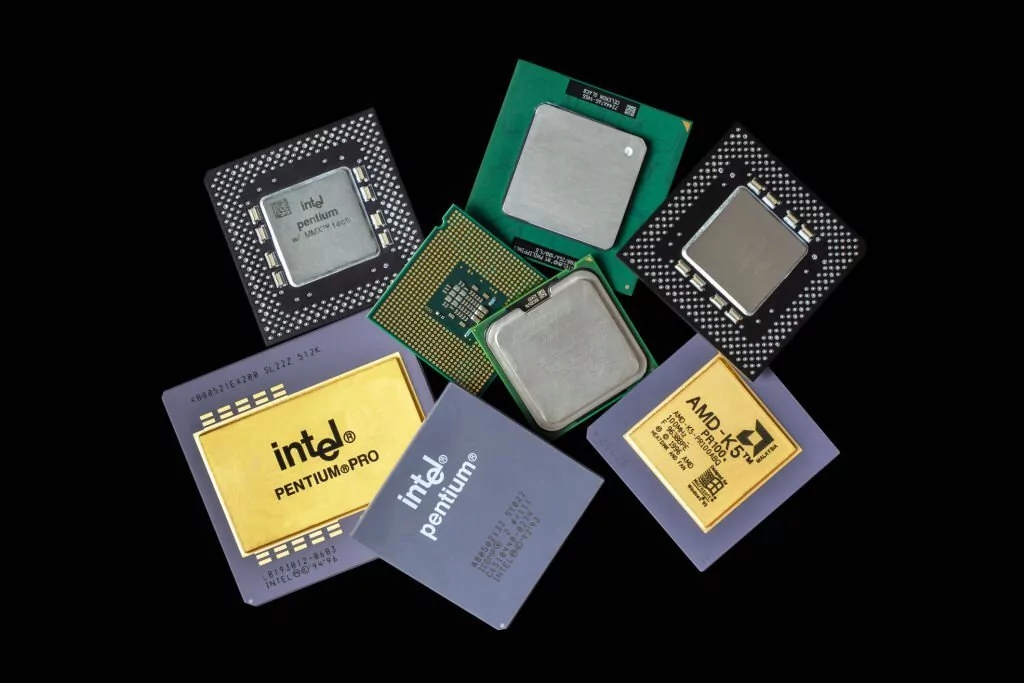
Whether you need database hosting or dedicated server hosting services, understanding the different types of CPUs is key to choosing the right product - and this needs to be judged in conjunction with the technical specifications and compatibility requirements of the server hardware and software.
In the CPU space, the competition between Intel and AMD has always been fierce, with both being leaders in research and development. Here are the core differences between the two companies' CPUs:
1. Intel
Intel Corporation (Intel) is one of the most recognized and widely used CPU brands in the world. Traditionally, its processors have been used insingle-core performanceIntel has outperformed AMD processors in terms of raw arithmetic, but in recent years, Intel has faced stiff competition from AMD.
Intel introduced the Intel® Xeon® family of processors designed for high-end desktops and servers -- a family that integrates cache into the same physical package, enabling systems to realize cost reductions while taking up less space and consuming less power.
2. Ultra Micro Semiconductor (AMD)
Advanced Micro Devices (AMD) processors have seen significant performance improvements in recent years. Multi-core performance is one of the core strengths of AMD processors, and in many scenarios, their multi-core performance has surpassed that of Intel processors; at the same time, AMD processors generally offer a better price/performance ratio.
AMD has launched the AMD Xiaoyong (EPYC) series of CPUs for all types of computer systems. The series utilizes a Multi-Chip Module design, which integrates one or more CPU core chips with memory controllers and input/output (I/O) interfaces into one or more integrated circuits, enabling higher core counts compared to single-chip designs.
Factors to consider when choosing a CPU
With the data center economy growing rapidly, computer demand is expected to double in the next eight years - which means you may need to invest in the right CPU for your server.
Selecting the optimal CPU requires evaluating processor performance based on the specific needs of the server and defining the core purpose of the server. It is recommended that the following factors be considered to ensure that the CPU has the arithmetic power needed to efficiently handle the task:
1. Core number
Whereas CPUs used to have only one core, today a single CPU can incorporate multiple cores, each capable of executing instruction cycles independently. This design dramatically improves server performance, enabling simultaneous processing of larger loads through parallel computing.
The number of cores is a key factor affecting the performance of a server processor: the higher the number of cores, the more efficiently the workload is distributed, and the speed and overall efficiency of the system is increased.
take note ofMake sure you match your system requirements with the number of cores to maximize CPU performance and optimize costs, and ensure that your servers have the power and capacity they need to efficiently handle your tasks.
2. Number of threads
Threads can be understood as “subtasks” that the processor can handle simultaneously. Most CPU cores support 2 threads, which means that the core can start a second task before completing the first -- a technique known asMultithreading OrHyper-Threading It is also a good way to increase the CPU speed.
Multi-threading technology boosts server performance by utilizing unused resources within the processor. In high-performance computing servers, this technology can even rival the power of a supercomputer and is an important consideration when choosing a CPU.
3. Clock frequency
The clock frequency is a key measure of the CPU's information processing speed, measured in units ofGigahertz (GHz) -- The higher the clock frequency, the faster the CPU can process.
The faster the processor, the more productive the server and the less downtime. In a business scenario, “time is cost”, so prioritize higher clock frequencies for faster processing when choosing a CPU.
take note of: While processors with high clock frequencies are attractive, they need to be evaluated in conjunction with other factors. Finding a balance between speed and computing power makes for a more logical CPU choice.

4. Cache size
CPU caches are used to store much-needed data for the deviceTemporary storage areaThe larger the cache, the more files can be temporarily stored. The larger the cache, the more files that can be stored temporarily, and the greater the CPU's ability to access data quickly - meaning the processor doesn't have to pull data from system memory as often, which improves server responsiveness and overall performance.
5. Slot compatibility
The CPU slot isInterface to processor and motherboardThe number of slots supported by a server determines the number of processors that can be installed. Servers typically range from 1 to 32 slots, with 2-socket servers being widely used in the small and medium business (SMB) market and 4-socket servers being found in the mid-range to high-end markets.
The motherboard and processor mustmutually compatibleThe main reason for this is that you need to make sure that the two slots match each other before you buy. The common CPU socket types are LGA, PGA and BGA, and the different types determine how the motherboard connects to the processor:
- LGA (grid array package): Pins are located on the motherboard
- PGA (Pin Grid Array Package): Pins are located on the processor
- BGA (Ball Grid Array Package): The processor is permanently soldered to the motherboard during production.
concluding remarks
The CPU, as the “brain” of the server, is the core foundation that enables multiple applications to run and handle various tasks (e.g., controlling factory equipment, executing database queries, and hosting web pages). Choosing the right CPU for your server is critical, as it directly determines whether the server can handle multiple requests simultaneously and maintain optimal performance.
This guide covers the advantages, evolution, types, and specifications of CPUs, as well as the key factors to consider when choosing a CPU for your server. By understandingDefinition of CPUand related core information, you can effectively increase productivity, reduce downtime, and keep pace with technological developments.
Follow-up: what to do next?
- How to Reduce CPU Utilization by Limiting the WordPress Heartbeat API
- exploratoryIntelligent Cloud Building Service Provider
- Understanding Advantageous Web Hosting Service Providers
Extended Reading (Useful Resources)
- Recommended Quality Server Providers
- Server CPU Market Share to 2024: Intel vs. AMD Head to Head
- Processor competition heats up
common problems
What is the difference between a desktop-class CPU and a server-class CPU?
Server-class CPUs are designed for high-load multitasking, multi-user concurrent access, and 7×24 hour non-stop operation, while desktop-class CPUs are optimized for day-to-day computing tasks and light multitasking scenarios. Essentially, server-class CPUs have more cores, larger caches, and more advanced power management features, while desktop-class CPUs focus on low power consumption and cost control.
How does the CPU affect the websites hosted on the server?
When the CPU receives a large number of requests at the same time, it queues up the requests and quickly processes them one by one. However, when the server is overloaded -- for example, when there are high traffic spikes on one or two sites -- too many CPU requests can cause other sites to run slower, a phenomenon known as “CPU Oversubscription ”.
What problems are caused by CPU overclocking?
CPU overruns cause server performance to degrade due to an excessive number of requests received by the CPU. Although each request is queued and processed one by one, when there are too many requests, the queue keeps getting longer and longer, which in turn causes processing delays. This can lead to slower loading of websites, and in severe cases, even a server crash.
How do web hosting providers deal with CPU overshoot?
Web hosting companies manage high CPU requests, which cause performance degradation for all websites on a server, in a number of ways: some providers use CPU Throttling or segregation of websites; others distribute the load evenly across multiple servers using cloud computing technology.
 English