


















Introduction (pain point analysis)
Individual developers, small and micro business owners, bloggers, students and other users with non-professional O&M backgrounds who want to quickly have a website (e.g., a blog, a corporate website, a portfolio) of their own.
Have you ever been discouraged from building your own website because you are not familiar with Linux commands? Do you have headaches when facing server environment configuration (e.g. Nginx, PHP, MySQL), security updates and database management? Traditional cloud servers are flexible but require a certain level of O&M knowledge, which is undoubtedly a huge threshold for you who just want to focus on content creation and business development.
If you're struggling withComplex server operation and maintenance, cumbersome environment configurationIf you are looking for a minimalist solution to build a website “out of the box”, then this article will provide you with a perfect solution.
Solution Architecture Diagram and Overview
A picture is worth a thousand words, demonstrating the simplicity and ease of use of the program.
Architecture Diagram:
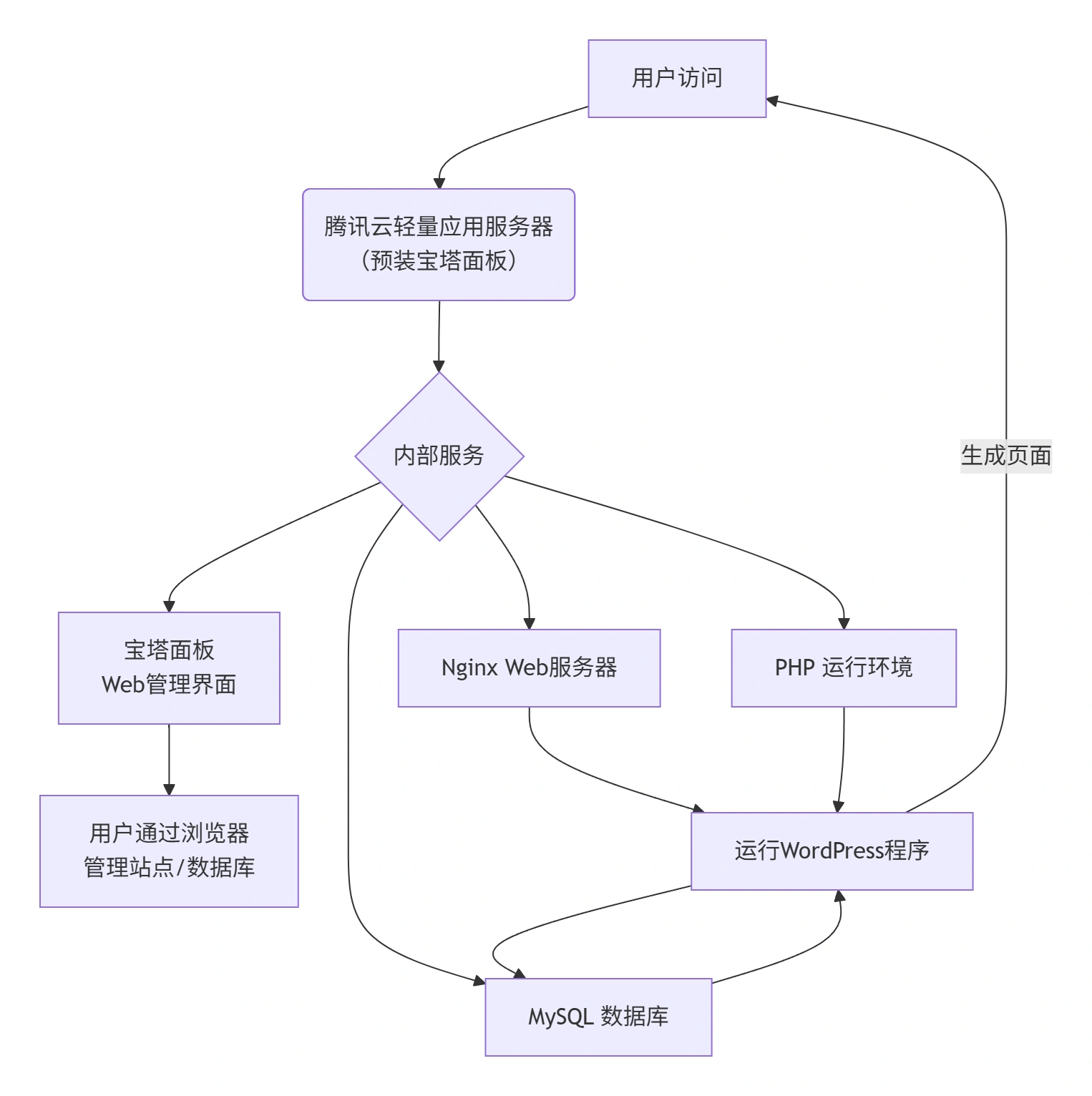
The core of this program is the use ofTencent Cloud Lightweight Application Serverand select the pre-installedPagoda PanelThe system image. After the server is purchased successfully, you don't need any command line operation, you can directly access the graphical interface of Pagoda Panel through your browser to complete all operations such as WordPress installation, website file management, database creation and backup, domain name binding, etc. The whole process is as simple and intuitive as using desktop software. The whole process is as simple and intuitive as using desktop software.
This program encapsulates all the complex server operation and maintenance work, and reduces the operation threshold through the graphical interface, so that you don't need to care about the underlying environment, and only need to focus on the construction of the content of the WordPress website, and truly realize theNo O&M, minimalist startup。
Core Products and Components
This solution has a clear architecture with only two core components, but is powerful:
| component name | play a role | Key configuration/selection recommendations | Why choose it |
|---|---|---|---|
| Tencent Cloud Lightweight Application Server | The underlying computing foundation of the solution, providing virtual machine resources (CPU, memory, hard disk, bandwidth). | Recommended Configuration:For personal blogs or official websites of small and micro enterprises, choosing an entry-level configuration (e.g., 2-core CPU, 2GB RAM, 50GB SSD hard disk) can meet the demand.Key Selection:When purchasing, select the “Pagoda Panel” image directly from the “Application Templates”. | Out of the box:No need to manually install OS and Ops components, get an optimized server environment in one click.Value for money:The package includes a public IP and traffic package at a manageable cost, perfect for lightweight applications. |
| Pagoda Panel | The server's “graphical operating system” provides a Web-based management interface. | Core Functions:Website management, FTP management, database management (MySQL), file management, one-click deployment (e.g. WordPress), security monitoring.Suggestions for use:Change the default port and password of the panel at the first time after installation to enhance security. | Extremely simplified operations and maintenance:Convert complex command-line operations (such as installing software, configuring virtual hosts) into point-and-click operations, greatly reducing the technical threshold.Comprehensive functionality:Integrates common functions for website and server management, eliminating the need to deploy multiple management tools separately. |
| WordPress (app) | A web content management system (CMS) running on a server. | Deployment mode:Installation can be done through the “One Click Deployment” feature of the Pagoda panel, or manually uploaded.Core strengths:A large number of themes and plug-ins, ecologically rich, can easily realize a variety of website functions. | The world's most popular CMS with rich learning resources for quick start and long-term maintenance. |
Summary of program benefits
- 🚀 Minute-by-minute deployment:By choosing a pre-installed image, the entire process from purchasing the server to a successful WordPress installation will only take about 10 minutes.
- 👨💻 Zero-based available:Full graphical interface operation, no need to memorize any Linux commands, the technical small can also easily manage the site and database.
- 🛡️ Environmental Optimization:Pagoda Panel pre-built LNMP (Nginx+MySQL+PHP) environment is optimized to provide a good basis for WordPress to run.
- 💰 Cost Optimal:Lightweight application servers are affordable, with package pricing that avoids the complexity and potential waste of purchasing and configuring multiple cloud offerings separately.
Application Scenarios and Applicable Customers
- The most suitable business scenario:
- Individual independent blogs/technical blogs
- Micro and Small Business Official Website
- Product Showcase Page/Personal Portfolio
- Low concurrency access to informational websites
- Typical characteristics of applicable customers:
- There is no specialized O&M team or technical support.
- Want to build a website quickly and are willing to pay a reasonable fee for “hassle” and “simplicity”.
- The site is not heavily visited initially, but there are basic requirements for stability and ease of use.
- The main body of users are individuals, startup teams, freelancers, students, etc.
 English