











Aggregation System Introduction.
Rainbow Aggregated DNS Management System is a professional domain name resolution management tool developed based on the ThinkPHP framework, designed to provide users with a unified interface for managing DNS resolution services across multiple cloud service providers. By integrating APIs from mainstream DNS service providers, the system enables centralized management of dozens of domain name resolution services—including Alibaba Cloud, Tencent Cloud, Huawei Cloud, Baidu Cloud, West Digital, Volcano Engine, Baota, DNSLA, CloudFlare, Namesilo, PowerDNS, and more—on a single platform.
Address.: https://github.com/netcccyun/dnsmgr.
Core Features.
1. Unified Multi-Platform Domain Name Management.
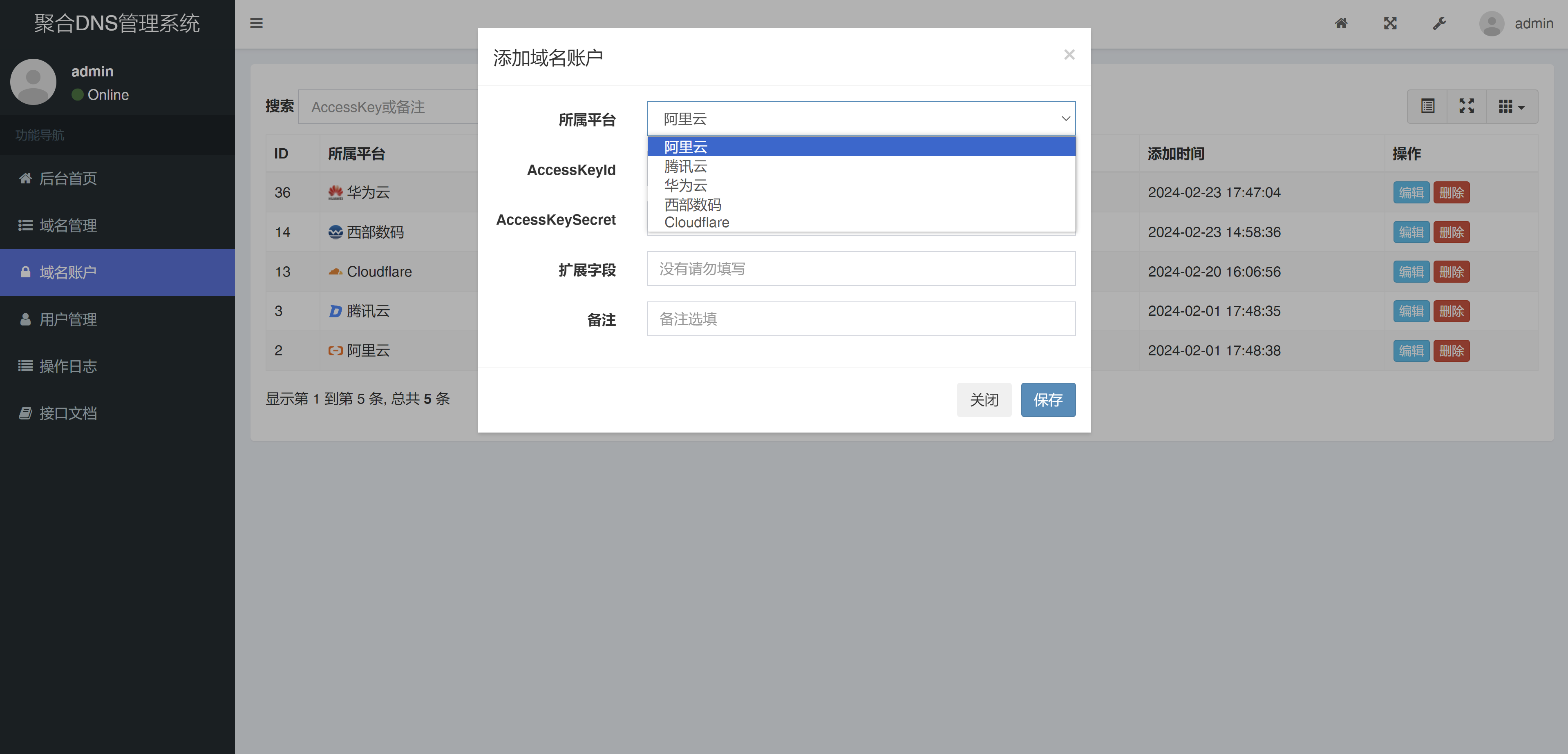
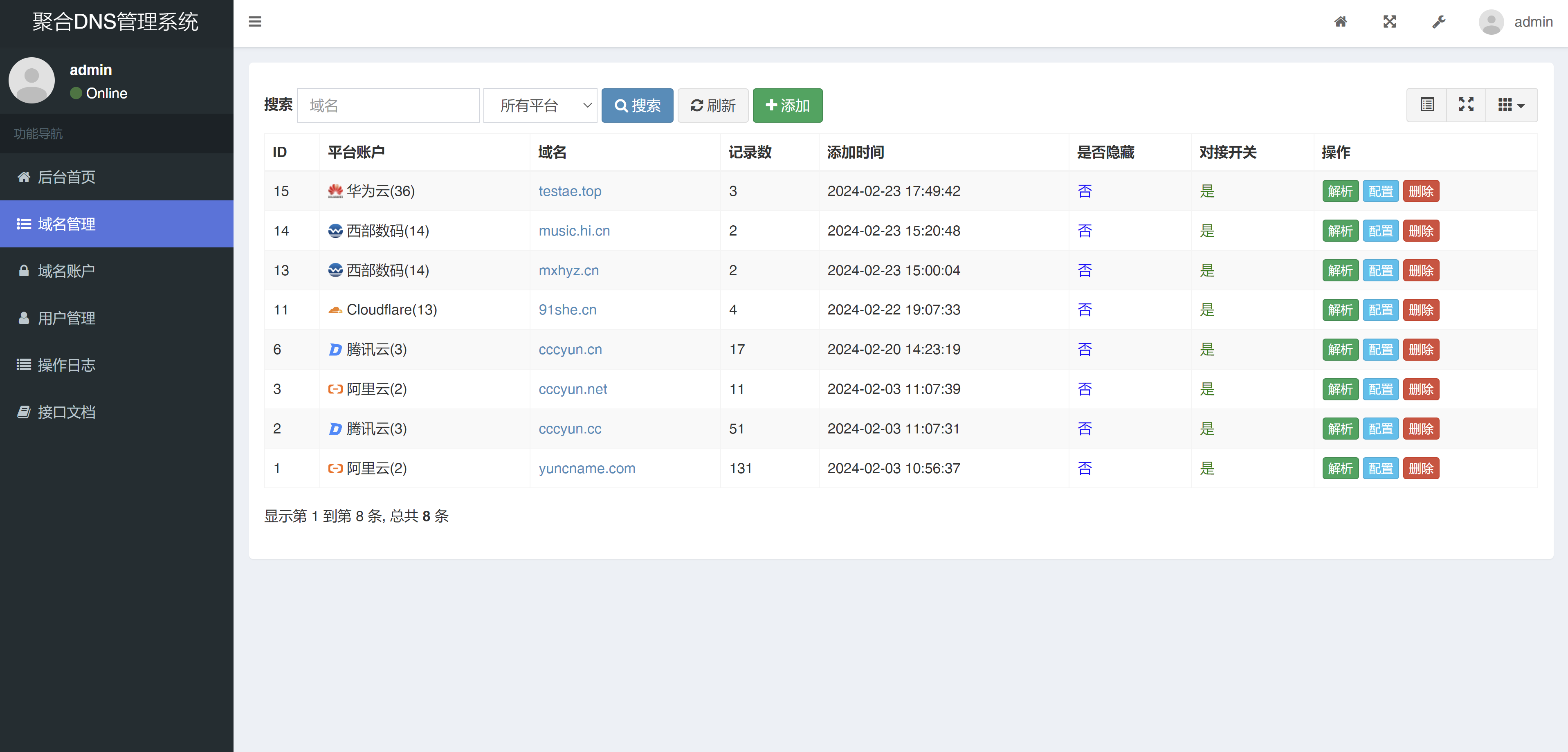
The system supports connecting multiple DNS service provider accounts. Users only need to add AccessKey information for each platform in the "Domain Accounts" module to achieve centralized management of domains from different providers. As seen in the screenshot, the system has successfully connected accounts from multiple platforms including Huawei Cloud, West.cn, Cloudflare, Tencent Cloud, and Alibaba Cloud.
2. Multi-User Permission Management.
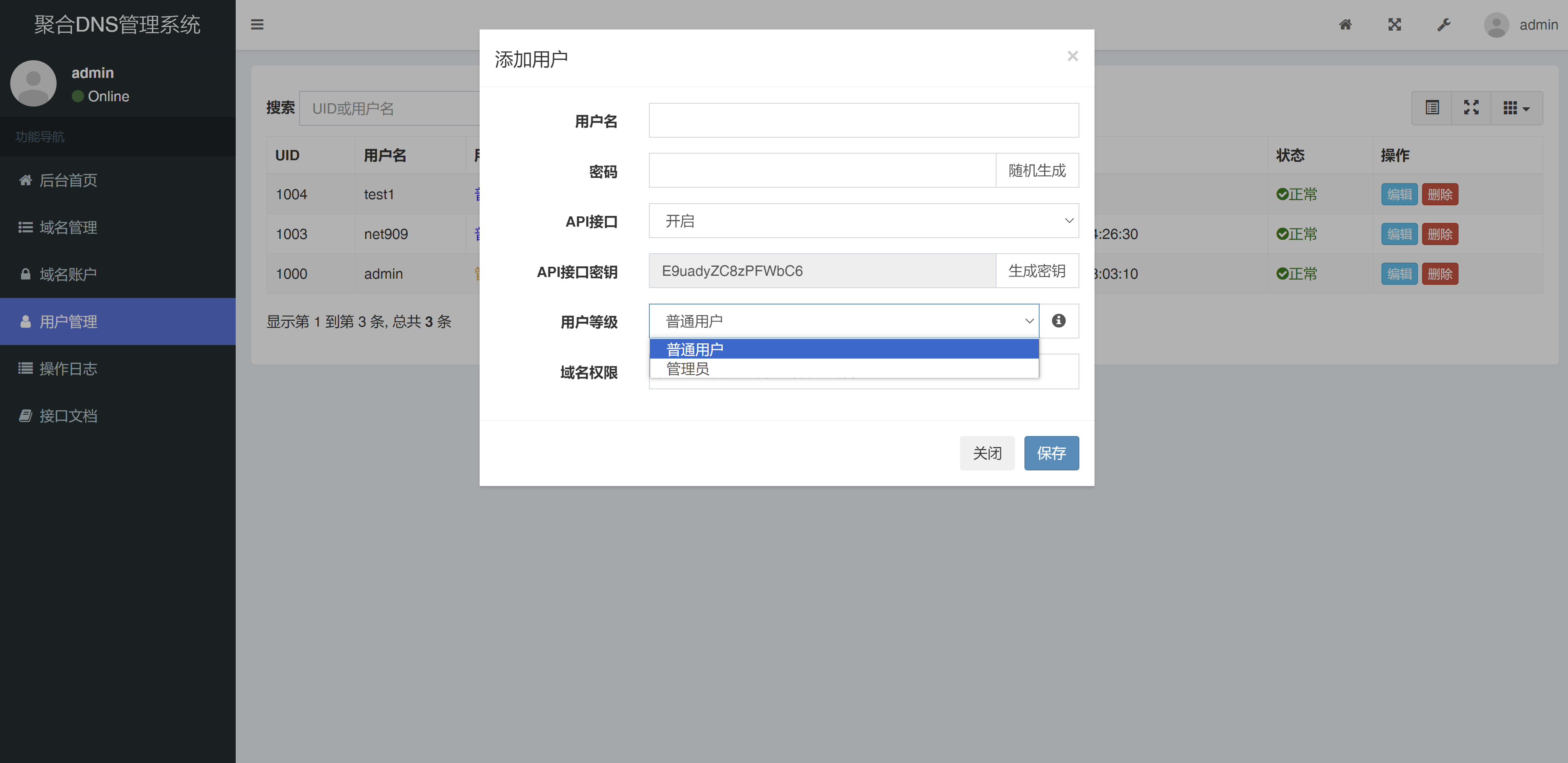
The system provides comprehensive user management functions, supporting the creation of user accounts with different permission levels:
- janitors: Possesses all system permissions.
- Regular User.: Can be assigned specific domain name management permissions.
Administrators can add new users in the "User Management" interface, set passwords, API interface keys (such as "E9uadyZC8zPF WbC6" in the example), and permission levels to achieve fine-grained permission control.
3. Intelligent Resolution and CF Optimized IP.
The system provides powerful intelligent resolution functions:
- Supports setting different resolution records based on line types such as Telecom, Unicom, and Mobile.
- Built-in Cloudflare optimized IP function, which can automatically obtain the best CDN node IPs and update resolution records.
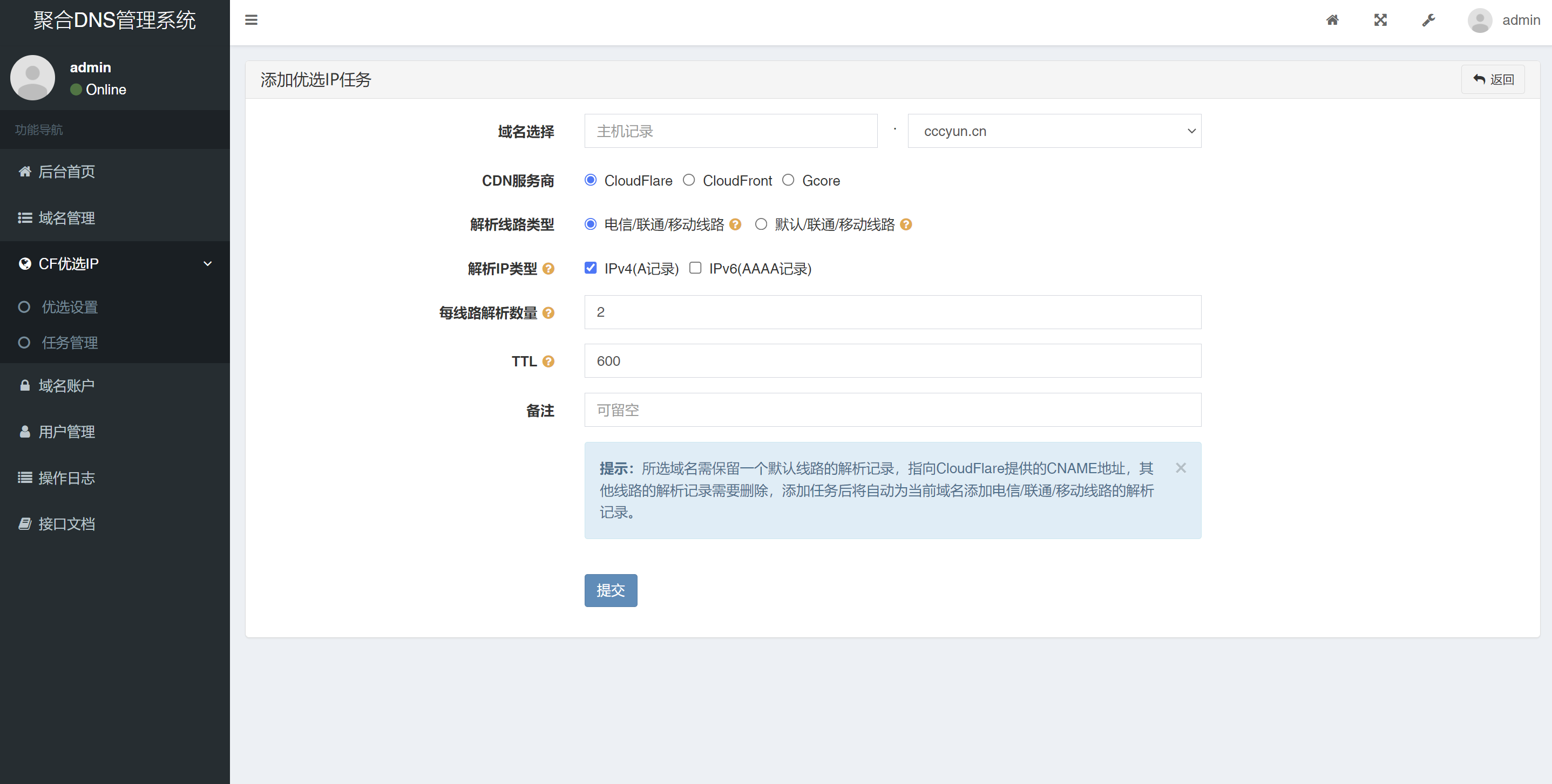
- Supports setting the number of resolutions per line (e.g., 2 IPs as shown in the screenshot) and TTL values (e.g., 600 seconds).
4. Full Lifecycle SSL Certificate Management.
The system provides a complete SSL certificate management solution:
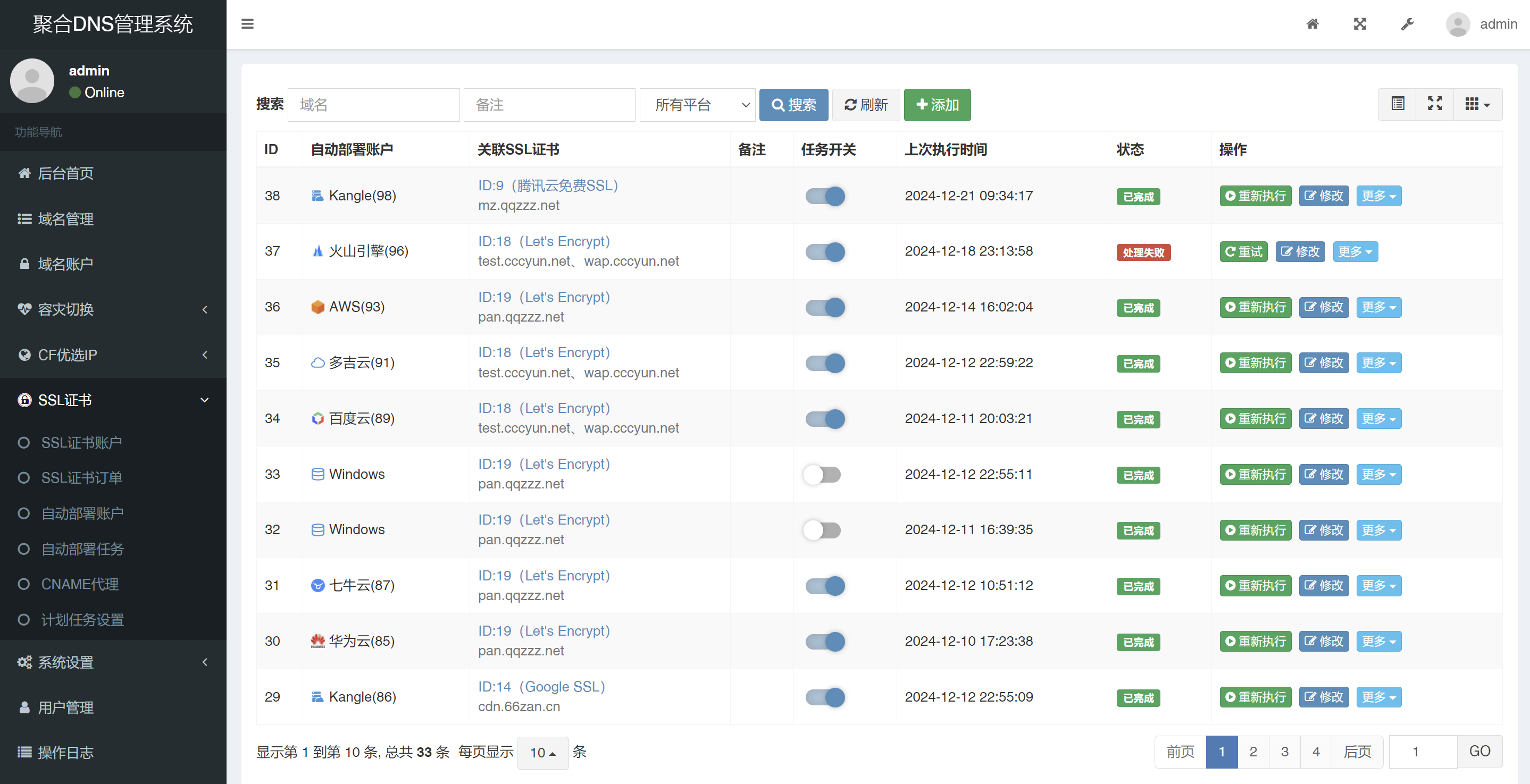
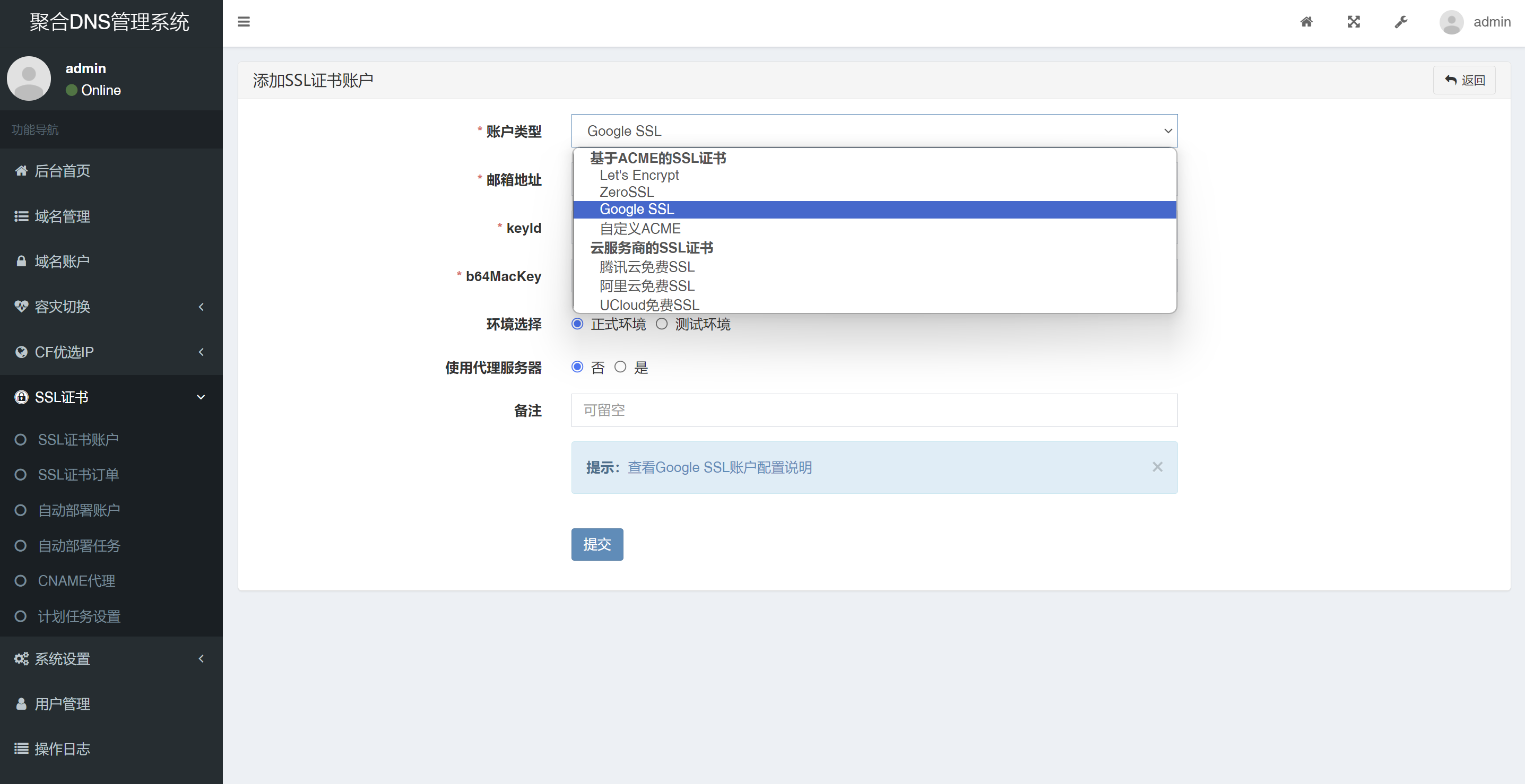
- Supports applying for certificates from multiple CA institutions such as Let's Encrypt, Google SSL, and ZeroSSL.
- Can automatically renew certificates that are about to expire.
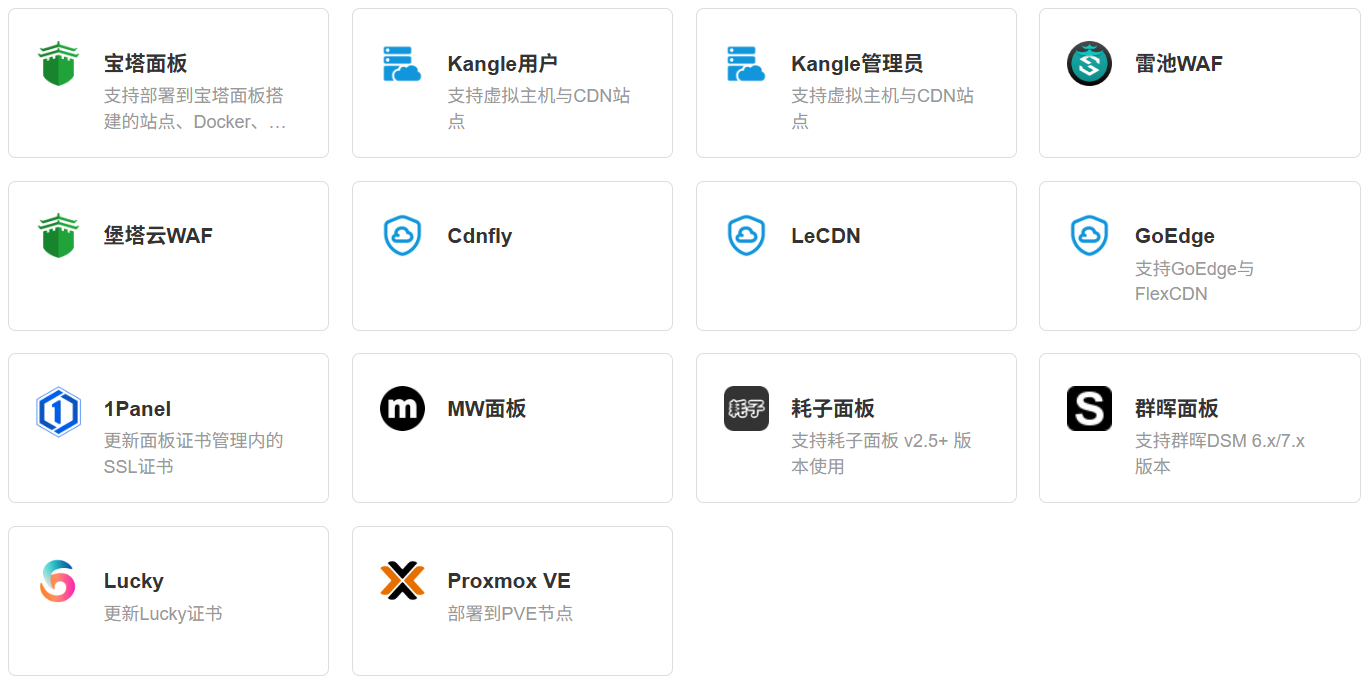
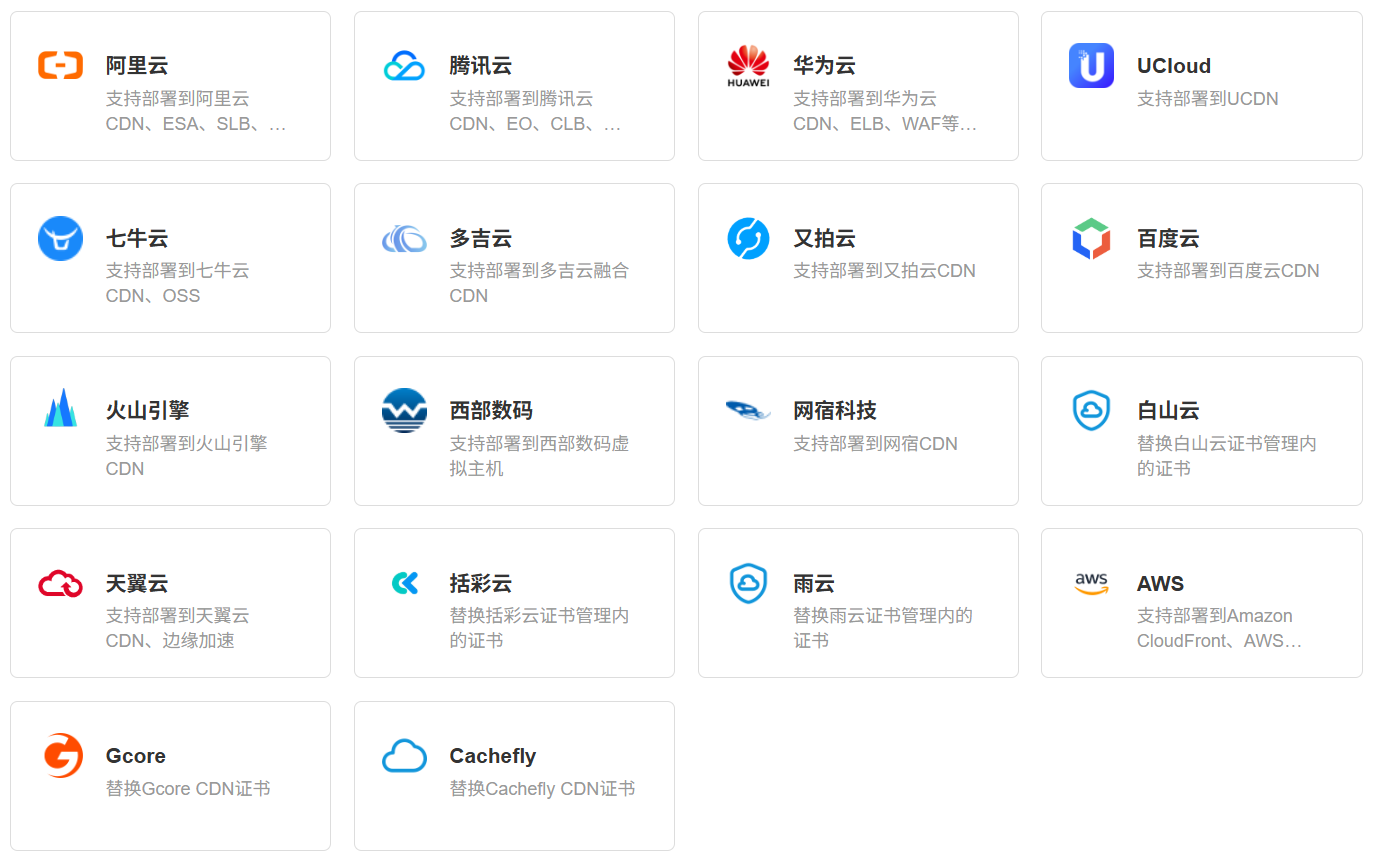
- Supports automatic certificate deployment to various environments like BT.cn panel, Kangle, and cloud service providers.
- Provides certificate status monitoring (issued, revoked, etc.) and operation (download, renew) functions.
5. Disaster Recovery Switching and Monitoring Alerts.
The system possesses intelligent disaster recovery capabilities:
- Supports multiple detection protocols: ping, tcp, http(s).
- Automatically pauses or modifies domain name resolution upon anomalies.
- Integrates multiple notification channels such as email, WeChat Official Account, Telegram, and DingTalk.
System Deployment Solutions.
1. Traditional Deployment Method.
Environment Requirements: .
- PHP 8.0+.
- MySQL 5.6+.
- Web Server (Nginx/Apache).
Deployment Steps: .
- Download the installation package from the Release page.
- Set the website running directory to 'public'.
- Configure URL rewrite rules:
- Nginx Rules: .
location ~* (runtime|application)/ {
    return 403;
}
location / {
    if (!-e $request_filename) {
        rewrite ^(.*)$ /index.php?s=$1 last; break;
    }
}- Apache Rules:
<IfModule mod_rewrite.c>
  Options +FollowSymlinks -Multiviews
  RewriteEngine On

  RewriteCond %{REQUEST_FILENAME} !-d
  RewriteCond %{REQUEST_FILENAME} !-f
  RewriteRule ^(.*)$ index.php/$1 [QSA,PT,L]
</IfModule>- Access the website to complete the installation wizard.
- Log in to the admin backend to start using.
2. Docker Deployment Solution.
- Single Container Deployment: .
docker run --name dnsmgr -dit -p 8081:80 -v /var/dnsmgr:/app/www netcccyun/dnsmgr- Domestic Mirror Acceleration: .
docker pull swr.cn-east-3.myhuaweicloud.com/netcccyun/dnsmgr:latest3. Docker-compose Deployment Solution.
- docker-compose.yml Configuration: .
version: '3'
services:
  dnsmgr-web:
    container_name: dnsmgr-web
    stdin_open: true
    tty: true
    ports:
      - 8081:80
    volumes:
      - /volume1/docker/dnsmgr/web:/app/www
    image: netcccyun/dnsmgr
    depends_on:
      - dnsmgr-mysql
    networks:
      - dnsmgr-network

  dnsmgr-mysql:
    container_name: dnsmgr-mysql
    restart: always
    ports:
      - 3306:3306
    volumes:
      - ./mysql/conf/my.cnf:/etc/mysql/my.cnf
      - ./mysql/logs:/logs
      - ./mysql/data:/var/lib/mysql
    environment:
      - MYSQL_ROOT_PASSWORD=123456
      - TZ=Asia/Shanghai
    image: mysql:5.7
    networks:
      - dnsmgr-network

networks:
  dnsmgr-network:
driver: bridge- Pre-deployment Preparation, create directories before running: .
mkdir -p ./web
mkdir -p ./mysql/conf
mkdir -p ./mysql/logs
mkdir -p ./mysql/data

vim mysql/conf/my.cnf[mysqld]
sql_mode=STRICT_TRANS_TABLES,NO_ZERO_IN_DATE,NO_ZERO_DATE,ERROR_FOR_DIVISION_BY_ZERO,NO_AUTO_CREATE_USER,NO_ENGINE_SUBSTITUTION- Log into the MySQL container to create and initialize the database: .
docker exec -it dnsmgr-mysql /bin/bash
mysql -uroot -p123456
create database dnsmgr;
System User Guide.
1. Domain Name Management.
- Add API credentials for each platform in "Domain Accounts".
- Access "Domain Management" to view all connected domains.
- Click the "Resolve" button to manage DNS records for a specific domain.
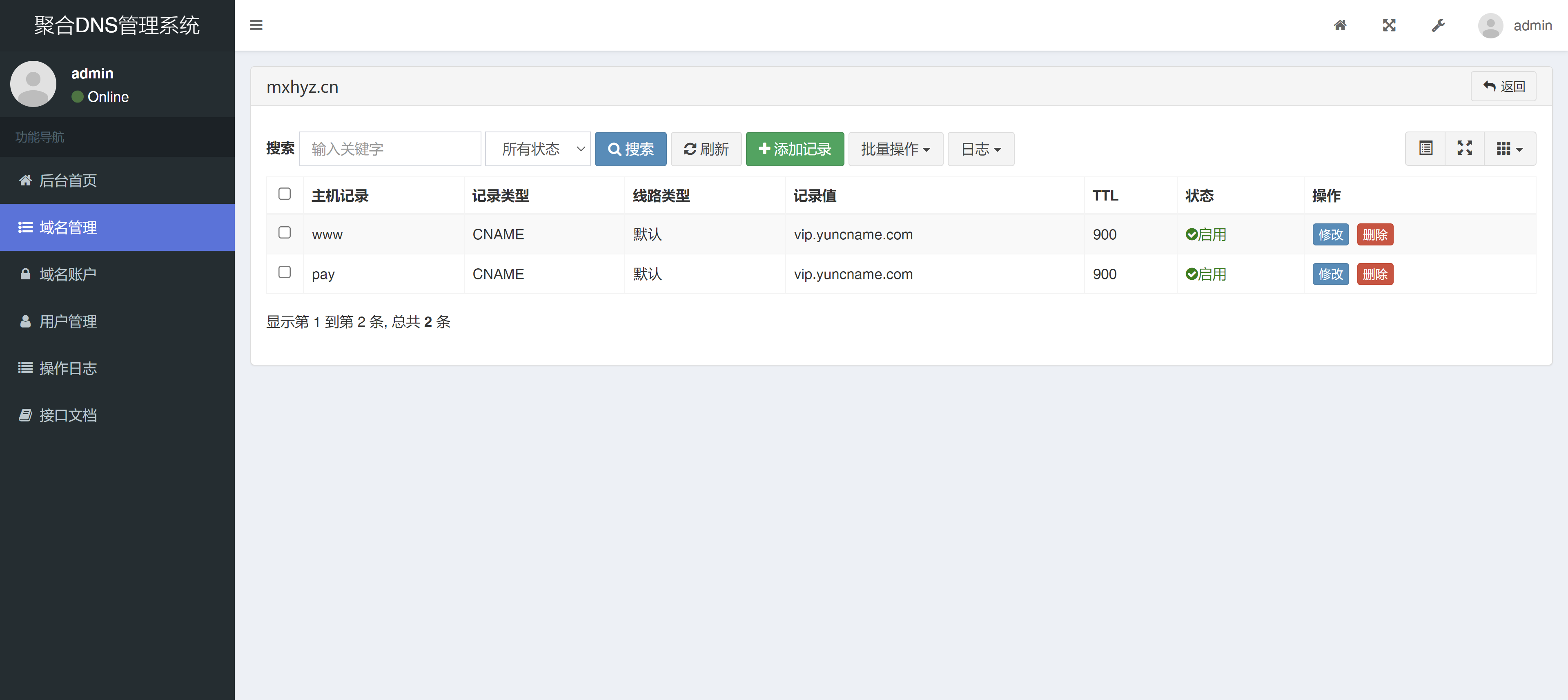
- Supports adding, modifying, and deleting various records such as A/CNAME/MX.
2. CF Optimized IP Configuration
- Navigate to "CF Optimized IP > Task Management"."
- Click "Add Optimized IP Task"."
- Select domain, CDN service provider (CloudFlare), and resolution line type.
- Configure resolution IP type (IPv4/IPv6), number of resolutions per line, and TTL value.
- After submitting the task, the system will automatically update the resolution records.
3. SSL Certificate Management
- Add Certificate Authority accounts in "SSL Certificate Accounts".
- Apply for new certificates or import existing certificates.
- Configure automatic renewal settings.
- Set up automatic certificate deployment to target servers or panels in "Auto-Deployment Tasks".
4. Disaster Recovery Switchover Configuration
- Set up monitoring detection protocols (ping/tcp/http).
- Configure failover strategies.
- Set notification channels and recipients.
- Enable monitoring tasks.
System Advantages
- Centralized Management: Eliminate the hassle of switching between multiple platforms; manage all domain resolutions in one place.
- Intelligent Optimization: Automatically select the optimal CDN nodes to improve website access speed.
- Security Assurance: Automatic SSL certificate renewal to avoid security risks caused by certificate expiration.
- High Availability Assurance: Intelligent disaster recovery switching ensures business continuity.
- Flexible Deployment: Supports traditional servers and containerized deployment to meet various environmental needs.
Applicable Scenarios
- Users with multiple domains distributed across different DNS service providers.
- Website operations personnel requiring intelligent DNS resolution.
- Development teams seeking automated SSL certificate management.
- Enterprises with strict requirements for website high availability.
- IDC providers offering domain hosting services.
Demo Screenshots
Self-built system automatic deployment.functionality
Cloud service providers.Automatic deployment.functionality
Server automatic deployment.functionality

Add domain account.
Domain management list.
Domain DNS resolution management, supports batch operations on resolutions.
User management: add users, supports enabling API interfaces for users.
CF Optimized IP feature: add optimized IP tasks.
SSL certificate application feature.
The Rainbow Aggregation DNS Management System, through its powerful features and flexible deployment methods, provides professional and efficient domain resolution management solutions for various users, significantly reducing the complexity of multi-platform DNS management. It is an ideal choice for website operations personnel and enterprises.

 English