












DNS, thedomain name system, is an Internet protocol that bridges the gap between domain names, which are easy for humans to remember, and IP addresses, which are readable by computers. The system simplifies the communication process between users and computers by efficiently matching domain names with correct IP addresses in a structured way.
Key highlights
- DNS helps users access websites with human-readable names instead of long, forgettable IP addresses.
- Multiple DNS servers look for authoritative name servers that know the IP address needed to access the site
- Root name servers, top-level domain name servers, authoritative domain name servers and DNS resolvers work together to assist in the DNS lookup process to find the correct IP address of the website you want to visit.
- You can keep your network safe by understanding the risks, investing in malware protection, and switching to a secure DNS server
What is DNS?
The Domain Name System (DNS) isTelephone directory of the Internet. As a fundamental part of the Internet, it matches domain names to their corresponding IP addresses. This makes browsing easier because users can easily memorize human-readable domain names instead of long, complex IP addresses.
When you type in a domain name, such as likacloud.com, the DNS server translates it into an IP address that your browser understands. This process ensures smooth communication between devices on the Internet.
Why is DNS important?
DNS inMaking the Internet more accessible to allplays a crucial role in terms of It allows users to access desired websites quickly and efficiently without having to memorize long strings of numbers. In short, DNS makes the Internetuser-friendly。
The DNS also allows organizations to create a new system without affecting theironline businessThe company's web services can be adjusted with the same premise in mind. For example, by simply updating DNS records, businesses can keep their website traffic intact when switching to a new web hosting provider. Without DNS, businesses and organizations would have to start from scratch with every change.
The Origins of DNS: From ARPANET to the Invention of DNS
In the past.United States Department of DefenseARPANET relied on a vast digital “phone book” to connect research centers. But as the network expanded in the 1970s, managing computers and their lengthy numeric IP addresses became extremely challenging, creating the need for a unified system.
It was then that two American computer scientists, Paul Moccapiejos and Jon Postel, stepped in and created the Domain Name System (DNS) in 1983. This invention quickly becameInternet standard, greatly optimizing the way applications and end users communicate with each other.



How DNS Works: An In-Depth Analysis
DNS is critical in the modern Internet environment. For example.More than 350.5 million domain names registered by the end of Q1 2023Without DNS, navigating this vast digital landscape would be a daunting and nearly impossible task. Without DNS, navigating this vast digital landscape would be a daunting and nearly impossible task.
Resolving a domain name can involve multiple steps and interactions with multiple DNS servers. Here's an in-depth look at how DNS works:
1. Entering the web site
When you're surfing the web.Enter the website URLThe moment you press enter, the DNS process starts. DNS then resolves the IP address of the site so you don't have to memorize a string of numbers.
2. Query recursive parser
Your browser sends a message to aDNS recursive resolverSend a request to a resolver, usually provided by your Internet service provider. The resolver checks to see if it already has the IP address you are looking for in its cache.
3. Querying the root name servers
If the parser doesn't know the IP address, it sends a message to the\nThe rootdomain name serverSeeking help. The root name servers then point the resolver to theTop Level Domain (TLD) Servers。
4. Contacting the top-level domain name servers
The resolver contacts the TLD name servers, which have knowledge of second-level domain names such as likacloud.com. The TLD name servers tell the resolver where to find authoritative name servers for the domain.
5. Reaching authoritative name servers
The authoritative name servers know the IP address you need and provide it to the recursive resolver.
6. IP address sent to the browser
The resolver sends the IP address back to your browser, which then uses it to connect to the web server hosting the site.
7. Loading of web pages
Finally, the web server sends the requested page to your browser. The browser then connects to the IP address and loads the website for you. The entire process takes only a few seconds, making it quick and easy for you to access the website.
draw attention to sth.
Tip:For faster browsing, utilize the DNS caching feature. Control how long the server and browser remember IP addresses by setting the Time to Live (TTL) value. Note, however, that higher TTL values can be inconvenient and should be lowered to avoid problems if you need to change the IP address of a domain name.
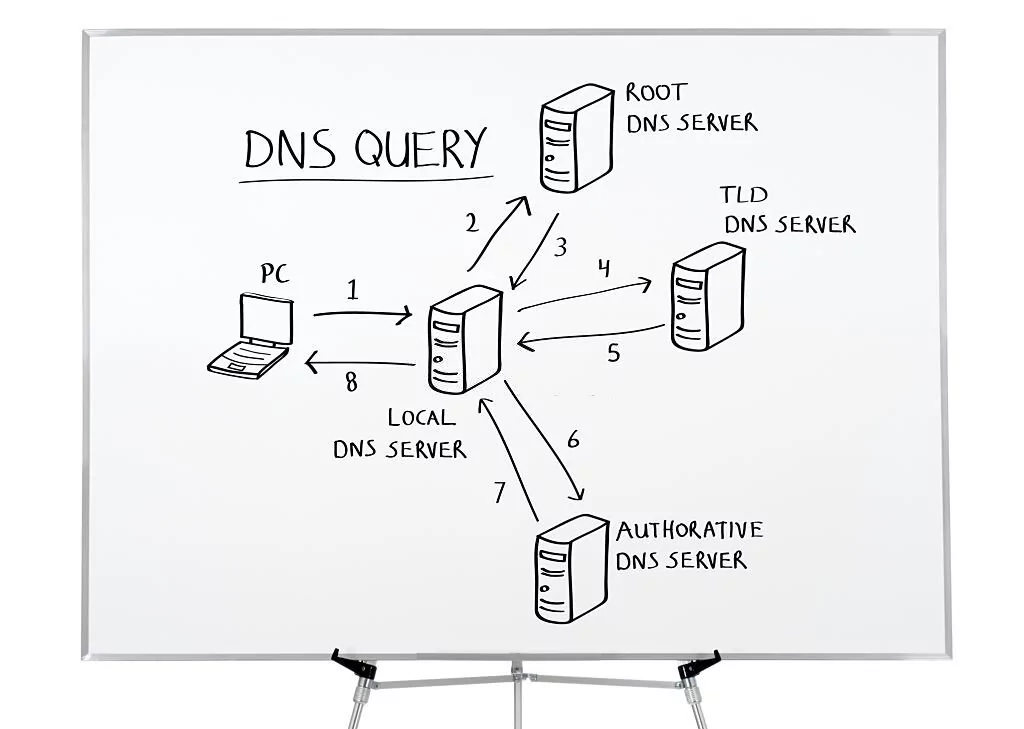
Which DNS servers are used to load websites?
When your computer can't find the IP address of a website in its cache or hosts file, it turns to four DNS servers for help. Let's take a look at each of these servers and see how they work together.
3. DNS resolver
The DNS resolver, also known as therecursive parserIt was the first to participate in theDNS Queriescomponent of the process. It acts as an intermediary between your computer and other DNS servers.
The main task of the parser is to find the site you want to visit with theCorrect IP AddressIf the IP address is already in the resolver's cache, the request is completed. If the IP address is already in the resolver's cache, the request is completed here and you can access the site immediately. However, if the resolver cannot find the IP address in its cache, it sends the request to the root name servers.
2. Root name servers
The root name servers areConverting domain names to IP addressesThe first step in the process. It doesn't store the IP address you're looking for, but rather points you to theright directionWhen the recursive resolver sends a request. When the recursive resolver sends a request, it recognizes the top-level domain name, tells it where to go next, and helps you find the correct IP address of the site you want to visit.
Think of the root DNS server as the information desk in a library, which directs you to different areas to find the books you need.
3. TLD domain name servers
The top-level domain name servers host the last part of the hostname, such as “com” in likacloud.com. This helpsNarrowing the searchto find the correct IP address, just like finding a book on a specific shelf in a specific section of a library.

4. Authoritative domain name servers
Authoritative name servers are your DNS requestfinal destinationIt stores all the information about the domain name you want to access, including its IP address. It stores all the information about the domain you want to access, including its IP address. It's like a dictionary on a specific library shelf.
Important Tip:When dealing with DNS and making changes, it is important to be cautious and avoid any unplanned changes. This is especially important for authoritative name servers, which contain all the information for a particular domain name.
What are the types of DNS queries?
There are three types of DNS queries that help speed up the resolution process and enhance your online experience. These include:
1. Recursive queries
Recursive query request for DNS serversFind the IP address of a specific domain name. If the address is cached, the server will return it directly. Otherwise, the server starts a recursive query process until it finds an authoritative name server that has the information. Eventually, this information is passed back to the DNS resolver and your computer, allowing you to access the site.
The recursive query is useful forConverting domain names to IP addressesand allow users to access websites on the Internet is critical. They ensure that DNS resolvers are able to provide answers to clients and locate the relevant IP address, even if multiple DNS servers need to be searched to find it.
2. Non-recursive queries
A non-recursive query is a request to a DNS server for a record it already holds. This is faster than a recursive query because the server canReturn DNS records immediatelyThe DNS servers usually store the records to improve performance.
Non-recursive queries speed up DNS resolution by skipping extra steps. These queries are especially useful when the necessary information is already in the DNS server's cache, reducing the number of queries and the load on the DNS infrastructure.

3. Iterative queries
The DNS resolver will do its best to provide the client with thebest answerIf the desired record is in the cache, it responds immediately. If the desired record exists in the cache, it responds immediately; if not, the client is directed to the most authoritative name server for the DNS zone. The client continues to query the directed server, and so on, until a valid DNS record is obtained or an error message appears.
In short, iterative querying is like playing “20 questions” with a DNS resolver. The client asks questions and the resolver gives the best answer. If it's not sure, it gives the client clues to optimize the question. This process continues until the client gets the answer it needs. This is useful for digging into the specifics of a domain name or IP address.


What is DNS security and why is it important?
Surprisingly, DNS, the backbone of Internet connectivity, was not designed with cybersecurity as a primary concern. In an enterprise environment, it's difficult to block or monitor DNS traffic, which makes it easy for hackers toDNS abuseleft an opportunity to exploit. Previously, DNS attacksEconomic loss and brand damage to the businessIt's actually gone up. This is where DNS security is necessary.
At the heart of DNS security is the protection of the DNS infrastructureProtection from cyber-attacksIt also ensures that the system is constantly fast and reliable. The comprehensive DNS security solution uses multiple defense measures, such as backup DNS servers, security protocols like DNSSEC, and comprehensive DNS logging to ensure safe and smooth operation of the system.
take note of
draw attention to sth.: Stay informed about DNS and network security risks. Protect yourself by switching to a secure DNS server, investing in malware protection, and regularly monitoring DNS traffic to detect and prevent malicious activity.

reach a verdict
DNS simplifies your browsing experience by translating easy-to-read website names into IP addresses that computers understand. Learn aboutWhat is DNS?Enables you to navigate the online world more efficiently and enhances your Internet security.
In addition, if you are in the business world, day-to-day operations rely on theWeb Hostingor email host, understanding how DNS works can help you stay ahead of the curve in today's digital environment. Implementing strong DNS security measures protects your online presence, maintains customer trust, and ensures smooth day-to-day operations.




 English