











A name is like your online street address -- just as people need an address to find your physical location, people need a domain name to find your website.
Domain names provide a humanized way of accessing websites rather than using theirInternet Protocol (IP) address(Also known as an Internet Protocol address, it is a unique identifier of a device in the Internet, similar to a real-life house number.)
In this article, we will explain what a domain name is, how it works, how to register a domain name, and discuss its importance in the online world. It will also cover how to choose the right domain name for your website and the exact registration process.
Recommendation of Quality Domain Name Service Providers


What is a domain name?
A domain name is a unique identifier that you enter into a web browser to access a specific website, such as likacloud.com. A domain name consists of two main parts: the body name and a suffix (also known as a domain extension), such as “.com” or “.org ”.
A well-chosen domain name reflects your brand image, is easy to remember, and gives users an initial expectation of what is available to them when they visit the site.
How do domain names work?
For a website to be accessible on the Internet, it needs two key components: a domain name and a server. The domain name is the humanized address that users use to access the website, while the web hosting server (also known as the webspace server, which can be understood as the “warehouse” where the website files are stored) is used to store all the files and data of the website.
The process of operating a domain name is as follows:
- The browser will pass theDomain Name System (DNS) servernetwork (similar to an “address book” in the Internet) to find the IP address associated with the domain name entered;
- Once the IP address is found, the browser sends a message to theWeb Hosting(i.e., a service that provides server space) to send requests for website data;
- The web server responds to the request, returning all the information needed to display the site's content;
- The browser receives this information and renders it into a web page that the user can interact with.
What does a domain name look like?
A domain name consists of two core components: the body of the domain name and theTop Level Domain (TLD)(Also known as a first-level domain name, it is the last part of a domain name). The body of a domain name is a unique string of characters combined, while a top-level domain is a suffix that sits after the body of the domain name, such as .com, .org, or .net.
Domain Name Example: likacloud.com
In this example, “likacloud” is the domain body and “.com” is the top-level domain.
Domain names can contain letters, numbers and hyphens, but not spaces or special characters. In addition, domain names are not case sensitive, so “LikaCloud.com” and “likacloud.com” is the same domain name.


What is the difference between a domain name and a URL?
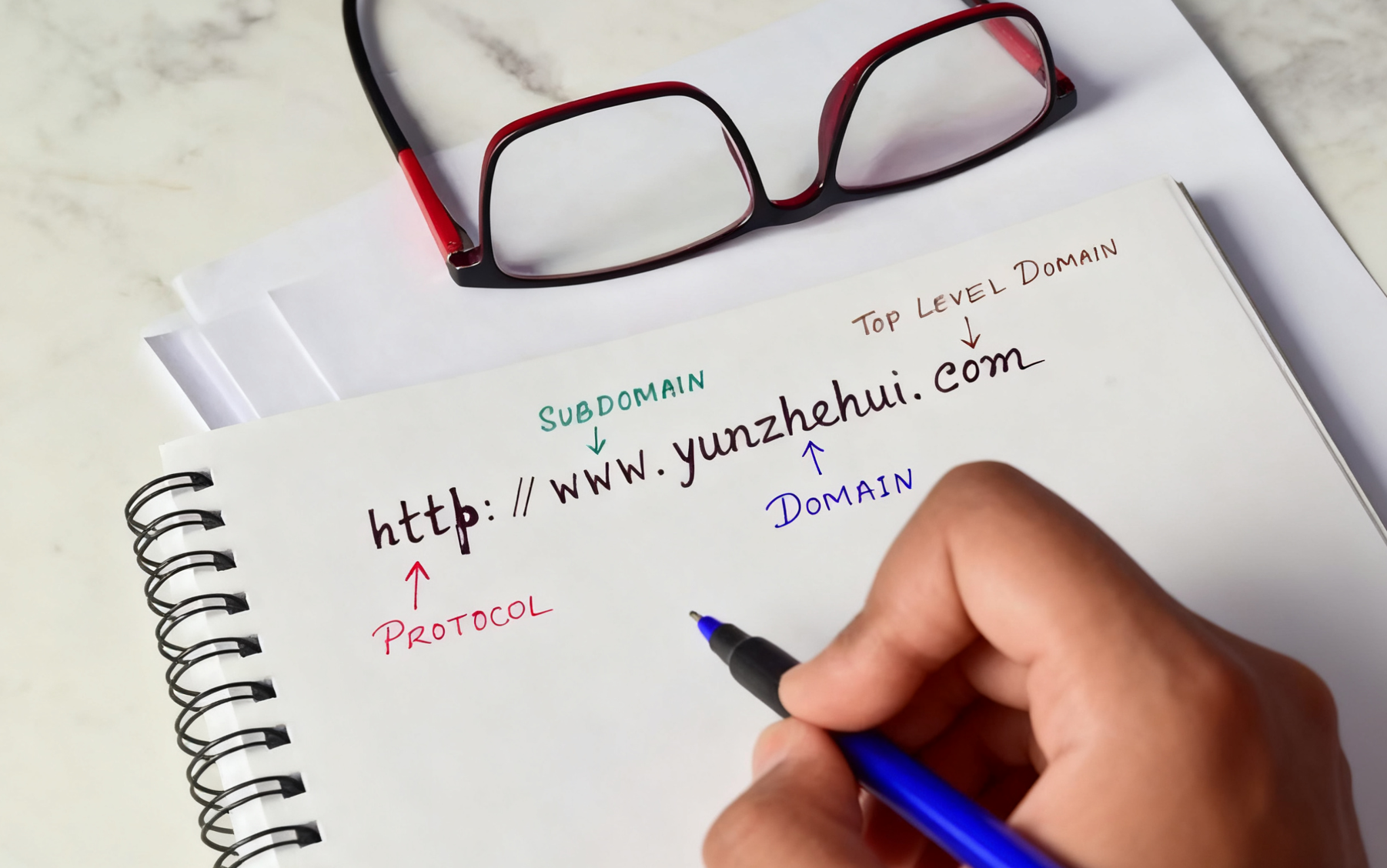
A URL (Uniform Resource Locator, also known as a web page address) is the full address used to access a specific page or resource on the Internet. It contains the domain name, but also other components such as protocols, subdomains, paths, query parameters, and fragment identifiers.
In short, the domain name is part of the URL, and the URL is the complete web address.
typical example: URL“https://www.likacloud.com/blog/cdn-safe/what-is-edgeone/#H-9 ” contains the following components:
- protocols: “https://” (indicates the network communication protocol used to ensure secure data transmission);
- subdomain: “Tentative” (a subset of the main domain name, often used to distinguish between different languages or regional versions of a website);
- domain name:“likacloud.com” (the unique identifier of the website);
- trails: “/blog/cdn-safe/what-is-edgeone” (path to a specific page or resource on the site);
- fragment identifier: “#H-9” (pointing to a specific paragraph position in a web page).
Why do you need a domain name?
Whether you're a hobbyist looking to make money from a hobby or a business owner looking to establish a solid online presence, you should have a domain name for your project or business.
Domain names are important in several ways:
- degree of credibility-- Establishing credibility is key to gaining the trust of your website visitors. If the domain name matches the name of your company or project, the website will appear more credible and professional. This, in turn, improves user interaction, increases traffic, and ultimately leads to more conversions (e.g., user purchases, registrations, and other behaviors).
- (having) authority-- An authority site allows you to become the “voice holder” in your industry and the primary source of trusted information in your niche. At the same time, other professionals in the industry are more likely to link to your site, which helps boost search engine optimization (SEO) results and website exposure.
- memorability-- A unique and memorable domain name makes it easy for users to remember your site, helps increase direct visits (users visit directly by typing in the domain name rather than looking it up through a search engine), and makes it easy for users to find your site quickly.
- possession-- After completing a domain name registration, no one else can take possession of the domain name for the duration of your registration. You have the right to decide which website the domain name will be directed to, which domain name registrar will manage the domain name, what information will be associated with the domain name account, who will be responsible for managing the domain name, and whether or not you decide to sell the domain name.
- brand building-- The right domain name creates a strong online brand, especially if it is similar to the company name. It can reflect the personality, style and values of a company or project, build a unified online presence, reinforce the brand message across platforms and communicate unique selling points to the target audience.
- Search Engine Optimization (SEO)-- A premium domain name that contains relevant keywords can help improve your website's SEO results and increase the probability of ranking higher in search results. Additionally, it makes it easier for potential customers to find your website, attracting more natural traffic, which in turn improves conversion efficiency.
Different Types of Domain Names
Below you will find a description of the different types of URLs that can be used to build a website:
Top Level Domain (TLD)
The top-level domain (TLD), often referred to as a domain suffix, is located at the very end of the domain name hierarchy. It consists ofInternet Assigned Numbers Authority (IANA) Administration, which regulates the existence of top-level domains and sells the right to use them to specific domain name registrars.
Note: The maximum length of a TLD is 63 characters, but most TLDs are usually around 2-3 characters long.Complete list of top-level domainsMaintained by the Internet Corporation for Assigned Names and Numbers (ICANN).
Second-level domain names (SLDs)
Second-level domain names (SLDs) is the portion of the domain name that comes before the domain suffix (e.g., “.com” or “.org”) that is the name or unique identifier of the website. For example, in the URL “likacloud.com” in which the second-level domain name is “yunzhehui”.
The combination of a second-level domain name and a top-level domain name constitutes a unique address on the Internet that points to a specific website. For example, “example.com” and “example.net” are two different domains, even though they have the same second-level domain name (“example”).
Country / Area Code Top Level Domains (ccTLDs)
Country / Area Code Top Level Domains (ccTLDs) It is a country or region specific domain name suffix that consists of two letters and is based on an internationally recognized country/region code. This type of domain name is useful for businesses that wish to focus on a specific country or region, and can be used to precisely target local audiences.
Examples of country/country code top-level domains:
- cn (China)
- .us (United States)
- .uk (UK)
- .ca (Canada)
- .au (Australia)
- .de (Germany)
- .jp (Japan)
- .il (Israel)
Sponsored Top-Level Domains (sTLDs)
Sponsored top-level domains (sTLDs) are sponsored or supported by specific organizations or communities. For example, Google has the exclusive “.google” suffix and Apple has the “.apple” suffix. Other common sponsored TLDs include “.edu” for educational institutions and “.gov” for government agencies.
Generic Top-Level Domain (gTLD)
Generic Top-Level Domain (gTLD)In particular, non-sponsored gTLDs are top-level domains that are not limited to a specific country/country code. These domain name extensions are not owned by any particular company or brand, and are centrally administered by ICANN.
Examples of gTLDs:
- .com (for commercial use)
- .net (for use in web-related fields)
- .biz (used in business, similar to .com but for a more niche audience)
- .org (usually for non-profit organizations)
clarification
According to VeriSign's Q1 2025 Domain Name Industry Brief, the total number of global TLD registrations reached 368.4 million in the first quarter of 2025, with 169.8 million registrations for .com and .net, and 12.6 million registrations for .net, which can be extrapolated to 157.2 million registrations for . The total number of registrations for .com domain names is 157.2 million.source address
subdomain
subdomain(also known as a third-level domain name) is a part of the main domain name that comes before the main domain name and is separated from the main domain name by a decimal point. For example, in “example.likacloud.com” where “example” is the subdomain.
The most common subdomain is “www”, but you can also use different subdomains to organize the structure of your website and make it easier for users to navigate the different sections of your website. Subdomains can be especially useful if your website contains multiple features or content areas.
For example, if your site has a blog section, you can create “blog.likacloud.com” such as subdomains to help users quickly identify and access that particular board.
take note of
The “http://” at the beginning of a web page URL is not part of the domain name, it is part of the “protocol” category, which is responsible for transferring data between the web browser and the website.

How do I choose a domain name?

Choosing the right domain name is crucial to boosting your website's exposure in search results, enhancing credibility and creating a distinctive brand image. To pick the most suitable domain name, refer to the following suggestions:
Keep it short and simple
While long, complicated domain names may look unique, they can be confusing to visitors, prone to spelling errors, and may cause dissatisfaction. Therefore, domain names should be concise and short, easy to pronounce, type and spell. This will improve the probability of visitors remembering and re-visiting the site, so far, most of the main watershed list spelling, duplex domain names have basically been registered, I recommend registering three spelling, four spelling, such asyunzhehui.comIt's triple spelled.rijimima.comIt's four spelling.
Business-related
Choosing a domain name that reflects the nature of your business will give you an edge, but without being too blunt, choose a name that is both clever and relevant to your business. It should give customers a general idea of what to expect from the content of the site and the products/services you offer.
Easy to recognize
You can use your company name or a unique name as a domain name, but the most important thing is to make sure that the domain name is easily recognizable and has not already been registered. At the same time, the domain name should not be confused with the name of another brand - using someone else's brand name can cause confusion and even legal disputes.
Choosing the right suffix
There is a wide variety of top-level domains (TLDs) on the market, and the choice can be confusing. Which suffix you ultimately choose depends on your target audience and business goals.
For example, if your website targets users in a specific region, then using a country/region code top-level domain (such as “.cn” for China or “.com” for international) may be more suitable for your business. These types of domain names help build a local brand image and increase your website's exposure in the region.
How do I register a domain name?

Once you have finalized the domain name of your website, the next step is to go through thedomain name registrar(an organization that provides domain name registration services) registers the domain name and sets a term for the registration. This process is known as domain name registration.
Simple steps to register a domain name:
- Check at the domain name registrar if your desired domain name is still available for registration.
- Purchase a domain name from a reputable registrar from the ICANN database, such as Tencent Cloud, Aliyun, etc;
- Find the “Register Domain Name” button or text on the registrar's website and click on it to enter the registration process;
- Fill out the registration form;
- Buy Domain Name: After completing the registration form, you will be prompted to select the term of registration (usually 1-10 years) and whether you require any other additional services. After completing your selection, proceed to the payment section, provide payment information and complete the transaction to purchase the domain name. IMPORTANT: Please make sure that your desired domain name is spelled correctly and all information is correct. Once the payment is completed, the domain information cannot be modified, so be sure to double check.
- The registrar will notify you when the domain name has been successfully registered;
- Domain Name System (DNS) information usually takes several hours to synchronize with all DNS servers. IMPORTANT NOTE: Due to legal requirements, some countries require registrars to maintain valid address information, so you will need to provide your physical address to the registrar when registering. Please fill in this information accurately to avoid deactivation of your domain name.
special hint
According to Chinese law, domain name registration in the Chinese mirror must be real-name authentication, if the domain name needs to be filed in China, domain name registered overseas, must be transferred to the domestic service provider for real-name authentication before filing.
How do I transfer a domain name?
Domain name transfer refers to the process of transferring a domain name from one registrar to another, which involves multiple steps. Follow the steps below to successfully complete a domain transfer:
- Check eligibility and unlock domains: Ensure that the domain name is eligible for transfer (registered for at least 60 days and no recent transfers) and then unlock the domain name in the current registrar's control panel;
- Initiation of transfer requests: Log in to the new registrar platform of your choice and follow the platform's instructions to initiate the domain transfer process;
- Confirmation of transfer requests: The new registrar will send you a confirmation email, follow the instructions in the email to confirm the transfer request;
- Waiting for the transfer to complete: The time required for the transfer process varies depending on the registrars involved, and may take anywhere from a few hours to a few days. Please keep an eye on your mailbox for notification of the transfer progress;
- Verify that the transfer was successful: Once the transfer is complete, log in to your new registrar's control panel and confirm that the domain name is showing up in your account;
- Locked Domain Name: After the transfer is verified as successful, the domain name is locked in the new registrar's control panel to prevent unauthorized modifications or re-transfers.
take note of
Please note that the Domain Name System (DNS) settings should remain unchanged during the transfer process to ensure that the website and email services are functioning properly.
summarize
Among its many competitors, a domain name is crucial to establishing a website's online presence, and domain name registration is a key step in accomplishing this goal. A domain name can be thought of as a unique “door number” for your website, which helps visitors find your site easily in the complex digital world.
In this article, we covered the definition of a domain name and how it can help boost SEO results, enhance credibility and establish authority in your industry. Hopefully, through this article, you'll gain a better understanding of the role domain names play in building and growing your online business or program.
Next Steps: What to Do Next?
- View Recommended Domain Name Registrars
- Learn About Cloud Website Builder Tool Providers
- Find a Web Server Provider




 English