


















Tencent Cloud offers 50 free SSL certificate credits, branded as DigiCert Global Root G2. Currently only supports single domain name, multiple domain names need to be individually...
take note of
Adjustment Notice for TrustAsia Branded Root Certificates
Free SSL Certificate Overview
Tencent cloud platform provides a free SSL certificate with a validity period of 90 days, which is mainly used for pre-testing and for users to use when HTTPS communication is required for business in the preconstruction stage of the website.
Difference between Free SSL Certificate and Official SSL Certificate
take note of
Official certificates have better compatibility than free certificates, for your business stability, please make sure to use official certificates for official projects. Click to go to Selection of official certificates。
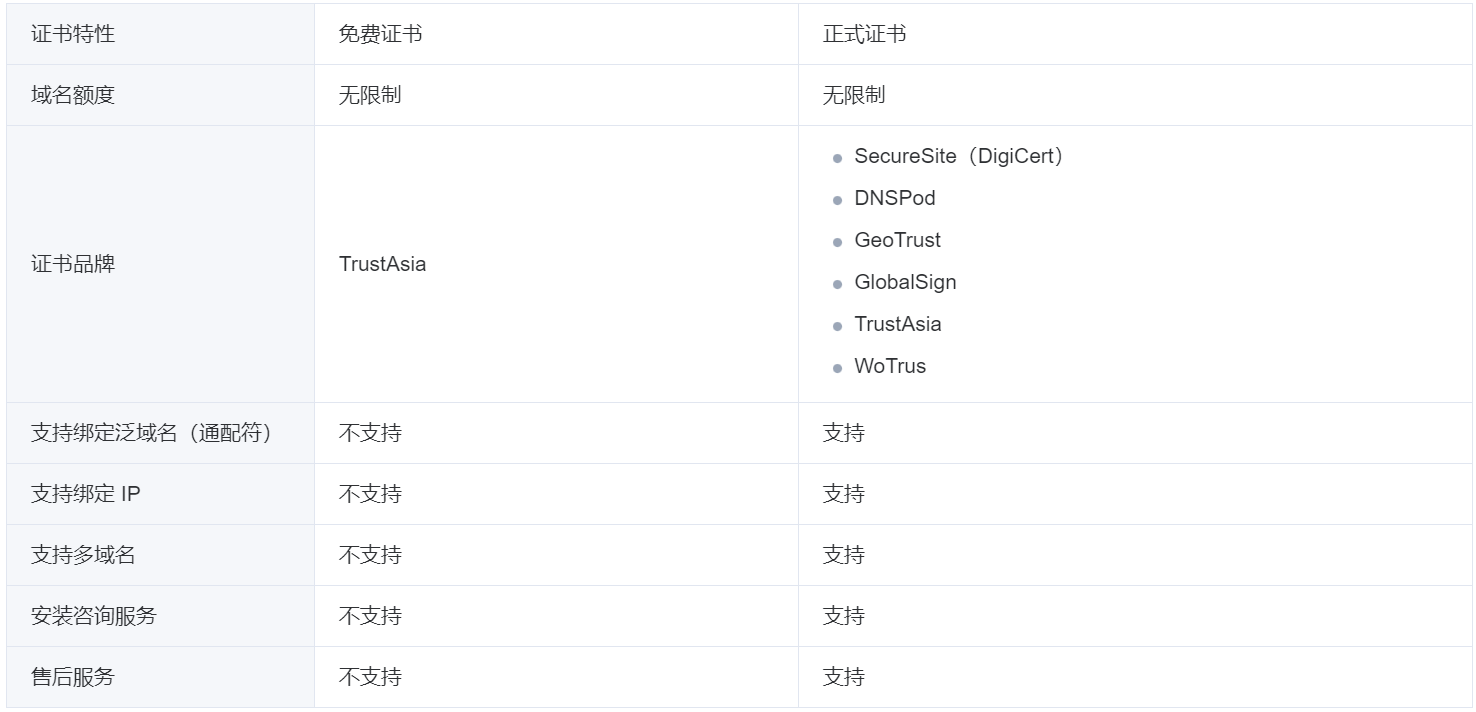
Free certificate credit rules
A Tencent Cloud account can only apply for a maximum of 50 free certificates.
Free SSL Certificate Usage Restrictions
1. Free certificate only supports binding a single domain name, does not support binding wildcard domain name or IP. does not support the application of free certificate for domain names with special words. Such special words include but not limited to: .edu, .gov, .org, .ru, .jp, .pay, .bank, .live and .nuclear;
2. Free certificates do not support manual technical support or installation guidance, please follow the guidance document to complete the installation and deployment of the certificate.
Free SSL Certificate Application Process
Register for an account
Tencent cloud platform to apply for certificates first need to register Tencent cloud account and complete the real name authentication.
1. For new users, please click Tencent cloud official website upper rightFree Registration, go to the registration page.
2. Please Register for a Tencent Cloud accountYou can log in to the Tencent Cloud console.
3. Completion real name verificationThe party may continue to apply for a certificate.
Apply for a free certificate
clarification
Free certificates only provide second-level domain name and its sub-domain certificate application, does not support IP and pan-domain application. For example, likacloud.com, docs.likacloud.com.
- log in SSL Certificate ConsoleEnterMy certificate.page and clickApply for a free certificate。
- In the pop-upCertificate Comparisonpage, clickApply for a free certificate.
- Fill out the certificate request form as shown below:
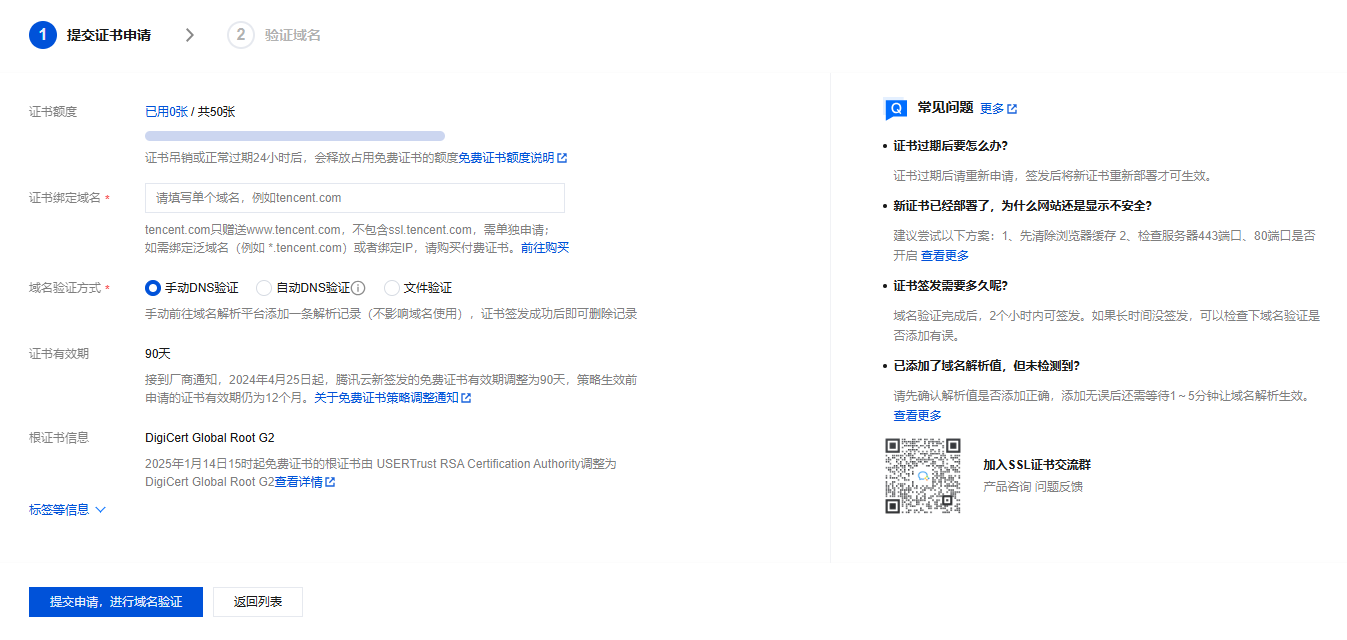
The certificate binds the domain name:Please fill in a single domain name. For example, yunzhehui.com、ssl.likacloud.com。
Domain validation method:
clarification
Automatic DNS authentication: For authentication methods, see the Automatically add DNS。
If the requested domain name has been successfully hosted on Cloud Resolution DNS ConsoleThe following is an example of a DNS add-on that supports automatic DNS addition.
Manual DNS Authentication: For the authentication method, see the DNS Authentication。
File validation: For validation methods, see Document validation。
When you're done filling out the form, clickSubmit application for domain verification。
5. AccessVerify Domain Namestep, follow the page prompts to complete the domain name verification operation, and click thefulfillment. As shown in the figure below:
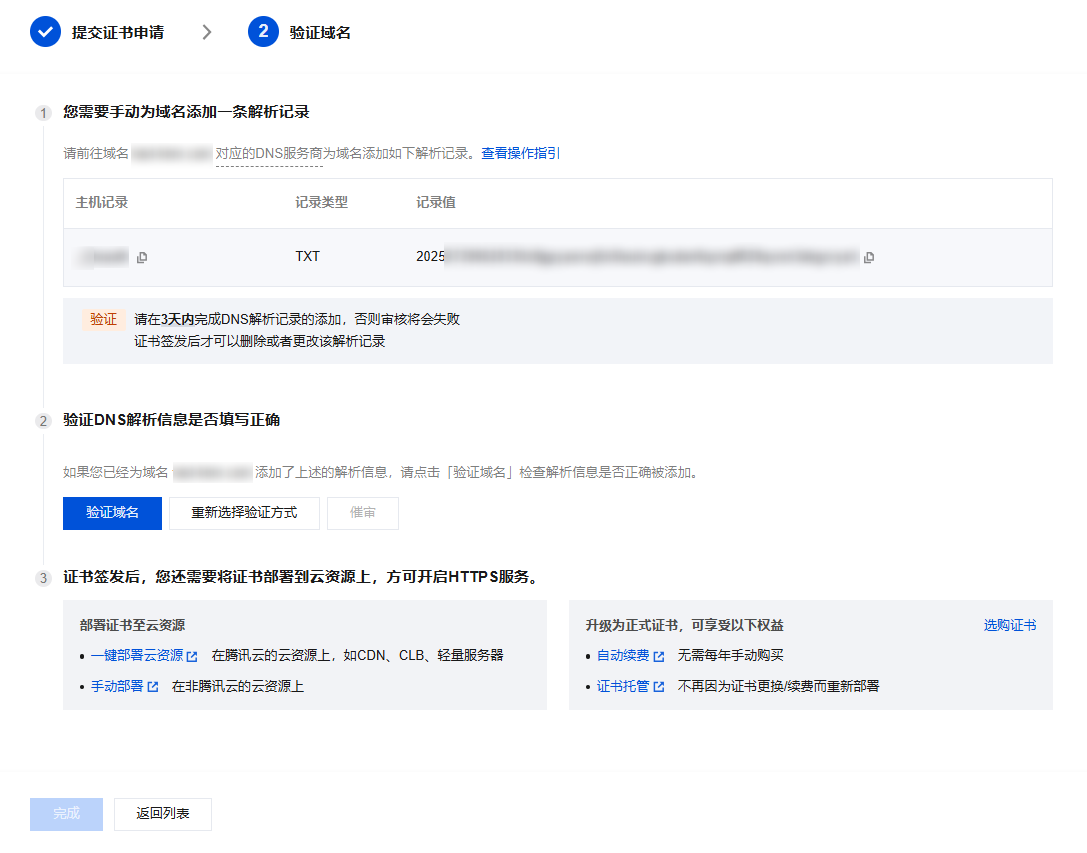
After the domain name verification, the CA organization will complete the certificate issuance operation within 24 hours, please wait patiently.
take note of
The submitted domain name did not pass the CA organization security audit, please refer to Reasons for Security Audit Failure。
Download and Deployment
After completing the domain name audit, the certificate issued is ready to be clicked ondownloadingGo to local for installation and deployment or deploy to Tencent Cloud related cloud services.
Usually the server admin panel will have a very handy feature for adding certificates, such as Pagoda:
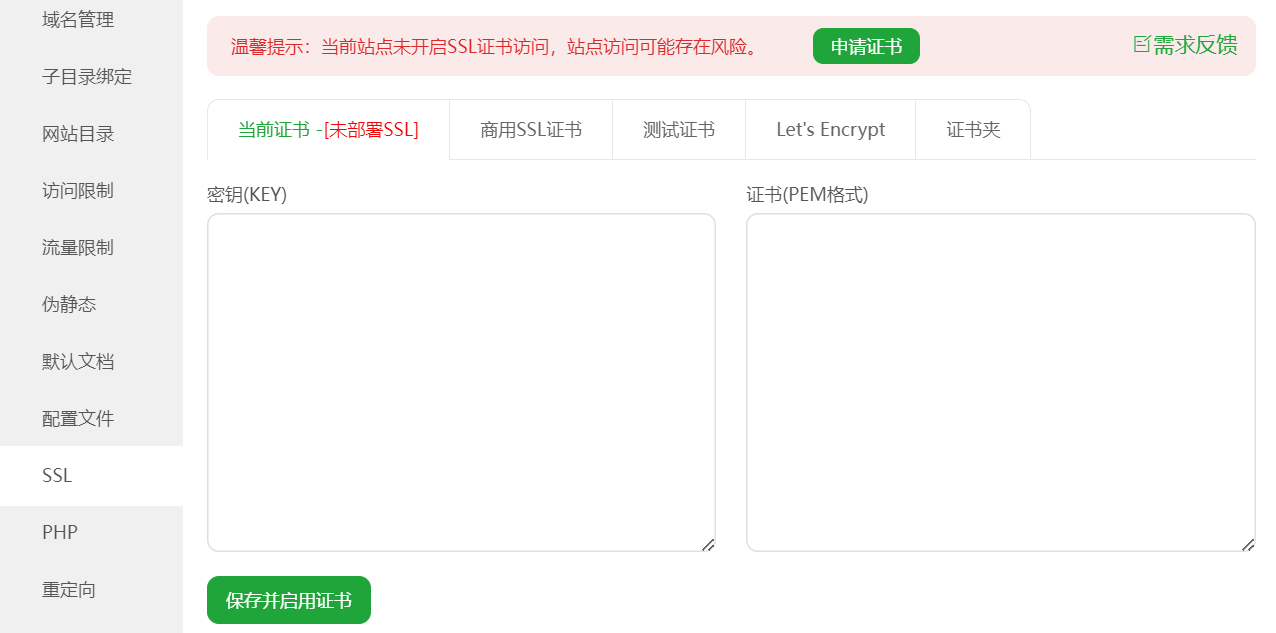
Just copy the Nginx type certificate key and pem into the corresponding input boxes.
How to upgrade your free SSL to an official certificate
Free SSL Certificate does not support renewal and is recommended to be used only for testing. In order to obtain higher security level and enjoy human customer service support, you can upgrade to the paid version of SSL Certificate through the following two ways.
Way 1: Go to the certificate console to upgrade
1. Login SSL Certificate ConsoleTo upgrade a certificate, go to the My Certificates management page, select the certificate that needs to be upgraded, and clickUpgrade. As shown in the figure below:

In the pop-up window, after confirming the certificate specifications, click theGo to Payment. As shown in the figure below:
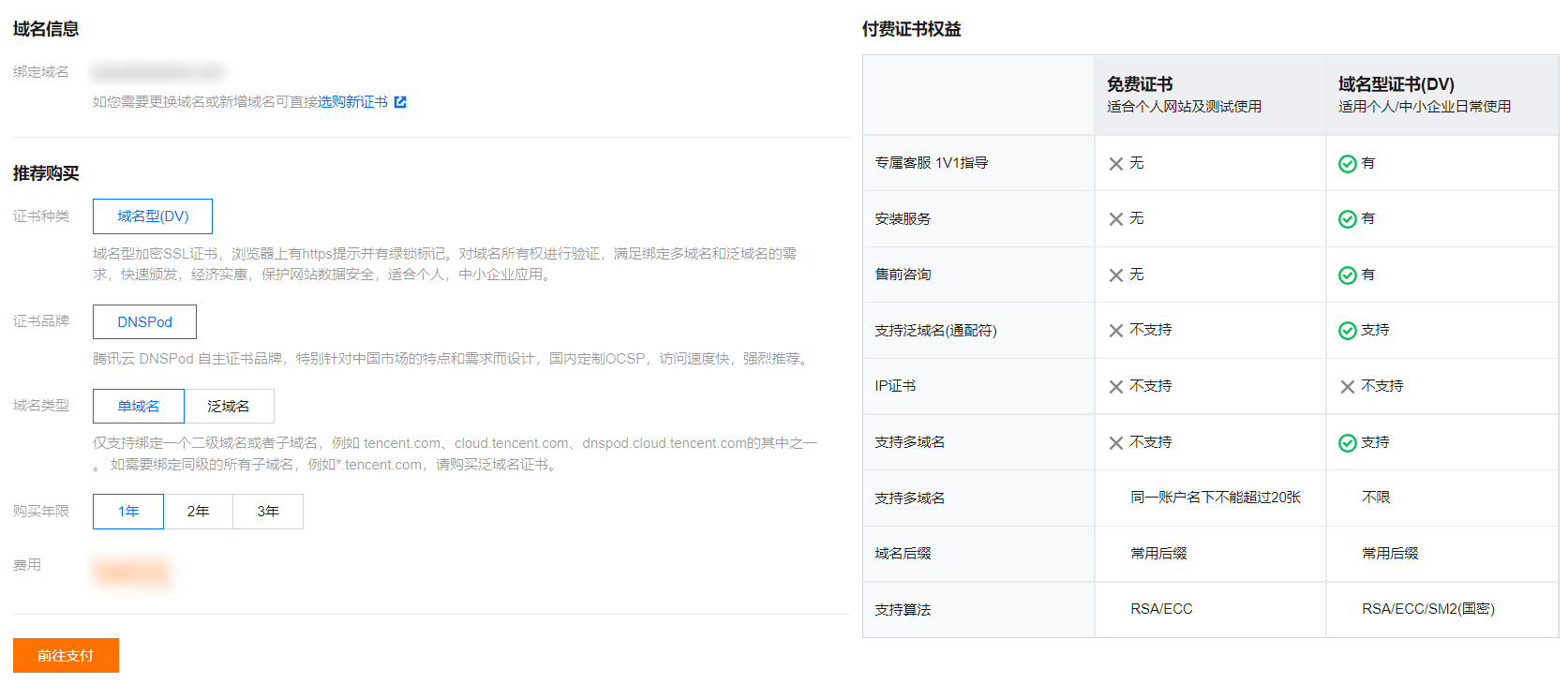
Option 2: Go to the Certificate Purchase Page and pay for the certificate
by purchasingCustomized ConfigurationPaid certificates as an example.
1. In SSL Certificate Purchase Page Purchase paid certificates, for more information, please see the official website for sale to provide a comparison of the parameters. As shown in the figure below:
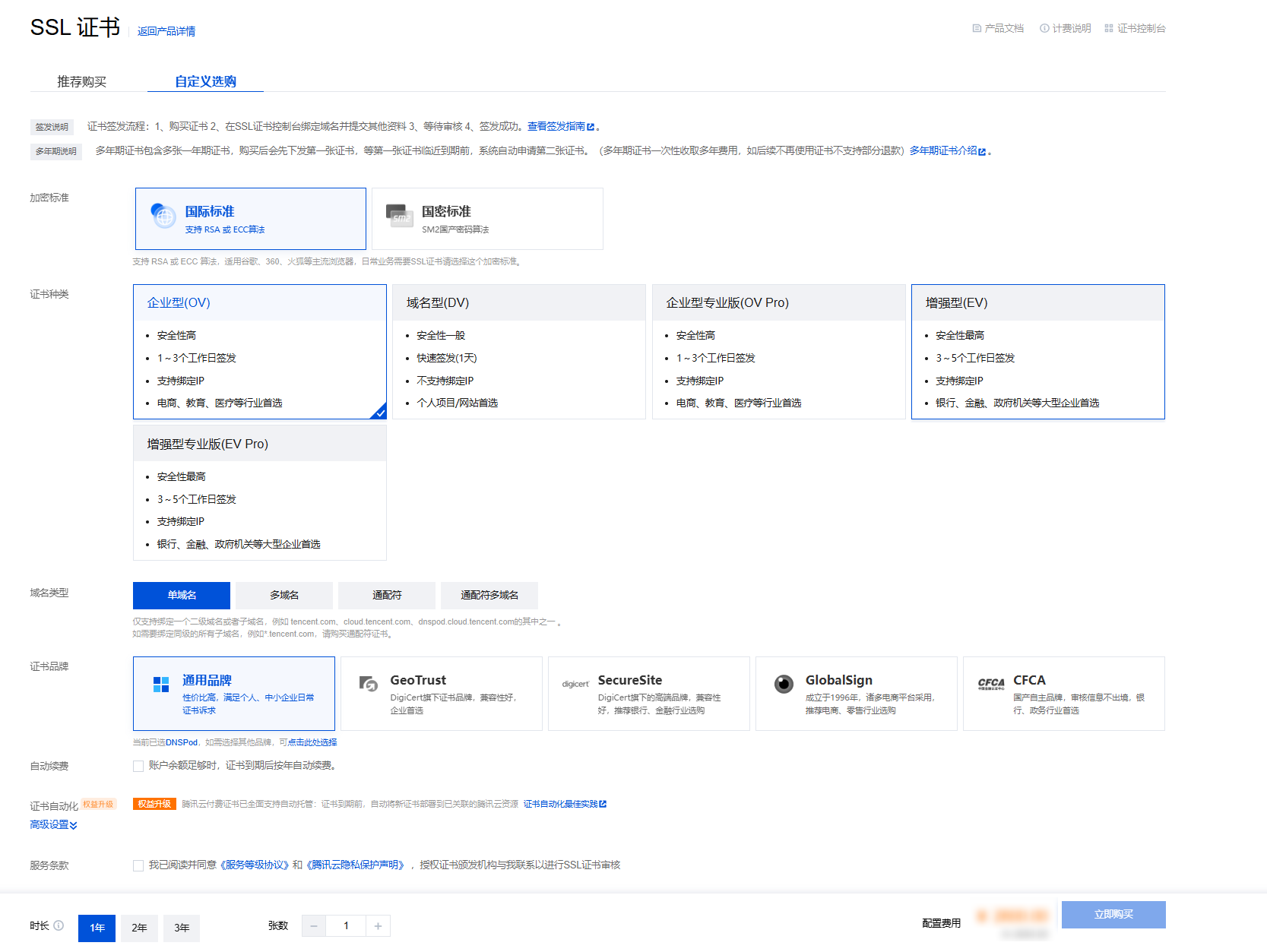
2. According to your industry and actual needs to choose the appropriate certificate type and certificate brand. For certificate types, please refer to Examples of SSL Certificate Types For certificate brands, please see SSL Certificate Brand Introduction。
3. Select the type of domain name and the number of supported domain names as required, the description of the domain name type is shown in the figure below:
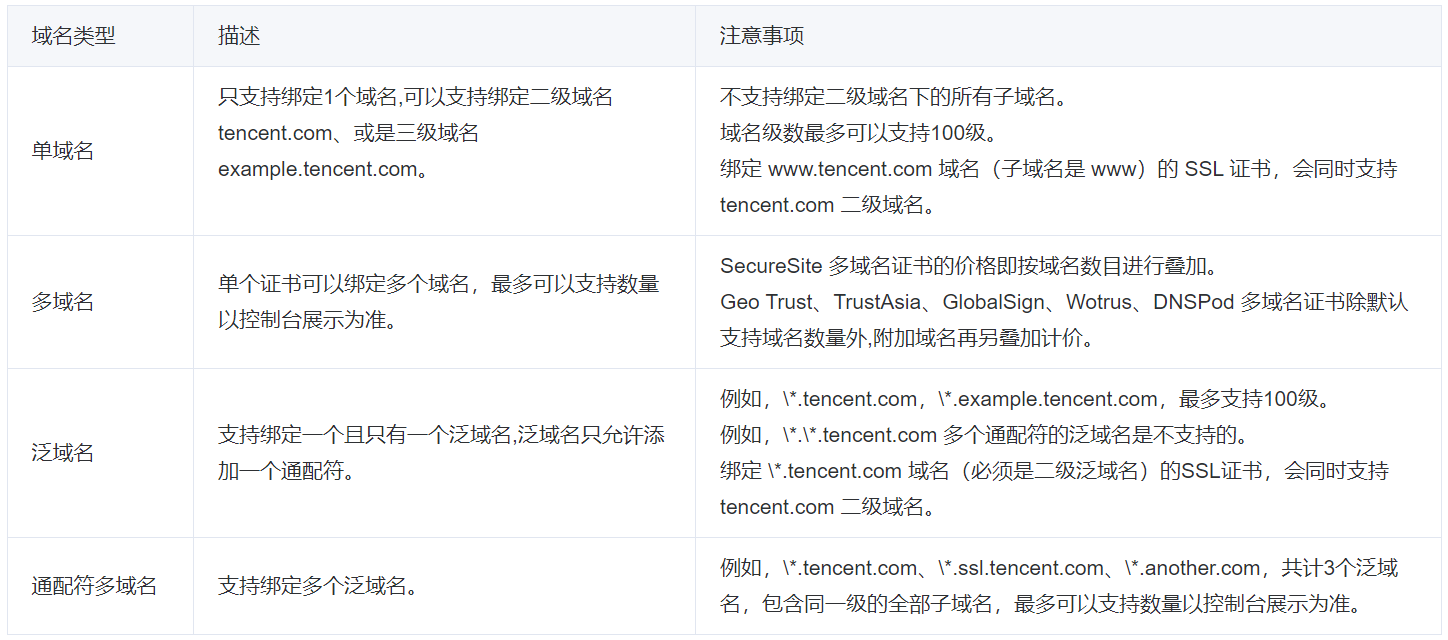
4. Select the number of years of certification as required.
5. ClickBuy NowTo do so, go to the Order Management page and clickSubmit OrderJust complete the payment.
Free SSL certificate quota related issues
Tencent official last update: 2024-09-04 14:51:11
How many free certificates can I apply for in Tencent Cloud?
A maximum of 50 free certificates can be requested for one account.
How to release the free certificate quota of Tencent Cloud account?
The free certificate quota of the occupied Tencent Cloud master account will be released within 24 hours after the certificate has been revoked or the certificate has normally expired.
testimonialsLet's EncryptFree Certificates
Let's Encrypt is a world-renowned free SSL certificate provider, operated by the Internet Security Research Group (ISRG), supporting automatic issuance and renewal, helping websites quickly realize HTTPS encryption.
It is completely free and highly compatible, covering mainstream browsers and servers, without the need for complex operations, individual developers, small and medium-sized enterprises can be easily accessed to effectively enhance the security of the site and user trust.
For a freeLet's EncryptFor free certificates check out this article >>
Of course, nowadays, server admin panels come with their ownLet's EncryptCertificate application, if you are too much trouble, you can apply directly with the server panel and then deploy with one click.
 English