











CDNs, known asContent Delivery Network (CDN)It provides faster website access to users around the world by deploying servers and caching content globally. It efficiently loads HTML pages, JavaScript files, images, and videos toEnhanced browsing experiencewhile reducing the load on the main server.Improve website reliability。
Check out ourMainstream CDN Service ProvidersThese are the best options for improving the performance of your website.
Key Takeaways
- CDN is a system that improves the speed and reliability of websites by distributing content across multiple servers worldwide.
- Using a CDN can improve site speed, scalability, and security, but it can also increase costs and require additional configuration.
- Knowledge of CDNs can help improve website speed, scalability, security, and overall user experience.
What is CDN?
CDNs are a suite of services that provide users around the world withFaster and more reliable website access experienceThe system. It is implemented by storing and distributing copies of website content to multiple servers located in different regions.
When visiting a website that uses a CDN, content is loaded from the server closest to the user. The shortened data transfer distance not only enablesFaster loading speeds、Better user experienceIt's still possible.Reducing the pressure on the main server。
How does a CDN work?
CDNs work on the principle that the globalStore copies of website content on multiple servers. When you visit a site, the content is loaded from the server closest to you, thus enabling site acceleration.
For a more intuitive understanding of how CDNs work, think of it as a restaurant with multiple locations: instead of traveling to the distant main location, you save time by eating at the nearest location. Similarly, CDNs ensure that users can load websites quickly and efficiently by distributing content from the nearest server.
History of CDNs
In the late 1990s, the Internet was growing at an unprecedented rate, and websites were struggling to keep up with the growing number of users. To solve this problem, theAkamai Technologies Innovative firms, represented by the first to take the lead, introduced in 1998 theFirst CDN, ushering in a new era of faster, more reliable network experiences.
Over time, CDN technology has evolved and more service providers have emerged. Today, CDNs have become the indispensable “guardians” of the Internet, ensuring that content is delivered quickly and efficiently to users around the world, theMaking the digital world a better place。

What are the advantages of using a CDN?
CDN can significantly improve the performance, scalability and security of websites, and is an important tool for modern websites, with the following core advantages:
- Faster website loading
Loading speed is critical to the success or failure of a website. Long loading times lead to higher bounce rates and decreased user patience. Studies have shown that only1 second loading delayIt can then lead to a drop in page views 11%, a decrease in customer satisfaction 16%, and a decrease in conversions 7%.
CDNs provide faster website loading speeds for users around the world by distributing content from servers near the user.Faster Websites Mean Better User ExperienceThe website can be used to attract visitors to stay and interact with the site.
- Better user experience
Faster loading sites canEnhance the overall user experienceCDNs ensure that website content loads quickly, thus increasing the length of time users stay, the depth of content they browse, and the rate of conversion completion.
- Greater scalability and traffic management capabilities
CDN canEffective Management of Website TrafficThe CDN can handle both daily visitors and unexpected traffic peaks with ease. During traffic peaks, the CDN distributes the load to multiple servers to avoid website crashes, reduce the pressure on the main server, and realize efficient handling of high traffic.
- Higher security
2020.Amazon Web Services (Amazon Web Services)There's been aDDoS attackThe CDNs were used by the company, causing platforms such as Netflix, Twitter (now X), and Reddit to go down. Had these platforms been using CDNs at the time, they would have been able to keep their websites safe and prevent users from being affected.
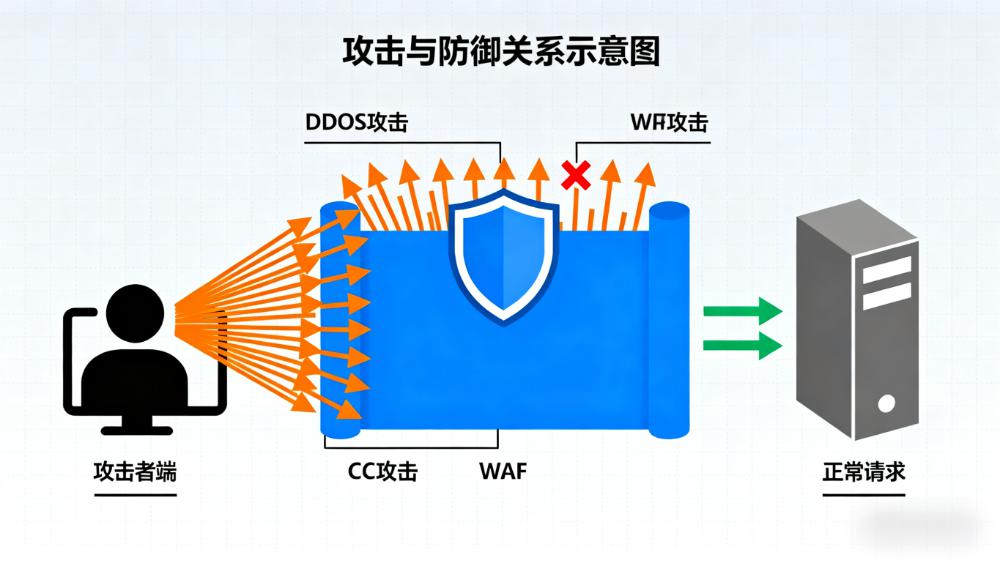
CDNs can provide websites withAdding additional layers of securityand defense against all types of threats. Many CDN providers have built-inDDoS Attack ProtectionIt also ensures that the website is constantly online; at the same time, it protects the data transmission between the website and the users through SSL/TLS encryption to safeguard privacy and security.
- Broader global coverage
With a CDN, your website canReach a global audienceThe CDN deploys servers around the world to ensure that your site loads quickly, no matter where your users are located.

Which users benefit from CDNs?
If you're looking to improve your site's performance, scalability and security, a CDN can make a world of difference. It's designed to increase site speeds and provide a better experience for visitors in different regions, with the following user groups in particular benefiting:
- highE-commerce sites
- Websites with a global audience
- Websites that provide large media files (e.g., video, audio)
- Sites that experience sudden traffic spikes
- Yessafety protectionSites with high demand for protection against cyber threats
What are the types of CDNs?
CDNs are becoming increasingly important as website owners demand more performance and security. There are various types of CDNs on the market today, each with its own unique features and advantages:
- Traditional CDN
Traditional CDNs are used by theDeployment of servers globallyDistribute content for users. When a user requests content from a website, the closest server responds directly. This type of CDN is ideal for users who haveWorldwide Visitors, sites that need to deliver content quickly.
Advantages of traditional CDNs includeFast loading speed、Wide coverage、High reliability; however, the drawbacks are also more obvious, for example, for small businessesHigher costsand the server location may haveLimitations of coverage, affecting the efficiency of content delivery in some areas.
- Peer-to-peer (P2P) CDNs
Peer-to-peer (P2P) CDNs are available through thepeer-to-peer networkDistribute content so that users can download content from other users' devices rather than from a centralized server.
P2P CDN is very suitable for video, audio streaming and other websites that need to transfer large files, which can effectively reduce bandwidth costs; however, the disadvantage is that if the number of users participating in the sharing is insufficient, it may facesafety riskOrSlower deliveryof the problem.
- Cloud CDN
Cloud CDN Basedcloud platformDistribute content for websites that have a need for flexibility and scalability. Website owners can flexibly adjust bandwidth and storage resources according to actual needs.
The advantages of cloud CDNs are fast content delivery and wide global coverage; however, the disadvantages areCosts are typically higher than traditional CDNs, may not be economical enough for smaller businesses with lower traffic.
- Hybrid CDN
Hybrid CDNs combine the benefits of traditional CDNs and cloud CDNs to provide a more adaptable solution. This type of CDN provides a more adaptable solution byUsing both cloud servers and traditional serversDistribute content that balances flexibility with the ability to deliver quickly.
Hybrid CDNs are good for sites that need to balance scalability with cost-effectiveness; but the downside is that theConfiguration and management require a higher technical thresholdThe CDN is more complex than other types of CDNs.
How do I get started with CDNs?
Starting a CDN may seem complicated, but you don't need to worry too much about it. Follow the steps below for easy deployment:
- Clarify website requirements
Before choosing the right CDN, firstDefine the specific needs of the website. The choices can be narrowed down by answering the following questions to find the best matching CDN:
- What are the current performance issues with the website?
- How do CDNs address these performance issues?
- What are the security concerns of the website?
- How can CDNs improve the security of your website?
- Selecting a CDN Provider
Once you have defined your requirements, you can start [Select CDN Provider]. There are many CDN providers on the market, so you can filter them by following the suggestions below:
- Clarify required functionsThe following are some examples of the types of products that can be used in this area, such as DDoS protection, SSL/TLS encryption, global coverage, and more.
- Based on their own needsResearch and compareDifferent CDN providers
- screeningProviders who can provide the required functionality
- considerationsWhether the provider's pricing program is on budget
- prioritizeProviders with good user ratings
- Configuring the CDN
Once the provider is selected, the next step is toConfiguring the CDN. The configuration process may vary from provider to provider, but typically includes the following steps:
- On selected CDN provider platformsregister an account
- Based on website requirementsConfiguring CDN Parameters
- Follow the provider's instructionsIntegrate your website with a CDN
- Test siteIf the CDN is working properly, you can verify that the CDN is working correctly.
- Monitoring and Optimizing CDN
After the CDN deployment is complete, theMonitor its performanceAndTargeted optimizationCritical. The following are specific recommendations:
- Monitoring website performanceTo verify that the CDN is effective in improving loading speeds and reducing latency
- Through the CDN provider'sData Analysis PanelTrack website performance and identify areas for optimization
- Changes based on website requirementsAdjusting CDN ConfigurationOrUpgrade PackageOptimizing CDN Performance
- Consider using content optimization, compression, etc.artifactFurther enhancement of website performance
- Regularly test website speed and performanceTimely identification and resolution of problems
- If you encounter problems or have questions about optimization, you canContact the CDN provider's support teamGetting Help
How do I choose the right CDN for my needs?
Choosing the right CDN can have a significant impact on your website's performance, scalability and security. Below are some of the key factors to consider when choosing a CDN:
- Performance
If you want to improve your site's performance with a CDN, you need to choose one that delivers content quickly and reliably, and thatLow latency and high uptimeof the provider. Also, make sure that the provider's server location matches the location of the website's target audience to improve loading speed. A provider with global reach ensures that users around the world can access the website quickly.
- safety
CDNs can enhance website security by providing DDoS protection, SSL/TLS encryption, and more. When choosing a CDN, you need to look at whether the provider canMeet the security needs of your websiteThe company also references its past performance in terms of uptime and security.
- scalability
As the site grows, the CDN needs to be able to scale accordingly. You should chooseExpandable packages availablecanTackling unexpected traffic spikesproviders to ensure that websites remain online and responsive during peak times.
- \nCost
Pricing varies greatly from CDN provider to CDN provider, so you'll need to choose one that fits your budget.Fit for purpose and cost effectiveprogram. It is important to note that investing in a CDN provides long-term benefits and may help save costs in the long run.
- Support and resources
When choosing a CDN provider, you also need toConsider the support and resources they providePreferred Provider. Prefer providers that offer documentation, tutorials, and good customer service to ensure that you have the guidance you need to successfully optimize your CDN and resolve any issues that may arise during the process.
summarize
CDNs are critical for websites, helping to deliver content quickly to users around the world. This article describes in detail the definition of CDN, its history, core advantages and beneficiaries, as well as explaining the different types of CDNs and deployment steps.
To improve your site's performance and optimize the user experience, you need to choose the right CDN provider, continuously monitor its performance, and optimize it. By doing so, you canSignificantly improve website performanceThe website has been designed to make it easier for visitors from all over the world to access your website.
Next Steps: What to Do Next?
- View Recommended CDN Service Providers
- Check out the cloud site builder providers
- Understanding Cloud Server Service Providers
Extended Reading (Useful Resources)
- Content Delivery Network (CDN) Market Research Report (Analysis 2023-2031)
- What is Edge Security Acceleration EdgeOne (EO)
common problems
How can I tell if my site needs a CDN?
If you have a large number of visitors to your site, a CDN can be a significant help - especially if the site has a global audience or is slow to load. In addition, if your site experiences sudden spikes in traffic, or if you want to improve your site's security, a CDN is essential to keep your site available and protected.
What types of content can be delivered via a CDN (Content Delivery Network)?
CDNs deliver multiple types of web content, including static and dynamic content such as HTML, CSS, JavaScript, images, video, etc., and also handle web applications and APIs, improving their performance and usability.
How do I integrate a CDN with my website?
Integrating a CDN with a website usually involves the following steps: signing up for a CDN provider account, configuring the website's DNS settings, installing a CDN plugin, or modifying the website's code. Most CDN providers provide documentation, tutorials and support to help users complete the integration.
I am using a web hosting / cloud hosting provider, can I use it with CDN??
Yes. Most CDN providers support integration with existing web hosting services, making it easy to add CDN functionality to your website no matter which hosting provider you use.



 English