











Introduction to Pure Highlightjs plugin

Backstage Setting

Topic Selection
- Daytime theme: choose the style style of the code block, save after selection, preview. No streamlining done, dozens of styles can be selected.
- Night theme: you need the theme to support the root html element to add dark to switch the night mode to take effect, otherwise you can only use the daytime theme.
Scroll bar color
You need to set the scroll bar style according to the theme style , the scroll bar with simplebar , compatible with all major browsers , can be applied to the whole site where you need the scroll bar , unfortunately does not support the page body and html screen side of the scroll bar style .
Note: The scrollbar color set in the plugin's background settings only applies to the scrollbars of code blocks.
If you need to use simplebar elsewhere on the site, open the following plugin directory file:
//位置 plugins/Pure-Highlightjs/assets/pure-highlight.js
// 根据类名添加simplebar滚动条样式
document
  .querySelectorAll(
    'pre, .a, .b, .c,.com-scrollbar'
  )
  .forEach((el) => {
    el.setAttribute('data-simplebar', '');
  });
Above code like .a, .b, .c, .com-scrollbar like this add the class name of div or other element here and it will be applied to the simplebar scrollbar for example:
<!-- 滚动条类最好是添加在这个div -->
<div class="com-scrollbar flex flex-col gap-4">
  <!-- 不建议在这个div添加滚动条类 -->
  <div class="content">
    <span>element</span>
    <span>element</span>
    <span>element</span>
    <span>element</span>
  </div>
</div>
Toolbar color settings
Because the plug-in style style of each theme is different, so add a tool style color settings, if the color is fixed directly in the code, for some theme styles are not coordinated, the background can be selected according to the style to set the toolbar color.
Toolbar display mode
- Always on: The toolbar will always be displayed and will not disappear.
- Mouse hover display: the toolbar will be displayed when the mouse is placed on the code block, mobile is a click on the code block will be displayed.
Toolbar Float
The toolbar is always sliding, and will always be displayed in the viewport area, following the page down when it slides down, up when it slides up, and returning to its original position when the viewport exceeds the code block.
Code Block Height
When there are many code blocks within the article, and many lines of code in each block? It is recommended to set the maximum height of the code block (max-height), the classic editor is to fill in the height when entering the code, the block editor is to use the class name method.
Classic Editor Code Block Height Settings
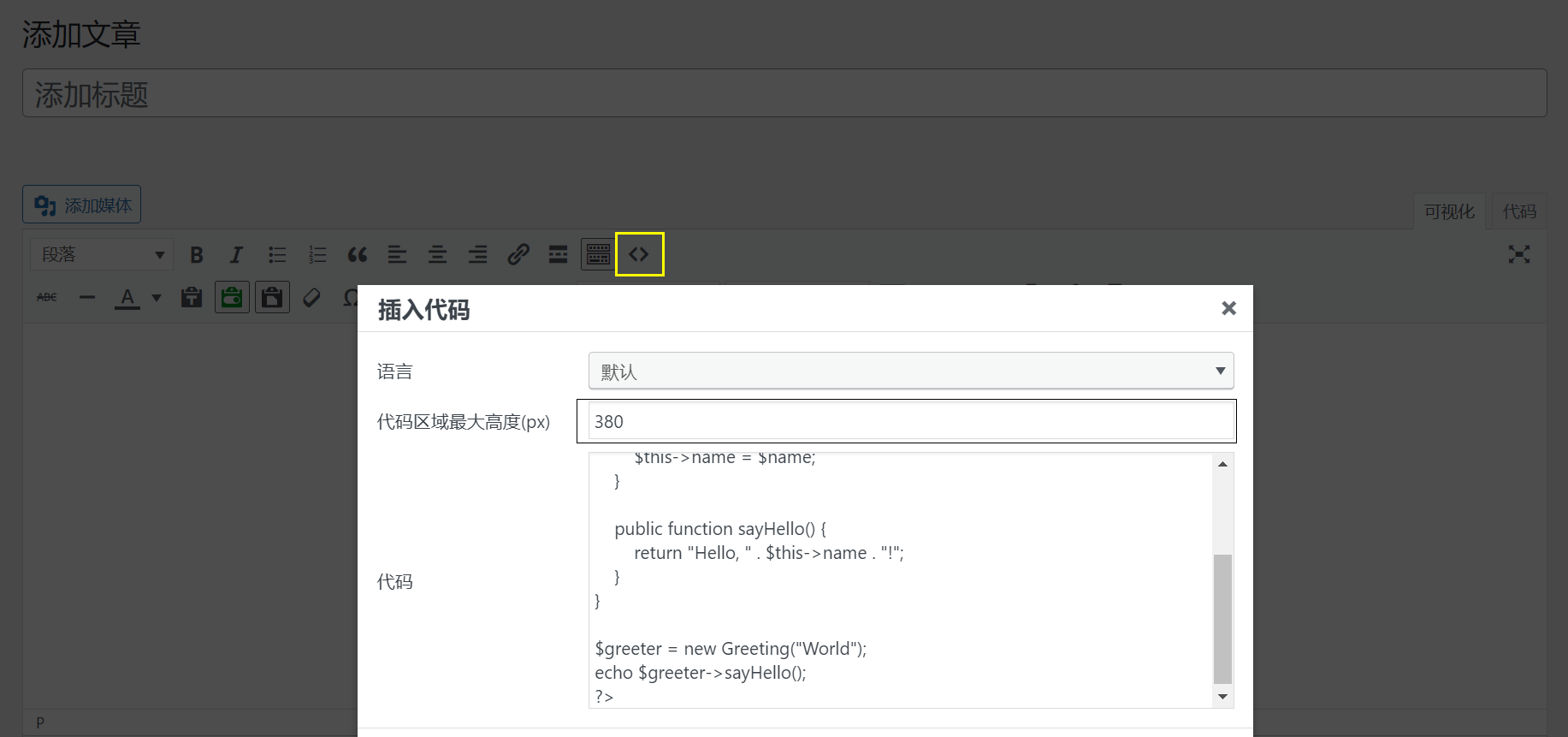
As shown in the figure, when the classic editor clicks the code button to insert code, the default is 380 maximum height, which can be modified to other numbers.When inserting code, a blank line will be added at the end by default, which is recommended to be deleted when there is no other code in the block.(?) At first, I thought it was a code problem, and finally why there will be more than 20px empty position, looking for a half a day the original is inserted into the code when adding the empty line, crying? ♀️), the following for the classic editor demo, the maximum height of 300px:
<?php
/**
 * PHP长行代码演示示例
 * 用于测试滚动条效果
 */

// 基本变量定义
$testString = "这是一个普通的字符串变量,用于演示PHP的基本语法特性";
$numberValue = 123456;
$arrayData = [
    'name' => '测试数据',
    'type' => '演示',
    'values' => [10, 20, 30, 40, 50]
];

// 这是一行很长的代码,包含了多个函数调用和字符串拼接,目的是测试滚动条效果。这里我们模拟一个复杂的数据处理过程,包含字符串操作、数组处理和数学计算等多种操作的组合。这段代码会将多个不同类型的数据进行转换和组合,生成一个复杂的结果字符串。
$longLine1 = "处理结果: " . strtoupper(trim(json_encode(array_merge($arrayData, ['timestamp' => time(), 'random' => rand(1000, 9999), 'status' => 'completed', 'message' => '这是一条很长的消息,用于增加字符串长度,测试滚动效果。这里继续添加一些内容,让这行代码变得足够长,以便在显示时需要滚动条才能完全查看。']), " \t\n\r\0\x0B"))) . " | 计算结果: " . (sqrt(pow($numberValue, 2) + pow($numberValue / 2, 2)) * 1.5) . " | 状态信息: 操作已完成,耗时 " . microtime(true) . " 毫秒,内存使用: " . memory_get_usage() . " 字节";

// 另一个长行代码,演示条件判断和函数嵌套的复杂情况
if (strlen($testString) > 10 && is_array($arrayData) && count($arrayData['values']) > 3 && $numberValue > 100000 && strpos($testString, 'PHP') !== false && (time() % 2 == 0)) {
    $longLine2 = "满足所有条件 | 数组信息: " . print_r($arrayData, true) . " | 字符串长度: " . strlen($testString) . " | 随机数: " . rand(1, 1000) . " | 当前时间: " . date('Y-m-d H:i:s') . " | 这是为了测试滚动条而添加的额外内容,继续增加长度直到足够长,确保在大多数编辑器或显示窗口中都需要滚动才能看到完整内容。这里再添加一些文字,让这行代码变得更长一些,以达到测试目的。";
} else {
    $longLine2 = "不满足所有条件的默认值";
}

// 函数定义
function processData($input) {
    if (!is_array($input)) {
        return "无效输入: 必须提供数组类型";
    }

    // 处理数据的逻辑
    $result = [];
    foreach ($input as $key => $value) {
        $result[strtoupper($key)] = is_string($value) ? strrev($value) : $value;
    }

    return $result;
}

// 类定义
class DemoClass {
    private $property1;
    protected $property2;
    public $property3;

    public function __construct($param1, $param2) {
        $this->property1 = $param1;
        $this->property2 = $param2;
        $this->property3 = "默认值: " . $param1 . " - " . $param2;
    }

    public function getCombined() {
        return $this->property1 . "|" . $this->property2 . "|" . $this->property3;
    }
}

// 执行演示
echo "PHP长行代码测试演示\n";
echo "=====================\n";
echo "1. 长行字符串1: " . $longLine1 . "\n\n";
echo "2. 长行字符串2: " . $longLine2 . "\n\n";
echo "3. 处理后的数据: " . print_r(processData($arrayData), true) . "\n\n";

$demoObj = new DemoClass("参数1", "参数2");
echo "4. 对象信息: " . $demoObj->getCombined() . "\n";
?>
The toolbar displays the Expand Collapse button when the Classic Editor code block has height.
Classic editor code when there is no height
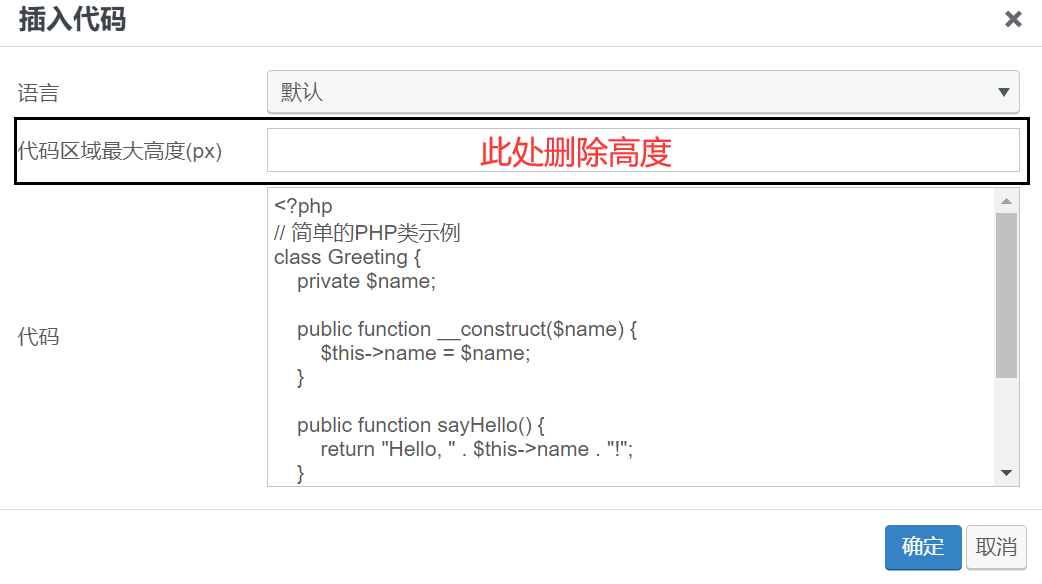
<?php
// 简单的PHP类示例
class Greeting {
    private $name;

    public function __construct($name) {
        $this->name = $name;
    }

    public function sayHello() {
        return "Hello, " . $this->name . "!";
    }
}

$greeter = new Greeting("World");
echo $greeter->sayHello();
?>
The Classic Editor does not show the Expand Collapse button when there is no height.
Block Editor Code Block Height Settings
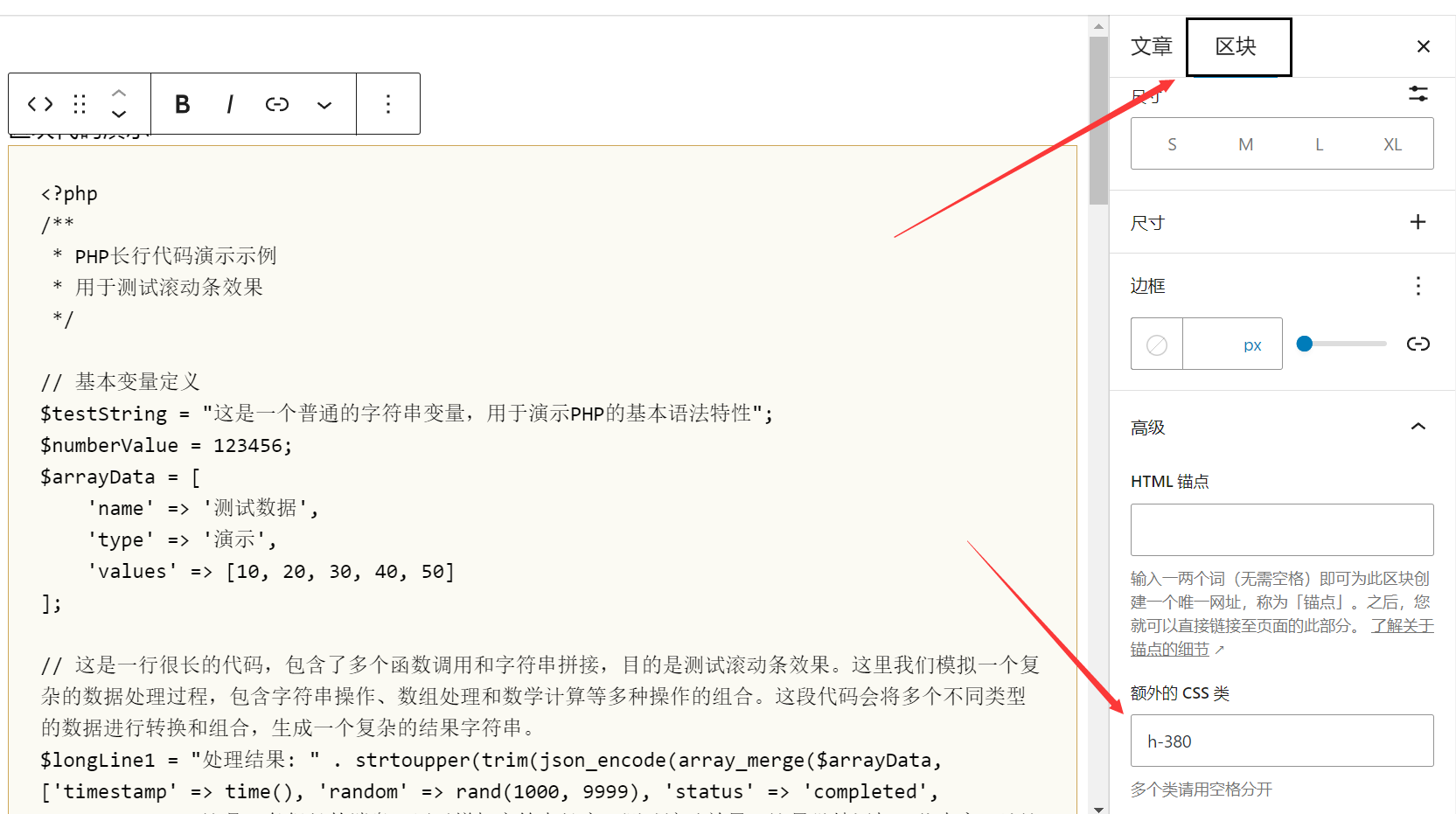
There are just a few of these height class names at the moment:
h-200 {
  max-height: 200px; /*最大高度为200px*/
}
h-300 {
  max-height: 300px; /*最大高度为300px*/
}
h-380 {
  max-height: 380px; /*最大高度为380px*/
}
h-500 {
  max-height: 500px; /*最大高度为500px*/
}
Block editor did not manually enter the height like the classic editor, using a fixed class, ? May be the editor just contact the block editor, the reason for it, follow-up to see if you can code block toolbar to add a manual input height function, the demo is as follows:
<?php
/**
 * PHP长行代码演示示例
 * 用于测试滚动条效果
 */

// 基本变量定义
$testString = "这是一个普通的字符串变量,用于演示PHP的基本语法特性";
$numberValue = 123456;
$arrayData = [
    'name' => '测试数据',
    'type' => '演示',
    'values' => [10, 20, 30, 40, 50]
];

// 这是一行很长的代码,包含了多个函数调用和字符串拼接,目的是测试滚动条效果。这里我们模拟一个复杂的数据处理过程,包含字符串操作、数组处理和数学计算等多种操作的组合。这段代码会将多个不同类型的数据进行转换和组合,生成一个复杂的结果字符串。
$longLine1 = "处理结果: " . strtoupper(trim(json_encode(array_merge($arrayData, ['timestamp' => time(), 'random' => rand(1000, 9999), 'status' => 'completed', 'message' => '这是一条很长的消息,用于增加字符串长度,测试滚动效果。这里继续添加一些内容,让这行代码变得足够长,以便在显示时需要滚动条才能完全查看。']), " \t\n\r\0\x0B"))) . " | 计算结果: " . (sqrt(pow($numberValue, 2) + pow($numberValue / 2, 2)) * 1.5) . " | 状态信息: 操作已完成,耗时 " . microtime(true) . " 毫秒,内存使用: " . memory_get_usage() . " 字节";

// 另一个长行代码,演示条件判断和函数嵌套的复杂情况
if (strlen($testString) > 10 && is_array($arrayData) && count($arrayData['values']) > 3 && $numberValue > 100000 && strpos($testString, 'PHP') !== false && (time() % 2 == 0)) {
    $longLine2 = "满足所有条件 | 数组信息: " . print_r($arrayData, true) . " | 字符串长度: " . strlen($testString) . " | 随机数: " . rand(1, 1000) . " | 当前时间: " . date('Y-m-d H:i:s') . " | 这是为了测试滚动条而添加的额外内容,继续增加长度直到足够长,确保在大多数编辑器或显示窗口中都需要滚动才能看到完整内容。这里再添加一些文字,让这行代码变得更长一些,以达到测试目的。";
} else {
    $longLine2 = "不满足所有条件的默认值";
}

// 函数定义
function processData($input) {
    if (!is_array($input)) {
        return "无效输入: 必须提供数组类型";
    }

    // 处理数据的逻辑
    $result = [];
    foreach ($input as $key => $value) {
        $result[strtoupper($key)] = is_string($value) ? strrev($value) : $value;
    }

    return $result;
}

// 类定义
class DemoClass {
    private $property1;
    protected $property2;
    public $property3;

    public function __construct($param1, $param2) {
        $this->property1 = $param1;
        $this->property2 = $param2;
        $this->property3 = "默认值: " . $param1 . " - " . $param2;
    }

    public function getCombined() {
        return $this->property1 . "|" . $this->property2 . "|" . $this->property3;
    }
}

// 执行演示
echo "PHP长行代码测试演示\n";
echo "=====================\n";
echo "1. 长行字符串1: " . $longLine1 . "\n\n";
echo "2. 长行字符串2: " . $longLine2 . "\n\n";
echo "3. 处理后的数据: " . print_r(processData($arrayData), true) . "\n\n";

$demoObj = new DemoClass("参数1", "参数2");
echo "4. 对象信息: " . $demoObj->getCombined() . "\n";
?>
When there is height, the toolbar displays the Expand Collapse button.
When the block editor code has no height

If you don't need the height or have very little code, you don't need to set the height class name, theWhen there is no height, the toolbar will not show the expand white collapsed buttonThe demo is as follows
<?php
// 简单的PHP类示例
class Greeting {
    private $name;

    public function __construct($name) {
        $this->name = $name;
    }

    public function sayHello() {
        return "Hello, " . $this->name . "!";
    }
}

$greeter = new Greeting("World");
echo $greeter->sayHello();
?>
Subsequently will update the demand to update the plugin, if the plugin has any problem please addQQ Group 1398231Feedback!




 English