











Introduction to Pure Highlightjs
In the WordPress ecosystem, code highlighting has always been an important feature for tech blogs and developer sites. Recently, the Pure Highlightjs plugin, which has been dormant for years, finally received a major update, upgrading its core Highlight.js library from an outdated version to the latest v11.11.1.
Plug-in Download

Pure Highlightjs Code Highlighting
Site Upgrade v2.1.3Download and unzip the Pure-Highlightjs folder and upload it to the plugin directory to enable it in the background!
Forgotten, Updated
Pure Highlightjs is a lightweight code highlighting plugin for the WordPress platform that was released by developer icodechef in 2016 and then stopped being updated. The plugin is favored by many WordPress users for its simplicity and efficiency, but over time, its built-in Highlight.js version has fallen seriously behind the mainstream, because I don't like the other plugin shortcodes, and prefer the built-in pre, so... I upgraded it to focus on WordPress native pre code.
This plugin is small but just right for my needs, "Seeing as it hasn't been updated in years, theSite EditorDecided to take it upon myself to upgrade it to the latest version of Highlight.js.
Improvements from upgrades
This upgrade to Highlight.js version 11.11.1 brings several important improvements:
- Code Toolbar:New toolbar expand, copy and select all buttons, and floating in the viewport, very smooth!
- Double-click to select all:New double-click select all, double-click in the code area of the computer can select all the code
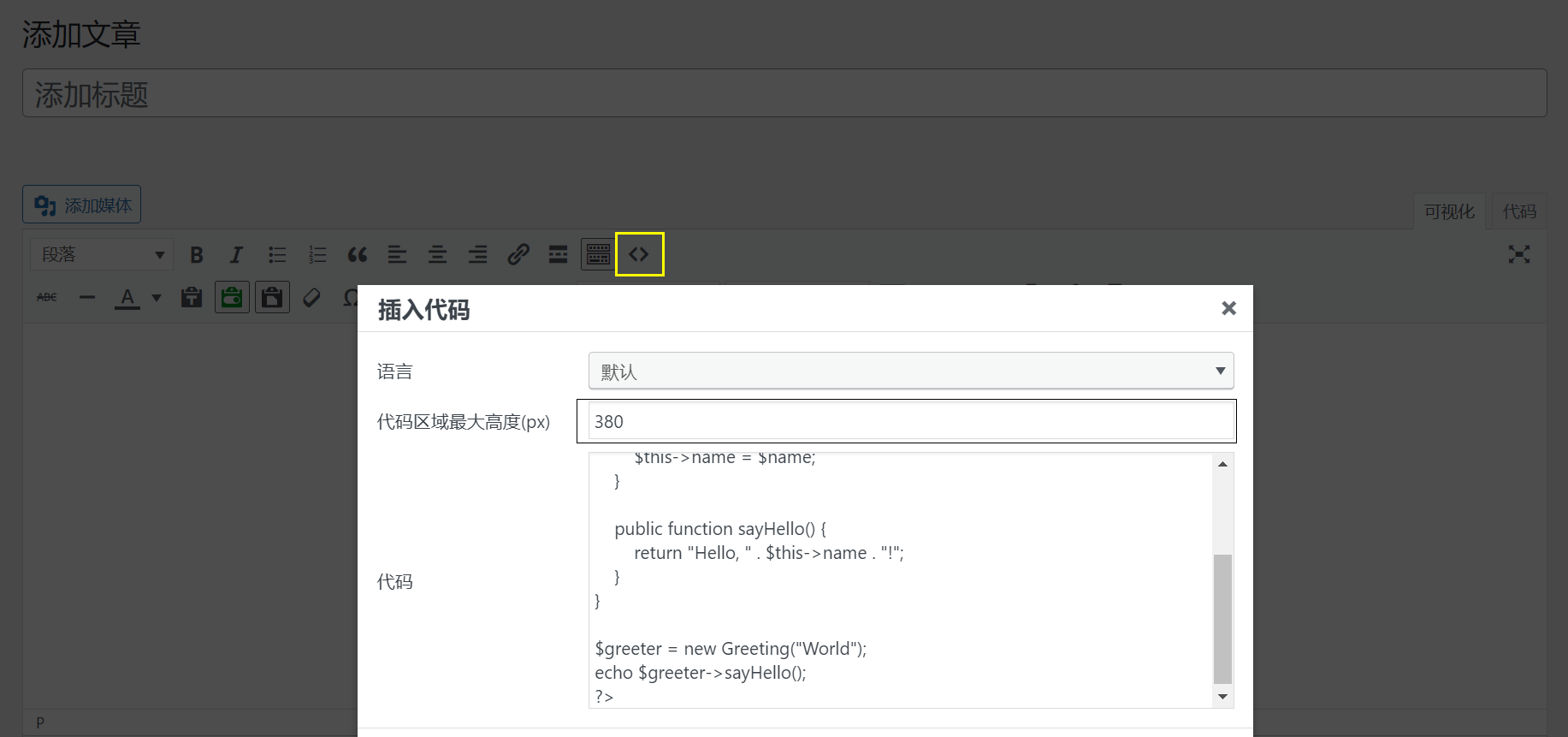
- Code block height:New maximum height of the code block, a large number of long sections of code can be set to a maximum height, horizontal and vertical will have a scroll bar
- Fold to unfold:New Expand button to expand and collapse the code block when it adds a height
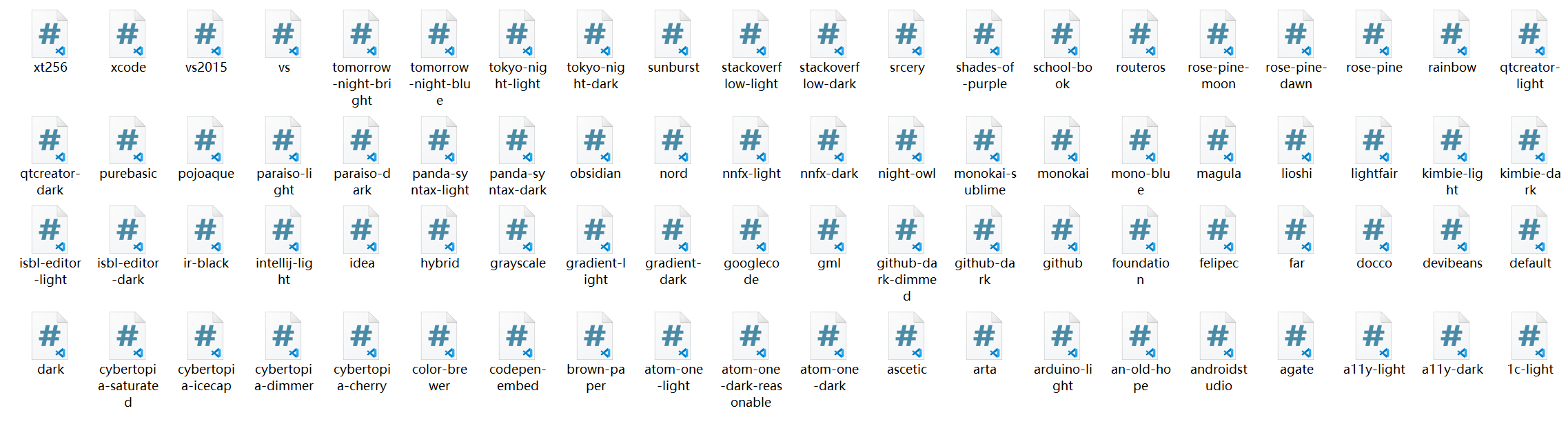
- Dark Mode: new dark mode, plug-ins can choose the day and night code theme style, WordPress themes have dark mode can be switched, you can experience the effect of this site!
- Optimize scrollbars:The plugin adds a simplebar scrollbar to optimize the style of the code scrollbar, which is compatible with mainstream browsers and can also be used for the whole site
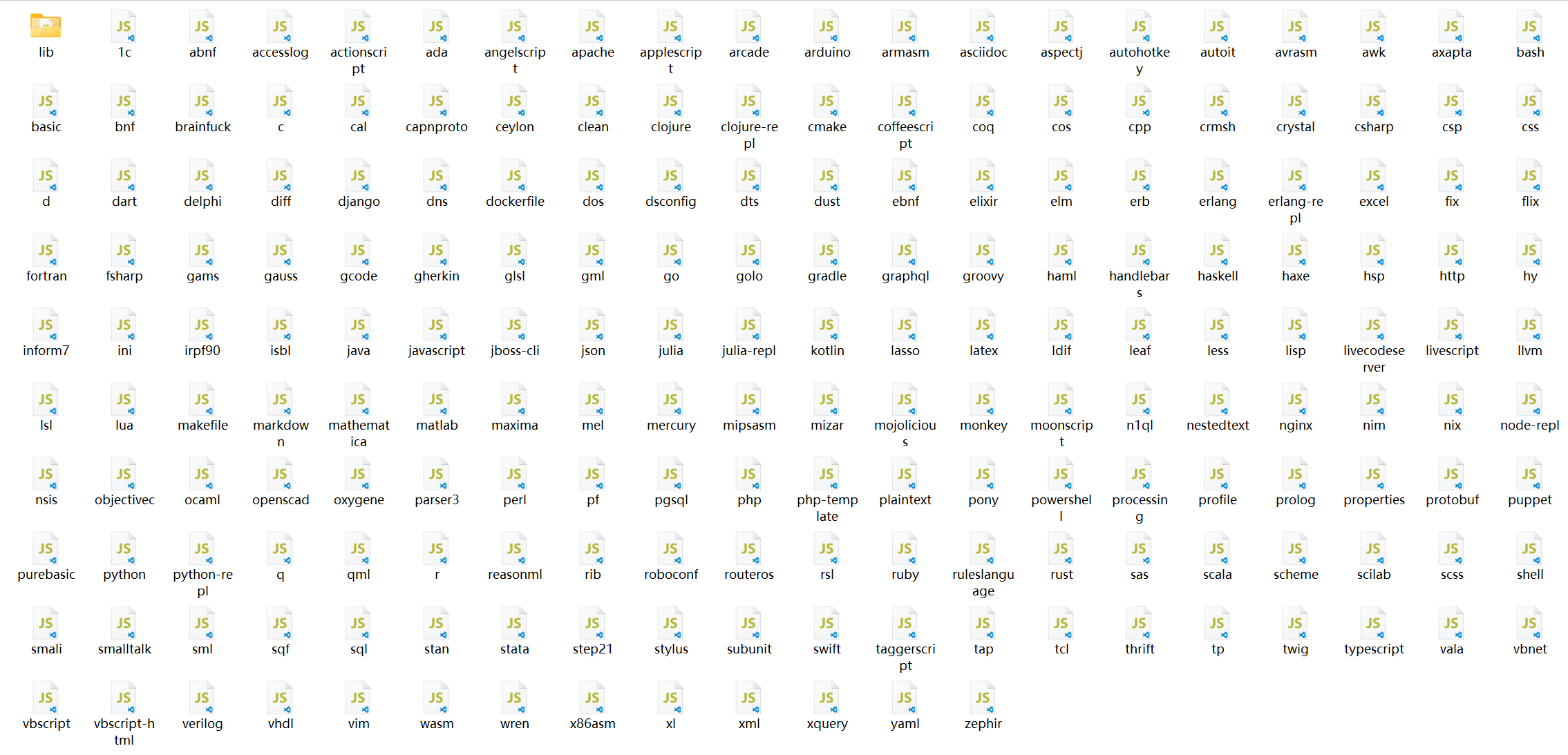
- Support for more modern programming languages: Added support for modern languages such as TypeScript, Kotlin, Dart, etc. A total of 192 languages and 80 style themes are supported.
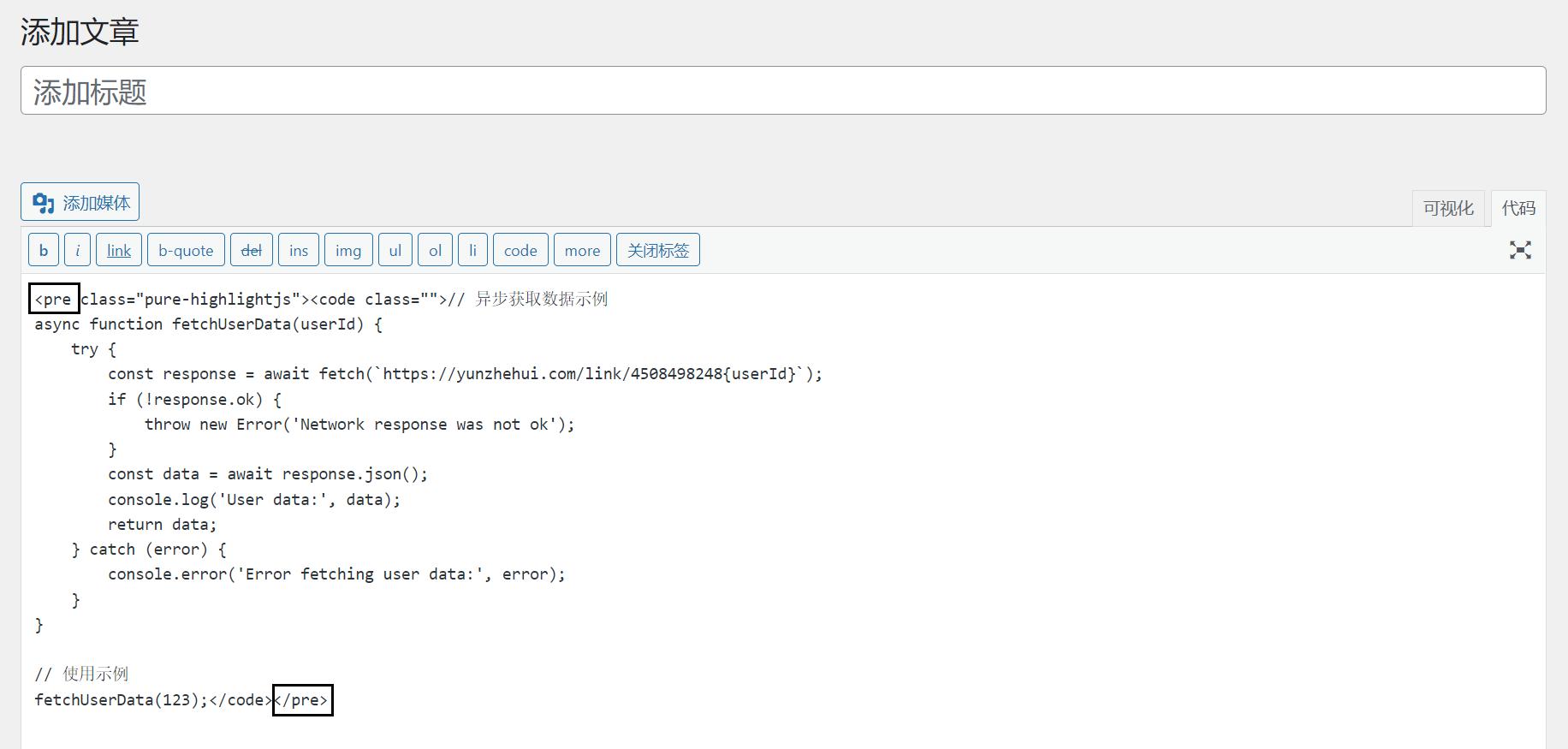
- Native official JS:No streamlining, no changes made to JS, optimized classic editor and block editor
- Better Grammar Analysis: Improved syntax recognition for JSX, Vue templates, etc.
- Compatibility Fixes: resolved potential compatibility issues in older versions
Why Highlightjs?
Among the many WordPress code highlighting plugins, Pure Highlightjs still has a place because of its unique advantages:
- Lightweight design: no dependency on jQuery, minimal impact on site performance
- native support: uses WordPress pre tags directly, without complex configuration and does not require a plugin shortcode like other plugins do
- simple and beautiful: The default style is clean and suitable for technical documentation
Code Demo
Code Scrollbar Demo
Scroll bar with simplebar scroll bar style, compatible with a variety of mainstream browsers, you can test with a number of different browsers to see the effect!
<?php
/**
 * PHP长行代码演示示例
 * 用于测试滚动条效果
 */

// 基本变量定义
$testString = "这是一个普通的字符串变量,用于演示PHP的基本语法特性";
$numberValue = 123456;
$arrayData = [
    'name' => '测试数据',
    'type' => '演示',
    'values' => [10, 20, 30, 40, 50]
];

// 这是一行很长的代码,包含了多个函数调用和字符串拼接,目的是测试滚动条效果。这里我们模拟一个复杂的数据处理过程,包含字符串操作、数组处理和数学计算等多种操作的组合。这段代码会将多个不同类型的数据进行转换和组合,生成一个复杂的结果字符串。
$longLine1 = "处理结果: " . strtoupper(trim(json_encode(array_merge($arrayData, ['timestamp' => time(), 'random' => rand(1000, 9999), 'status' => 'completed', 'message' => '这是一条很长的消息,用于增加字符串长度,测试滚动效果。这里继续添加一些内容,让这行代码变得足够长,以便在显示时需要滚动条才能完全查看。']), " \t\n\r\0\x0B"))) . " | 计算结果: " . (sqrt(pow($numberValue, 2) + pow($numberValue / 2, 2)) * 1.5) . " | 状态信息: 操作已完成,耗时 " . microtime(true) . " 毫秒,内存使用: " . memory_get_usage() . " 字节";

// 另一个长行代码,演示条件判断和函数嵌套的复杂情况
if (strlen($testString) > 10 && is_array($arrayData) && count($arrayData['values']) > 3 && $numberValue > 100000 && strpos($testString, 'PHP') !== false && (time() % 2 == 0)) {
    $longLine2 = "满足所有条件 | 数组信息: " . print_r($arrayData, true) . " | 字符串长度: " . strlen($testString) . " | 随机数: " . rand(1, 1000) . " | 当前时间: " . date('Y-m-d H:i:s') . " | 这是为了测试滚动条而添加的额外内容,继续增加长度直到足够长,确保在大多数编辑器或显示窗口中都需要滚动才能看到完整内容。这里再添加一些文字,让这行代码变得更长一些,以达到测试目的。";
} else {
    $longLine2 = "不满足所有条件的默认值";
}

// 函数定义
function processData($input) {
    if (!is_array($input)) {
        return "无效输入: 必须提供数组类型";
    }

    // 处理数据的逻辑
    $result = [];
    foreach ($input as $key => $value) {
        $result[strtoupper($key)] = is_string($value) ? strrev($value) : $value;
    }

    return $result;
}

// 类定义
class DemoClass {
    private $property1;
    protected $property2;
    public $property3;

    public function __construct($param1, $param2) {
        $this->property1 = $param1;
        $this->property2 = $param2;
        $this->property3 = "默认值: " . $param1 . " - " . $param2;
    }

    public function getCombined() {
        return $this->property1 . "|" . $this->property2 . "|" . $this->property3;
    }
}

// 执行演示
echo "PHP长行代码测试演示\n";
echo "=====================\n";
echo "1. 长行字符串1: " . $longLine1 . "\n\n";
echo "2. 长行字符串2: " . $longLine2 . "\n\n";
echo "3. 处理后的数据: " . print_r(processData($arrayData), true) . "\n\n";

$demoObj = new DemoClass("参数1", "参数2");
echo "4. 对象信息: " . $demoObj->getCombined() . "\n";
?>
Classic Editor Code Demo
Classic editor add code to set the maximum height, according to the height of the display expand collapse button
<?php
/**
 * PHP长行代码演示示例
 * 用于测试滚动条效果
 */

// 基本变量定义
$testString = "这是一个普通的字符串变量,用于演示PHP的基本语法特性";
$numberValue = 123456;
$arrayData = [
    'name' => '测试数据',
    'type' => '演示',
    'values' => [10, 20, 30, 40, 50]
];

// 这是一行很长的代码,包含了多个函数调用和字符串拼接,目的是测试滚动条效果。这里我们模拟一个复杂的数据处理过程,包含字符串操作、数组处理和数学计算等多种操作的组合。这段代码会将多个不同类型的数据进行转换和组合,生成一个复杂的结果字符串。
$longLine1 = "处理结果: " . strtoupper(trim(json_encode(array_merge($arrayData, ['timestamp' => time(), 'random' => rand(1000, 9999), 'status' => 'completed', 'message' => '这是一条很长的消息,用于增加字符串长度,测试滚动效果。这里继续添加一些内容,让这行代码变得足够长,以便在显示时需要滚动条才能完全查看。']), " \t\n\r\0\x0B"))) . " | 计算结果: " . (sqrt(pow($numberValue, 2) + pow($numberValue / 2, 2)) * 1.5) . " | 状态信息: 操作已完成,耗时 " . microtime(true) . " 毫秒,内存使用: " . memory_get_usage() . " 字节";

// 另一个长行代码,演示条件判断和函数嵌套的复杂情况
if (strlen($testString) > 10 && is_array($arrayData) && count($arrayData['values']) > 3 && $numberValue > 100000 && strpos($testString, 'PHP') !== false && (time() % 2 == 0)) {
    $longLine2 = "满足所有条件 | 数组信息: " . print_r($arrayData, true) . " | 字符串长度: " . strlen($testString) . " | 随机数: " . rand(1, 1000) . " | 当前时间: " . date('Y-m-d H:i:s') . " | 这是为了测试滚动条而添加的额外内容,继续增加长度直到足够长,确保在大多数编辑器或显示窗口中都需要滚动才能看到完整内容。这里再添加一些文字,让这行代码变得更长一些,以达到测试目的。";
} else {
    $longLine2 = "不满足所有条件的默认值";
}

// 函数定义
function processData($input) {
    if (!is_array($input)) {
        return "无效输入: 必须提供数组类型";
    }

    // 处理数据的逻辑
    $result = [];
    foreach ($input as $key => $value) {
        $result[strtoupper($key)] = is_string($value) ? strrev($value) : $value;
    }

    return $result;
}

// 类定义
class DemoClass {
    private $property1;
    protected $property2;
    public $property3;

    public function __construct($param1, $param2) {
        $this->property1 = $param1;
        $this->property2 = $param2;
        $this->property3 = "默认值: " . $param1 . " - " . $param2;
    }

    public function getCombined() {
        return $this->property1 . "|" . $this->property2 . "|" . $this->property3;
    }
}

// 执行演示
echo "PHP长行代码测试演示\n";
echo "=====================\n";
echo "1. 长行字符串1: " . $longLine1 . "\n\n";
echo "2. 长行字符串2: " . $longLine2 . "\n\n";
echo "3. 处理后的数据: " . print_r(processData($arrayData), true) . "\n\n";

$demoObj = new DemoClass("参数1", "参数2");
echo "4. 对象信息: " . $demoObj->getCombined() . "\n";
?>
PHP Code Demo
<?php
// 简单的PHP类示例
class Greeting {
    private $name;

    public function __construct($name) {
        $this->name = $name;
    }

    public function sayHello() {
        return "Hello, " . $this->name . "!";
    }
}

$greeter = new Greeting("World");
echo $greeter->sayHello();
?>
CSS Code Demo
/* 响应式卡片样式 */
.card {
    width: 300px;
    border-radius: 8px;
    box-shadow: 0 4px 6px rgba(0,0,0,0.1);
    transition: transform 0.3s ease;
    background: #fff;
}

.card:hover {
    transform: translateY(-5px);
}

@media (max-width: 768px) {
    .card {
        width: 100%;
    }
}
JavaScript Code Demo
// 异步获取数据示例
async function fetchUserData(userId) {
    try {
        const response = await fetch(`https://api.example.com/users/${userId}`);
        if (!response.ok) {
            throw new Error('Network response was not ok');
        }
        const data = await response.json();
        console.log('User data:', data);
        return data;
    } catch (error) {
        console.error('Error fetching user data:', error);
    }
}

// 使用示例
fetchUserData(123);
GO Language Code Demo
package main

import (
	"fmt"
	"net/http"
)

// 简单的HTTP服务器
func handler(w http.ResponseWriter, r *http.Request) {
	fmt.Fprintf(w, "Hello, %s!", r.URL.Path[1:])
}

func main() {
	http.HandleFunc("/", handler)
	fmt.Println("Server starting on port 8080...")
	http.ListenAndServe(":8080", nil)
}
MySQL Code Demo
-- 创建用户表并查询示例
CREATE TABLE users (
    id INT AUTO_INCREMENT PRIMARY KEY,
    username VARCHAR(50) NOT NULL,
    email VARCHAR(100) NOT NULL UNIQUE,
    created_at TIMESTAMP DEFAULT CURRENT_TIMESTAMP
);

-- 插入数据
INSERT INTO users (username, email)
VALUES ('john_doe', '[email protected]');

-- 查询数据
SELECT * FROM users WHERE email LIKE '%@example.com';
Node.js Code Demo
// Express.js 简单API示例
const express = require('express');
const app = express();
const port = 3000;

app.use(express.json());

app.get('/api/greet', (req, res) => {
    const name = req.query.name || 'World';
    res.json({ message: `Hello, ${name}!` });
});

app.listen(port, () => {
    console.log(`Server running at http://localhost:${port}`);
});
Python Code Demo
# 使用Flask创建Web服务
from flask import Flask, jsonify

app = Flask(__name__)

@app.route('/api/square/<int:num>')
def square(num):
    return jsonify({"result": num ** 2})

if __name__ == '__main__':
    app.run(debug=True)

# 列表推导式示例
squares = [x**2 for x in range(10) if x % 2 == 0]
print(squares)
C++ code demo
#include <iostream>
#include <vector>
#include <algorithm>

// 简单的C++程序示例
int main() {
    std::vector<int> numbers = {5, 2, 8, 1, 9};

    // 排序并输出
    std::sort(numbers.begin(), numbers.end());

    std::cout << "Sorted numbers: ";
    for (int num : numbers) {
        std::cout << num << " ";
    }
    std::cout << std::endl;

    return 0;
}
Java Code Demo
// 简单的Java类和接口示例
public class Main {
    public static void main(String[] args) {
        Calculator calc = new BasicCalculator();
        System.out.println("5 + 3 = " + calc.add(5, 3));
    }
}

interface Calculator {
    int add(int a, int b);
}

class BasicCalculator implements Calculator {
    @Override
    public int add(int a, int b) {
        return a + b;
    }
}
Demo Screenshots
Backstage Demo

Classic Editor Demo
Block Editor Demo

Support for 192 languages
80 style themes
For technical bloggers and document writers, an up-to-date and efficient code highlighting tool is still in demand, and this rebirth of Pure Highlightjs may bring new life to WordPress's code presentation capabilities.





 English