











If you often have to localize WordPress themes/plugins in Chinese, especially if you want toNo need to download/upload files, directly in the WP backend does the translation, generates the .mo, rolls back at any timeSo. Loco Translate It tends to be smoother and more “flavorful” than Poedit.
But it's not everything:Update coverage, privilege security, performance caching, versioningThese potholes, knowing them in advance will enable you to take 80% fewer detours.
pivot
-
Why do a lot of people think, “Don't use Poedit.”
-
What is Loco Translate? Who is it for?
-
Poedit vs Loco Translate In-Depth Comparison (Scenarios + Cost + Efficiency)
-
Translation Basics: .po/.mo, Text Domain, and what's really going on with language packs
-
Loco Translate Hands-on Tutorial (AI Translation Theme/Plugin from 0 to Live)
-
Advanced Usage: Batch Search, Multiple Translations, Automatic Translation, Glossaries
-
Updating without losing translations: the most stable storage paths and strategies
-
Frequently Asked Questions and Troubleshooting (not working / garbled / string not found / overwritten)
-
Security and Permissions: Why Backend Translations Can “Flop” Too”
-
SEO Perspective: Multilingualism vs Localization vs Content Translation
-
List of best practices
-
Summary & Q&A
1. why do many people think “don't use Poedit anymore”?”
Poedit isn't bad, but it's still a classic gettext translation tool. The problem is that **in the actual workflow of WordPress, it often adds an extra step, is inconvenient, and can lead to mistakes**. Common pain points include:
- Download/upload back and forth: To pull .po/.mo from the server, change it and pass it back, more confusing once multiple people collaborate.
- Path and coverage issues: Translations are misplaced and the theme/plugin is gone as soon as it's updated.
- It's not convenient to change words on site: The customer says “change this button to ‘Buy Now’” and you still have to turn on the computer, find the file, change it and upload it.
- Multi-site/multi-environment troubles: Three sets of files are synchronized for development environment/test environment/official environment, which is easy to leak.
- If you don't know the details of gettext, you're in trouble.: e.g. text domain mismatch, wrong language code, cache not cleared.
And here's the cool thing about Loco Translate:
✅ Search for strings, translate, save, auto-generate .mo directly in the WP backend.
✅ Support scanning themes/plugins, extracting new strings, merging updates
✅ Support for saving translations to a safe directory to avoid update overwrites
✅ Closer to reality for “just want to change the interface to Chinese”.
2. What is Loco Translate? Who is it for?
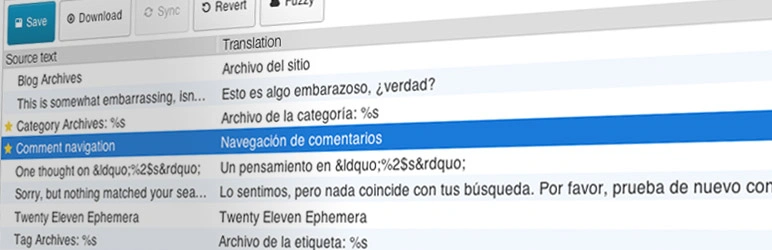
Loco Translate is a WordPress plugin that lets you manage gettext translations (i.e. the .po/.mo system) right in the backend, with key capabilities:
- Scan the theme/plugin source code to find the translatable string (
__()、_e()、esc_html__()(etc.) - Create/edit language files (.po)
- Compile to generate .mo (WordPress actually reads it)
- Manage storage paths (theme directories, languages directories, custom security directories)
- Search, filter untranslated/translated, fuzzy search, batch replacement
- Optional: call for online translation (auto-population of first drafts)
Good for the crowd:
- Webmasters/operators: want to quickly translate the theme/plugin interface into Chinese (or change it to be more relevant to their business)
- Foreign trade/cross-border team: to be a multilingual site but more concerned about “interface translation” and “terminology consistency”.”
- Development/Implementation: want to change words quickly at customer site, don't want to go on FTP/SSH
- Small team collaboration: want translations to be centrally managed in the back office, controlled rollbacks
Not really:
- You want to do “whole site content multilingual” (articles, categories, product descriptions, SEO multilingual) - Loco is only responsible for gettext UI copy, not WPML/Polylang content-level multilingual solutions!
- You need strict Git versioning, CI automated packaging of language packs - Poedit + repo workflows may be a better fit (combined with Loco export of course)
3. Poedit vs Loco Translate Depth Comparison
The following comparison suggests that you choose by “your usage scenario”, not by “who is more advanced”.
3.1 Comparison table (efficiency, collaboration, risk, cost)
| Dimension | Poedit (local software) | Loco Translate (WP Backend) |
|---|---|---|
| initial difficulty | Medium (to understand file/path/upload) | Low-Medium (backend visualization) |
| Modification speed | Medium (still have to upload after changes) | High (direct save in effect) |
| Updating coverage risk | High (misplaced and lost) | Low (can be stored in a secure directory) |
| Multiplayer Collaboration | Additional specification required (Git/shared disk) | Centralized back-office management is more intuitive |
| version management | Strong (natural fit Git) | Requires an export/backup policy |
| server authority | No background write access required | Requires WP writable (be safe) |
| Scenario | Professional translation, development process, batch offline | Webmaster rewording, implementation delivery, rapid iteration |
| \nCost | Software may be paid for (versions vary) | The plugin is free enough, the pro version is another story |
3.2 Real Workflow Comparison
Scenario A: The customer says, “Change Checkout to Checkout.”
- Poedit: find .po → open → search string → modify → save → generate .mo → upload → clear cache → refresh
- Loco: Open the plugin in the background → Search for Checkout → Change to De-Checkout → Save → Refresh
Scenario B: Plugin update adds 20 new strings to translate
- Poedit: you have to get a new version of .pot or reextract → merge → deal with conflicts again
- Loco: background scanning/synchronization → automatic display of new untranslated → article-by-article completion
Scenario C: You're afraid to update the override translation
- Poedit: You have to remember the “correct path” and maintain it manually!
- Loco: the option to “store in a safe directory” when creating translations makes them less prone to error!
4. Translation basics: .po/.mo, Text Domain, what's up with language packs?
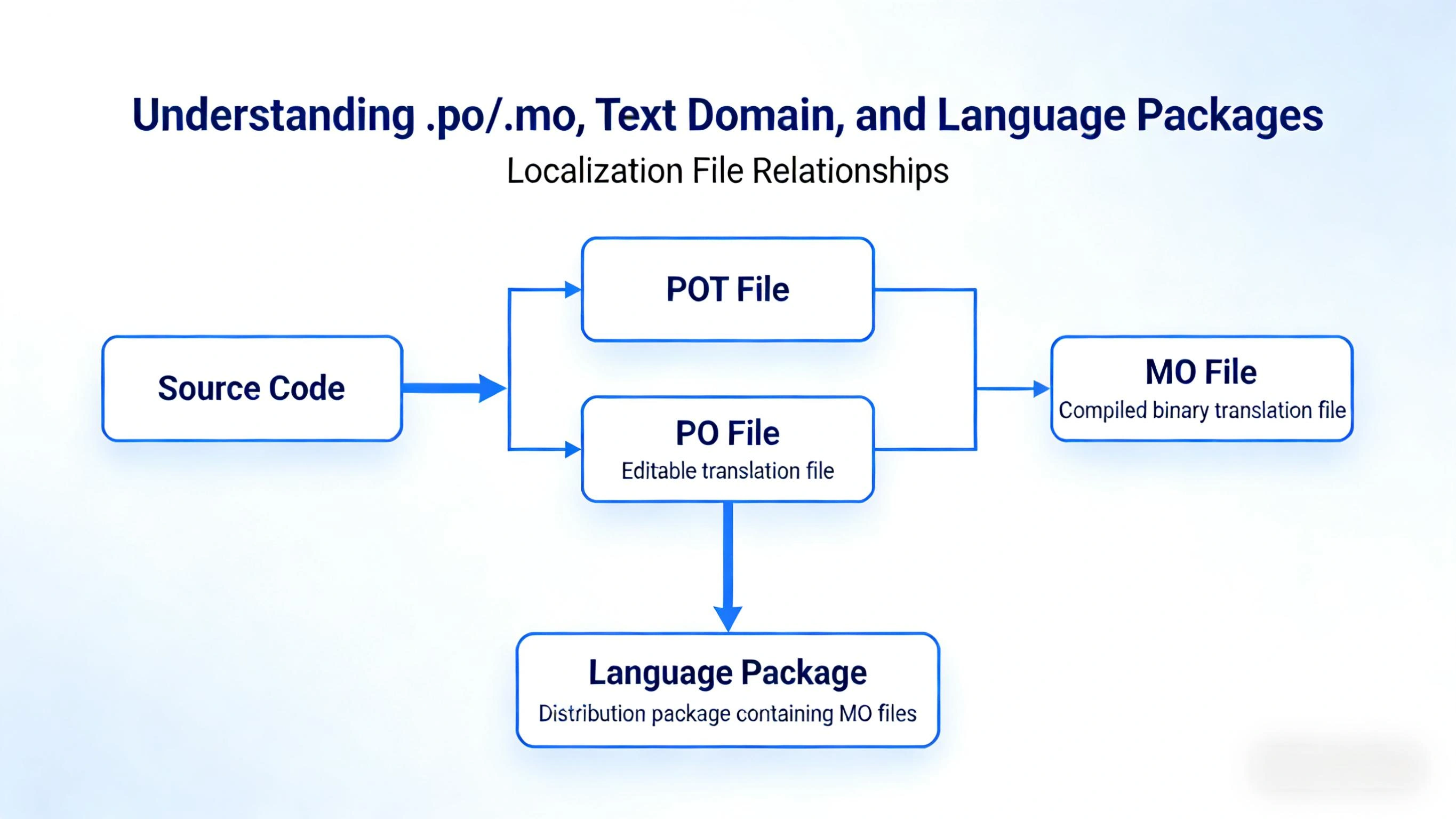
4.1 What are .po and .mo?
- .po: readable and editable translation source files (you see the original English text → Chinese translation)
- .mo: compiled binary file.WordPress actually loads the .mo
So what you change in Loco/Poedit must eventually beGenerate .mobefore it takes effect (Loco usually compiles it automatically when you save it).
4.2 Why is the Text Domain important?
WordPress uses the text domain to determine “which language pack to look in for a translation of this English sentence”.
If it's used in the theme/plugin code:
__('Add to cart','woocommerce')Then you must translate. woocommerce The language pack for this domain.
domain Inconsistent = translation never worksThis is the number one pitfall for newbies. This is the number one pitfall for newbies.
4.3 How is the language code written?
Common Chinese Simplified is:zh_CN
If you do traditional:zh_TW Or zh_HK(customary by target area)
Write a wrong characterWordPress just pretends it doesn't exist.
5. Loco Translate hands-on tutorial
The following is written in the “most common and secure” manner:Translating and storing secure directories + updated but not lost + Ready to roll back。
5.1 Installation and foundation setup
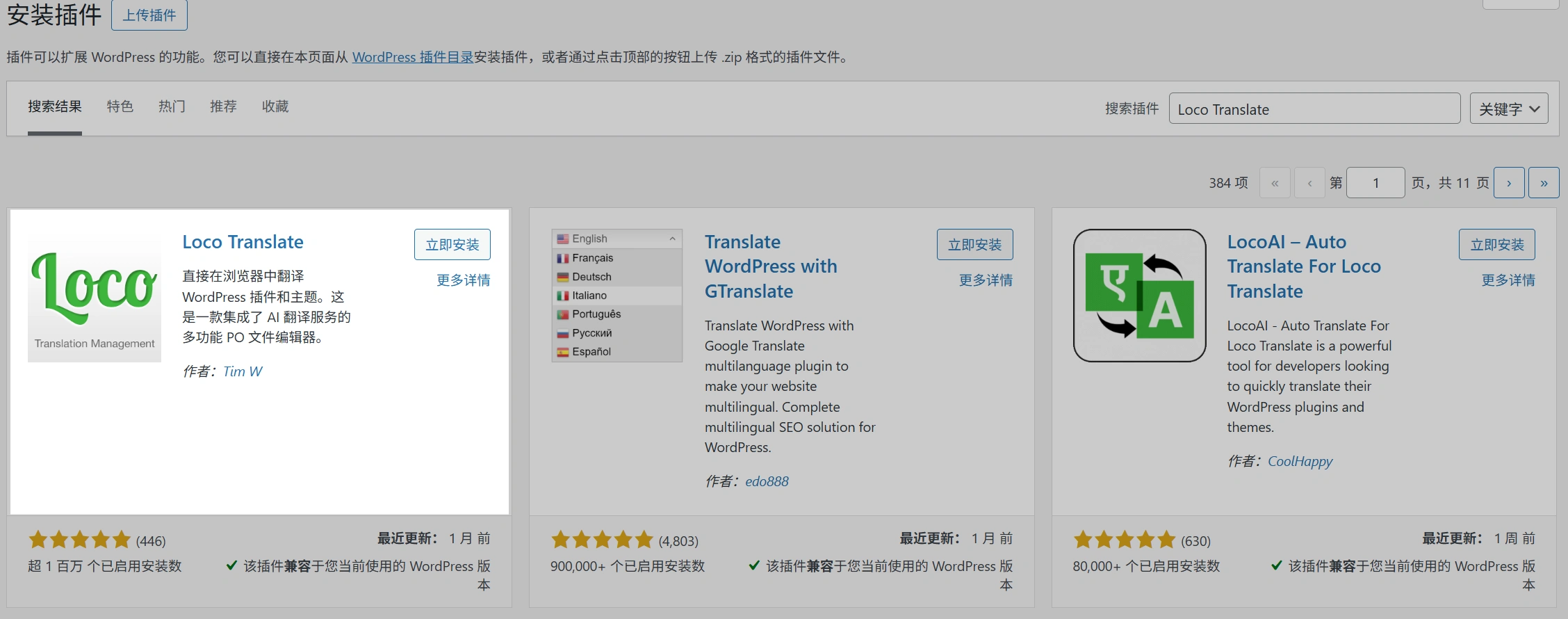
- WP Backend → Plugins → Install Plugin → Search Loco Translate → Install and enable
- Loco Translate → Settings suggests attention:
- Directories that allow creation/writing of language files(Ensure writability)
- If you have a caching plugin/CDN on your site, remember to clear the cache later!
5.2 Translation Theme
- Loco Translate → Themes → Select the topic you want to translate
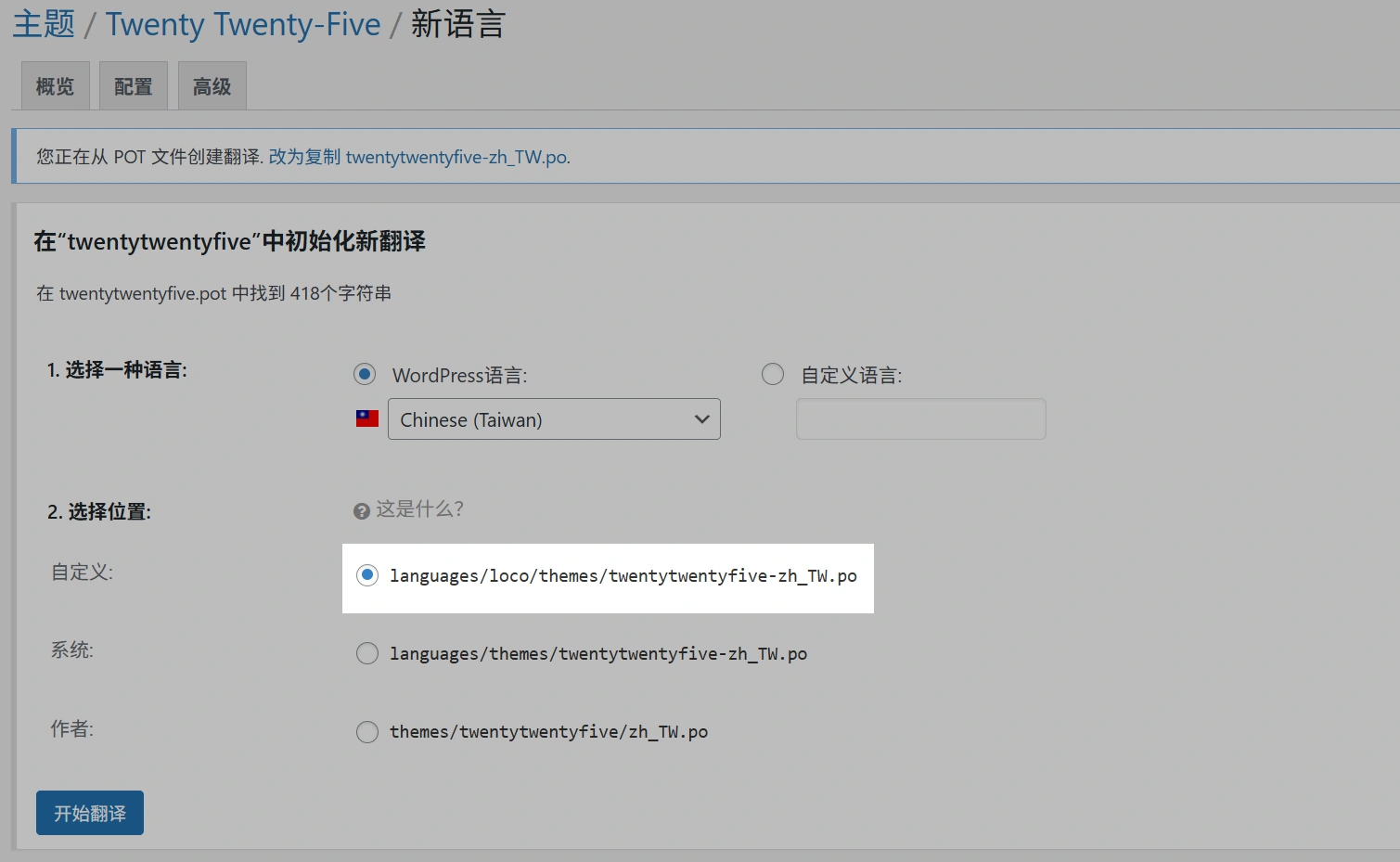
- Click New language
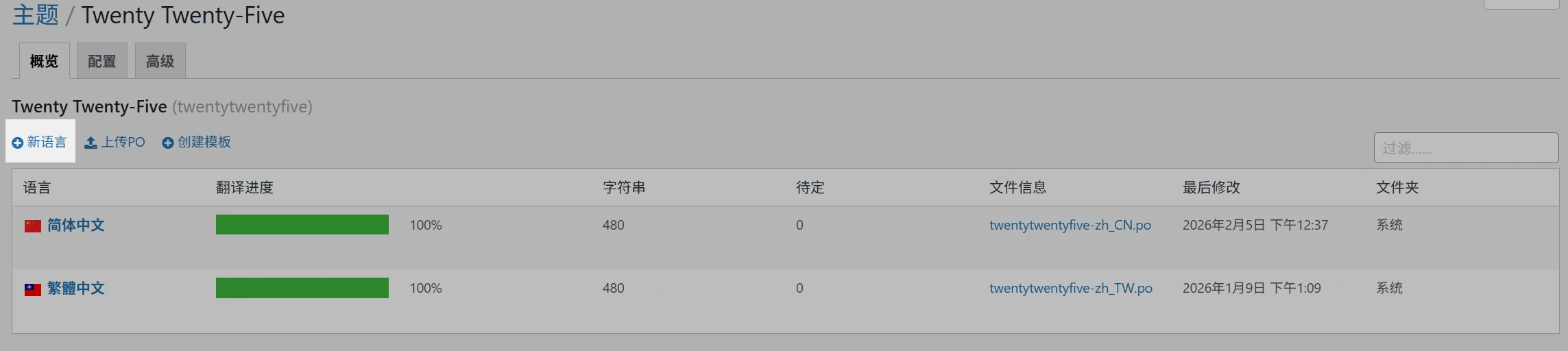
- Select Language:
Chinese (Taiwan)/zh_CN - Key Step: Selecting a Location
- Highly recommended pick:Custom / Loco Translate directory (secure directory)
- Not recommended: inside the theme directory (because updates may overwrite)
- Highly recommended pick:Custom / Loco Translate directory (secure directory)
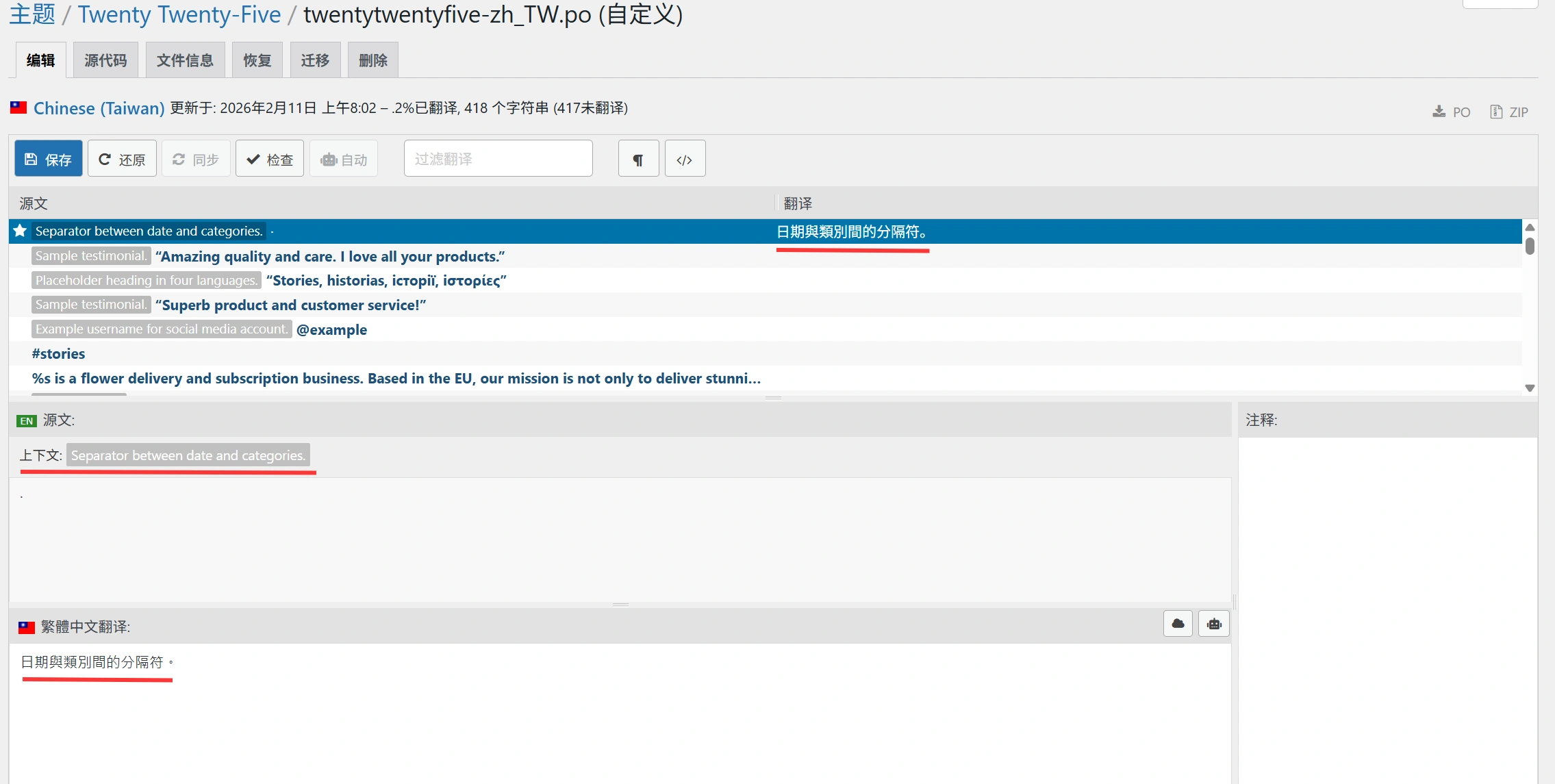
- Once created, enter the edit screen:
- Enter keywords (e.g. “Cart”, “Checkout”, “My account”) in the search box above
- Fill in the Chinese translation of each article
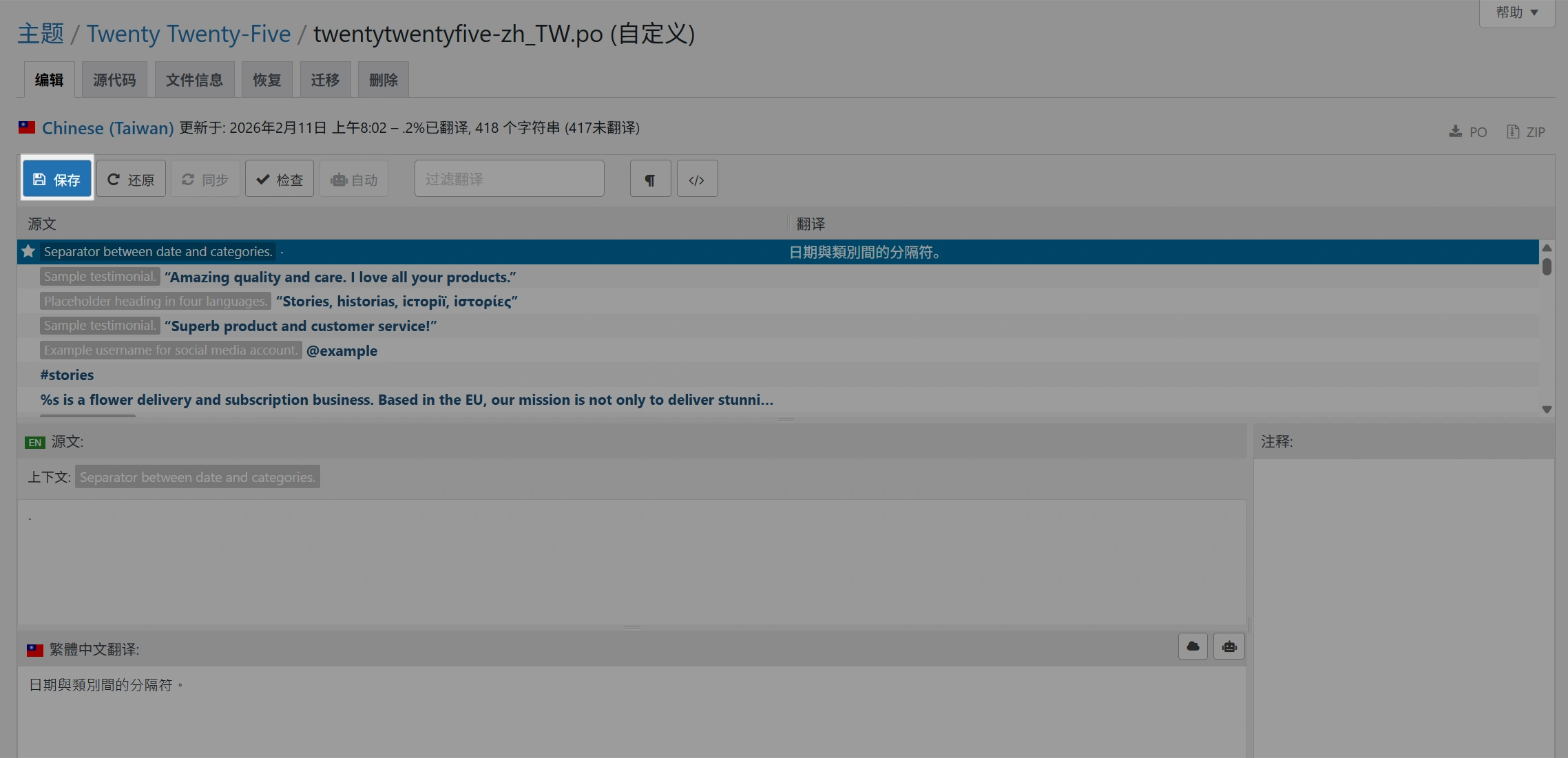
- Click Save: it saves the .po and compiles it to generate .mo
5.3 Translation Plugin
- Loco Translate → Plugins → Select Target Plugin
- New language as above:
zh_CN - The storage location is also recommended for Loco Secure Catalog
- Search and translate → Save
5.4 Correct posture for “string not found”
You obviously see English on the page, but you can't search for it in Loco, usually because of this:
- This text is not gettext output (written to death in templates/JS/database)
- The text comes from JS(requires JS i18n processing, or plugin didn't internationalize correctly)
- The text comes from the page content (written in the editor), not the theme/plugin language packs
You can do this:
- On Loco's Themes/Plugins page click on Sync / Rescan
- Try searching for shorter keywords (e.g. only part of “Checkout”)
- Check if the theme/plugin actually supports translation (does it have .pot/.po)
- If you are writing dead text: you can only change the template file/override the template (sub-themes are recommended)
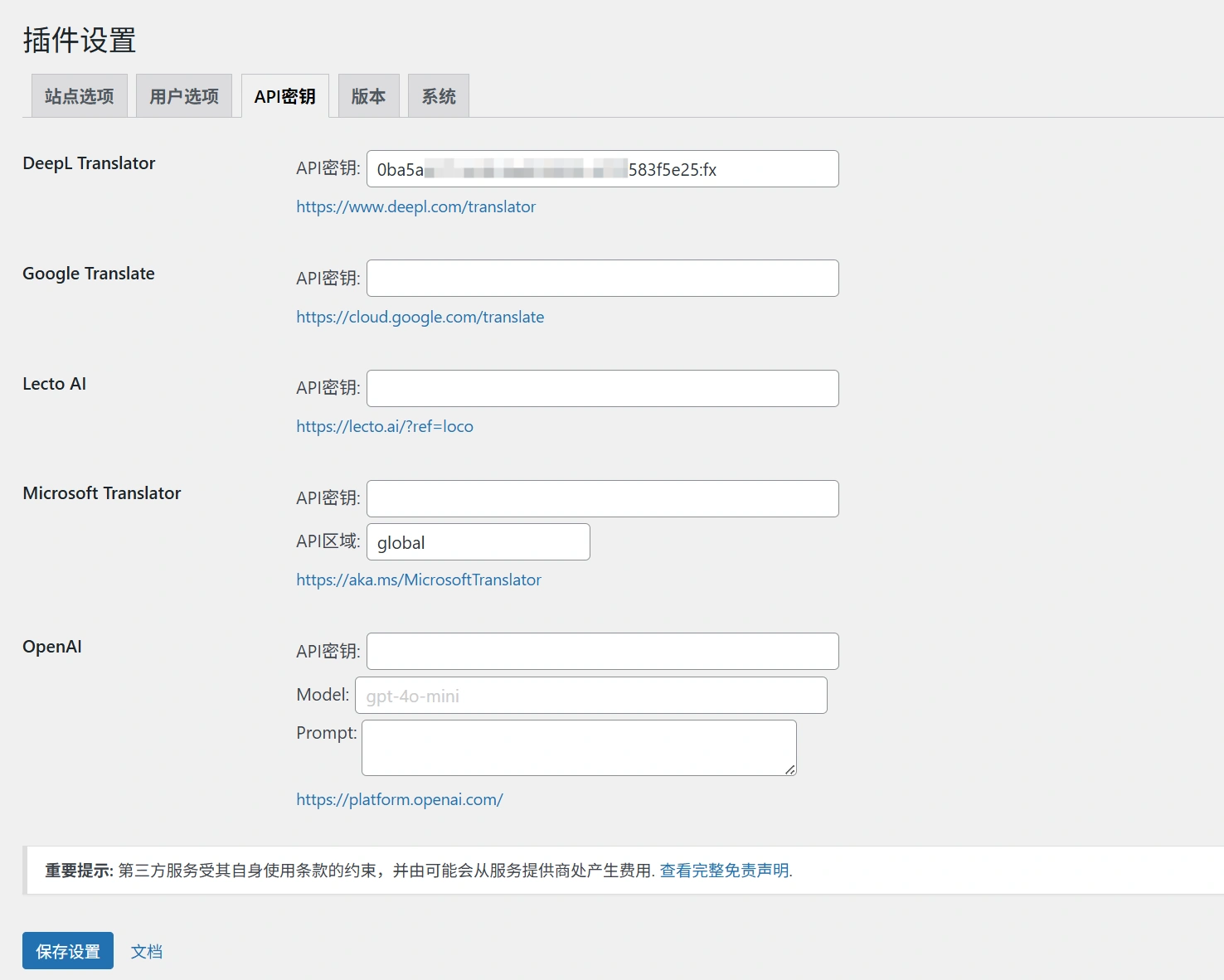
5.5 AI Translation Deepl, Google, OpenAI, etc.
- Configuring the AI API
- Click on the language you want to translate
- Ctrl+J or click on Suggest a Translation
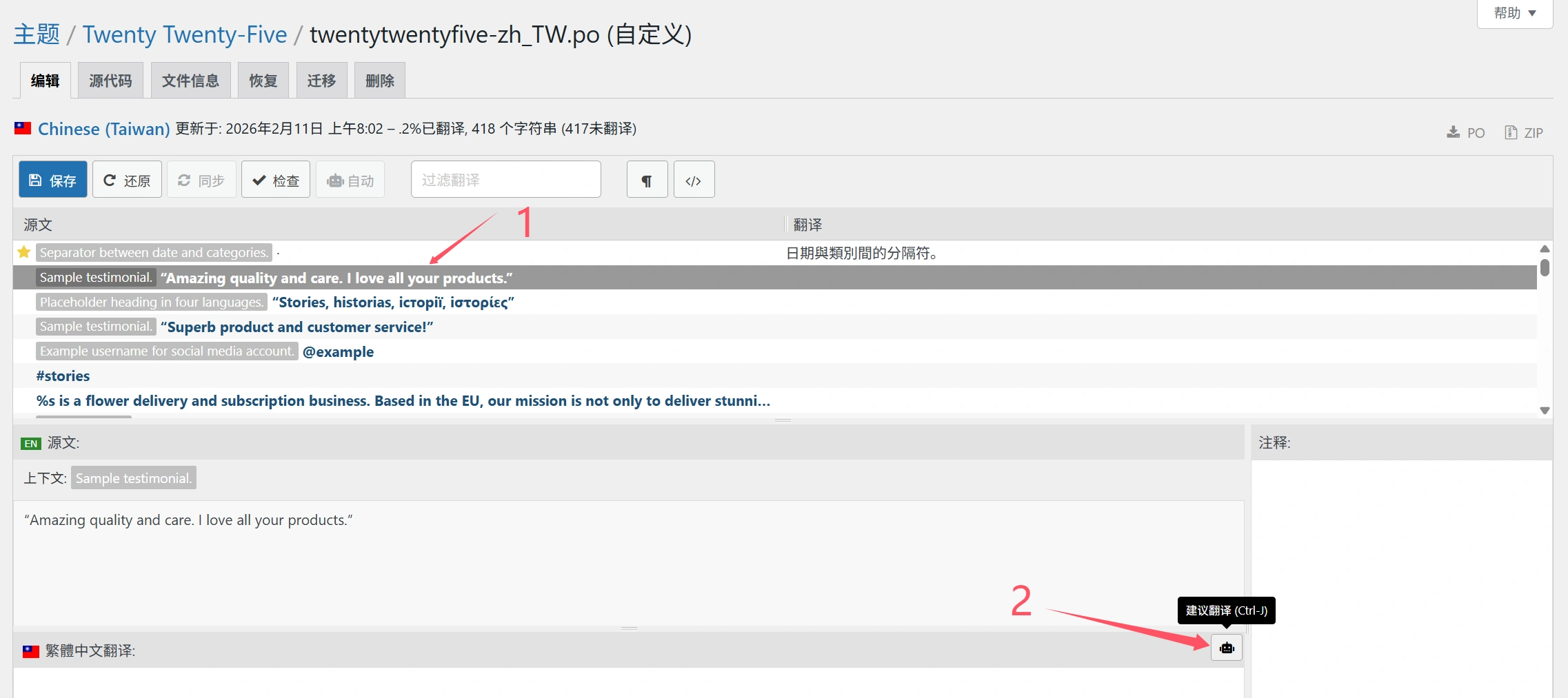
- Select AI-translated content
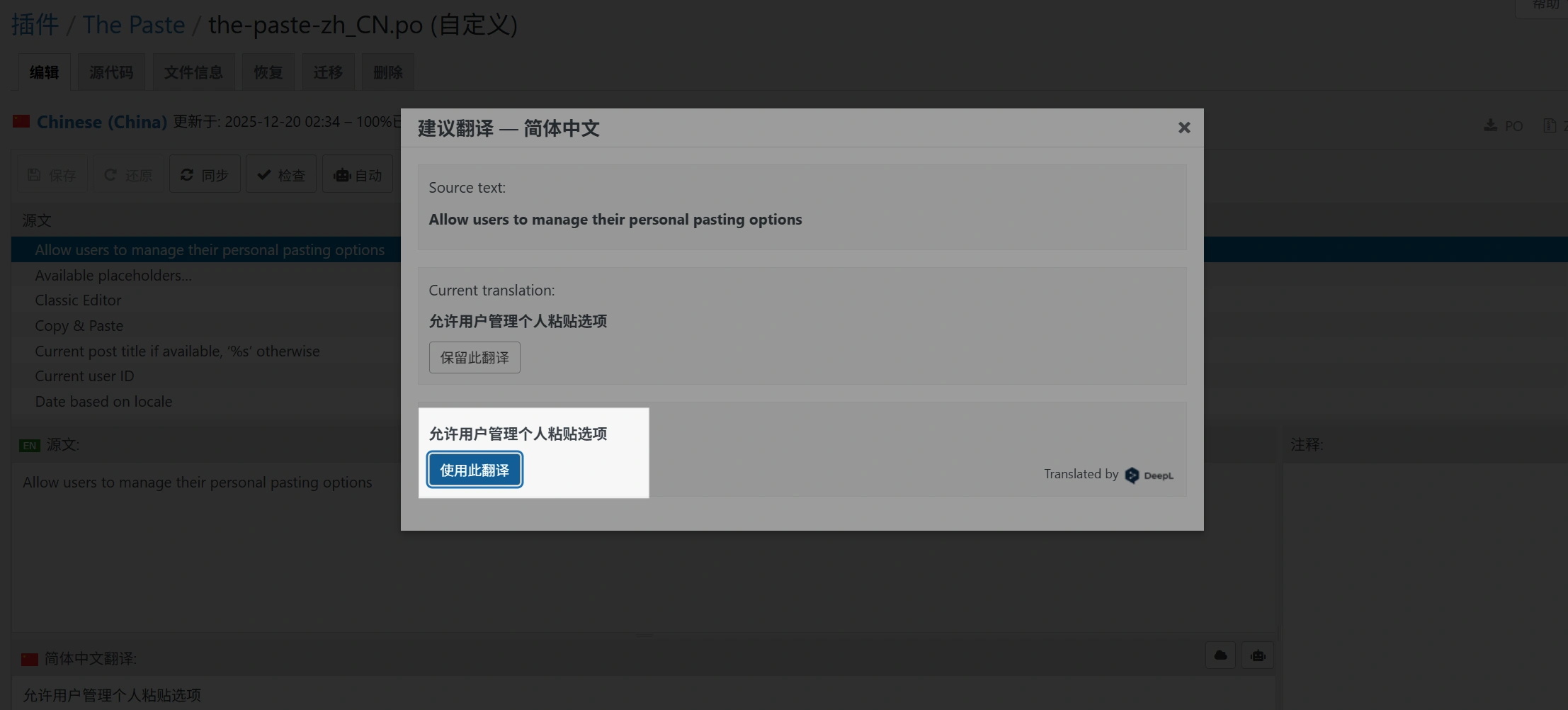
6. Advanced usage: batch search, reuse of translations, automatic translation, terminology consistency
6.1 Quick fill with “filters”
Loco editors are usually supported:
- look at Untranslated
- look at Fuzzy (fuzzy/to be confirmed)
- look at Translated
Suggested process: zero out the untranslated first, then go back and deal with the fuzzy words.
6.2 Harmonization of terminology: no five translations of a word
The most common terminology confusion at e-commerce stations:
- Checkout: Checkout / Go to checkout / Cashier / Payment
- Cart: Shopping Cart / Shopping Basket
- Billing: Billing / Payment Information / Invoice Information
- Shipping: Distribution / Transportation / Shipping
I suggest you start with a glossary of terms.“(even a simple table) before you start translating. Otherwise you'll feel awkward afterward.
6.3 Automated translation is just a “primer”, don't go straight to the wire!
Many people try to quickly use automatic translation, and the result appears:
- “Account” is rendered as “account” instead of “account”.”
- “Order notes” was turned into “order notes” instead of “order remarks”.”
- “Apply coupon” can be translated as “Apply coupon” (which is acceptable), but in Chinese, it's more common to say “Use the coupon code”.
Recommended Practice:
Automatic translation → harmonization of terminology → manual proofreading by key pages (registration/login/cart/checkout/order)
7. Updating without losing translations: the most stable storage paths and strategies
A lot of the reason you find Poedit troublesome is that the translation files are in the wrong place.
7.1 Recommended Strategy: Putting Translations in a Separate Directory
Core principles:Don't put custom translations in the theme/plugin's own directory, as updates may be overwritten.
It's usually more prudent:
- WordPress global languages directory
- or Loco's own secure directory (managed by the plugin)
As long as the path is correct and the domain is correct, WP will be able to load the corresponding language pack.
7.2 What to do after each theme/plugin update?
- Go to Loco → corresponding theme/plugin → click on Sync/Rescan
- See if new strings are added (and if the untranslated count goes up)
- Just add the new part, no need to re-turn it.
8. Frequently Asked Questions and Troubleshooting (not working/gibberish/strings not found/overwritten)
8.1 Translations don't work: Follow these 6 steps to troubleshoot
- Whether the site language is set to Chinese (Settings → General → Site Language)
- Translation file language code match
zh_CN - text domain match (most common problem)
- Whether .mo is generated (Loco saves usually generate it)
- Whether there is a cache (page cache/object cache/CDN) → clear cache
- Are there any higher priority language packs with the same domain name overriding your translation (e.g. a file with the same name already exists in the system languages directory)
8.2 Glitch/block letters appear
- Mostly encoding or file corruption issues
- It is recommended to ensure that the editor/system uses UTF-8.
- Editing with Loco built-in is usually less likely to mess up the code (better than some messy native editor)
8.3 Can't find a sentence in English
- Make sure it's not gettext text first
- If it's returned from JS or an interface, gettext may not care.
- If it comes from a database (like Elementor/Block content), you need to translate the content itself
8.4 Translations gone after update
- 80% is that you saved the translation in the theme/plugin directory
- Solution: Migrate to a safe directory and get in the habit of Sync after updates
9. Security and permissions: why even background translations can “roll over”
The convenience of Loco comes from one thing: it requires writing to a server file.
This means you should pay attention:
- Don't give unnecessary account administrator privileges
- Preferably with a security plugin / two-factor login
- If the site is a multi-person collaboration, there should be a process for translation changes (who changed, what was changed, how to roll back)
- Important site recommendation: backup language files regularly (export .po/.mo or backup directory)
Bottom line:
Loco turns “file operations” into “background buttons”, which saves time and requires more privilege management.
10. SEO perspective: multilingual vs localization vs content translation (don't think of Loco as a site-wide SEO multilingual solution)
A lot of people searching for “translation themes/plugins” actually end up with:Doing Multilingual SEO。
Here's the difference:
- Loco Translate: Translation of “interface copy” (buttons, prompts, backend frontend UI)
- WPML/Polylang/TranslatePress:: Translation of “content” (articles, products, categories, URLs, hreflang, site structure)
If you're going to do Google SEO multilingual, you usually also have to:
- Configuration of URLs for different languages (subdirectories /en/, subdomains, separate domains, etc.)
- hreflang
- Multilingual sitemap
- Content-level translation and localization (not just interface buttons)
So the best combinations tend to be:
- Loco: Clean translation of theme/plugin UI
- Content Multilingual Plugin: Responsible for content and SEO structure of articles/products/categories etc.
11. Inventory of best practices
- Always prioritize saving translations to a safe directory(Avoiding update overwrites)
- After each theme/plugin update:Sync → Only add new strings
- Make a “glossary” of terms first to ensure consistency
- Critical conversion paths must be proofread: registration/login/shopping cart/checkout/order/email templates
- Changed translation: clear cache (page cache + object cache + CDN)
- Critical sites: regular .po/.mo backup export (versionable)
- Multiple teams: define the process for translation changes (who changes, when, where)
- Encountered can not find the string: first determine whether it is gettext, and then decide to change the template or translation of content
12. To summarize: what is the “flavor” of Loco Translate?
- Come on: Back-office changes take effect immediately
- be spared worry: FTP/SSH round-trip file transfer is not required
- anti-renewal: Choose the right storage location and you won't be afraid to overwrite
- Getting closer to the WordPress world: Especially suitable for webmasters, implementation, operation of high-frequency rewording
But also remember:
- It's an “interface translation tool”, not a “site-wide multilingual SEO solution”.”
- Writable files in the background means more emphasis on permissions and backups
13. The problem of not being able to translate automatically when the original language is not English
Loco Translate has hardcoded English in the plugin, which means that if the code in your plugin or theme is not in English, the API translation might not work. Here's the solution:
Add the following code to the theme or plugin for temporary use, and it will zh_CN Change it to the original language in the plugin or theme
add_filter('loco_api_provider_source', function ($tag, $path) {
    if (is_string($path) && str_contains($path, 'langrouter-for-translatepress')) {
        return 'zh_CN';
    }
    return $tag;
}, 10, 2);
common problems
Q1: Does Loco Translate translation affect theme/plugin updates?
will not affect the update itself, butIf you put the translation files in the theme/plugin directoryThe update may be overwritten. It is more stable to save the translation in a safe directory.
Q2: Why is the page still in English even though I have translated it?
Common reasons: the site language is not zh_CN, text domain does not match, did not generate .mo, cache is not cleared, covered by other language packs.
Q3:Can Loco translate WooCommerce?
You can (WooCommerce is part of the plugin gettext translation), but WooCommerce officially has language packs as well. If you want to change some wording, it's common to override the partial translation with Loco.
Q4:Does Loco translate the text in the background (wp-admin)?
It is possible to translate some of the backend text from the plugin/theme, but the WordPress Core BackendTranslations are usually handled by the official language packs, and it is not recommended to “harden the core” with Loco.
Q5: What should I do if I can't find a certain string?
First make sure that that text is not gettext output. If it's write dead/JS/database content, it's not in the .po system and you need to change the template or translate the content source.
Q6: Does using Loco slow down a website?
Not generally. The runtime mainly loads .mo files; it's what you do in the background when scanning/synchronizing that's really “heavy”. In production environments, full scans are sufficiently infrequent.
Q7: Should I do versioning for translated files?
Highly recommended. Especially for commercial sites: exporting .po/.mo or a backup directory is fine with Git or regular backups.
Q8:Can I use Loco as an English station to turn Spanish/French?
Yes. gettext's language wrapping mechanism is language-independent; it's all about the language code and the text field.
Q9: Is Poedit still necessary?
Yes. If you're a professional translator/developer collaborator, need rigorous proofreading, offline batch processing, and deep integration with repositories/CIs, Poedit is still strong. Many teams are Poedit + Loco combo: Poedit for development, Loco for delivery and maintenance.
Q10: Is Loco suitable for beginners?
It is more suitable than Poedit. Because it has interface to “file path, uploading, downloading, compiling”, it's easier for newbies to succeed.
Recommended Hosting and Documentation
- Check out the recommendedWeb Hosting
- WordPress Documentation and Technical Guide


 English