











WooCommerce is a popular e-commerce plugin for WordPress websites. It enables you toTransform your website into an online storeWooCommerce allows you to sell products and services directly to your customers. With WooCommerce, you can manage store inventory, receive payments, handle logistics, and customize the look and feel of your store.
suitabilityWooCommercehosts



At the beginning of a business venture, an online retailer must decide whether to adopt a program like Shopify'sHosting PlatformOr do you want to go with something like WooCommerce?Self-hosted applicationsto set up store. At the same time, they need to determine whether to go with a simple solution or one that can grow as their business expands.
This article provides a comprehensive overview of what WooCommerce is and how it can be utilized to set up and run a successful online store. If you are ready to open your own online store, you can start with theRecommended Cloud Hosting ActivitiesGet hosting services and get started today!
WooCommerce is a popular WordPress plugin that transforms your website into an e-commerce store with product listings, payment and logistics tools. If you're looking for an easier alternative, many of thecloud computingBuilt-in e-commerce functionality, no additional plugins required. Explore our recommendedCloud Building ActivitiesThe online store is an easy way to start your journey to the online store.
pivot
- WooCommerce is a user-friendly e-commerce platform perfect for beginners - no coding knowledge required!
- This is a free plugin designed for WordPress websites - you need to install WordPress before using it!
- The WooCommerce platform provides shopping carts, product pages, delivery options and payment gateways for online stores.
- The platform supports plugins and extensions such as product bundles, bookings, subscriptions, memberships, product reviews and recommendation features
- WooCommerce is highly customizable, scalable, cost-effective, and seamlessly integrates with other platforms
What is WooCommerce?
WooCommerce is aFree and open source e-commerce plug-insIt is designed for small businesses that want to create an online sales platform for their products.
The plugin was developed in 2011 byWooThemesCreated specifically for WordPress.
In 2015, Automattic, the company behind WordPress.com, acquired WooThemes and became the legal owner of WooCommerce.
This e-commerce plugin has since risen to fame and is now one of the main tools for online businesses. Currently, WooCommerce powers more than 1 million of the world's top online stores.Over 25%of the website.
WooCommerce is becoming increasingly popular as it offers users a wide range of e-commerce features including:
- cart
- product page
- Transportation Options
- Payment Gateway
These tools help entrepreneurs sell easily while providing customers with an optimized online shopping experience.
Features of WooCommerce
WooCommerce is a feature-rich plugin that provides online merchants with a variety of tools and features to help them optimize their online stores. Below we explore some of the key features that make WooCommerce the preferred choice for online retailers:
- easy-to-use
One of the outstanding features of WooCommerce is its user-friendly interface. The platform utilizesSimple and intuitive designIt makes it easy for anyone to set up an online store, and no technical expertise is required to operate and manage the platform.
Its setup wizard makes it easy to create an online store and add products with just a few clicks. What's more, you can easily customize the site to your liking.
- customizable
WooCommerce isHighly customizable. It offers a range of themes and plugins for online merchants that can be used to enhance the functionality of the website.
The platform is flexible and versatile, enabling you to customize the platform according toUnique Business RequirementsCustomization. For example, you can customize product pages, checkout pages, and even emails to match your brand's design style and personality. If your store requires specific functionality, chances are there's already a plugin available for WooCommerce.
- product management
WooCommerce also has a powerfulproduct managementtool that enables online retailers to easily manage product inventory. You can manage your product inventory through aCentralized DashboardCreate and manage product pages, categories, tags and attributes, which saves time and increases productivity.
You can also organize your inventory and make it easy for customers to find the items they want.
- Payment Gateway
WooCommerce supports a wide range of payment gateways, making it easy for you to receive payments from customers around the world.
The platform supportsMainstream payment gatewaysThis flexibility allows businesses to cater to their customers' preferred payment methods, such as PayPal, Stripe and credit card payments. You can also set upAutomatic Tax CalculationandFreight ratesto save the trouble of manually calculating these variables.
- Delivery Options
For some businesses, logistics and transportation can be a nightmare. However, with WooCommerce, providing customers with delivery options is a breeze.
The platform supports a variety of delivery options, includingFlat rate shipping and free delivery.and by carriers such as the United Parcel Service (UPS) and the United States Postal Service (USPS)Real-time freight calculation。
You can also set up delivery zones to manage shipping costs for different regions. This flexibility allows organizations to provide customers with accurate andCost-effective distributionQuote.
- Marketing Tools
WooCommerce provides merchants with a range of marketing tools to help promote products and boost sales.
These tools includeDiscounts, Couponsas well asEmail Marketing Integrationthat makes it easy to incentivize your customers. You can also utilize social media integrations to expand your reach and promote your products on different social platforms.
In addition, WooCommerce has a built-in product rating system that allows customers to rate and review products, which helps build trust and foster customer loyalty.
- Analysis and Reporting
In order to make informed business decisions, it is critical to accurately track important business analytics data.
WooCommerce offers a variety ofAnalysis and ReportingTools that help businesses track sales, monitor inventory and understand customer behavior.
With its built-in reporting system, organizations can get detailed reports on sales, orders, customer and product performance. In addition, you can integrateGoogle Analyticsto analyze the performance of your online store in more depth.
Benefits of Using WooCommerce
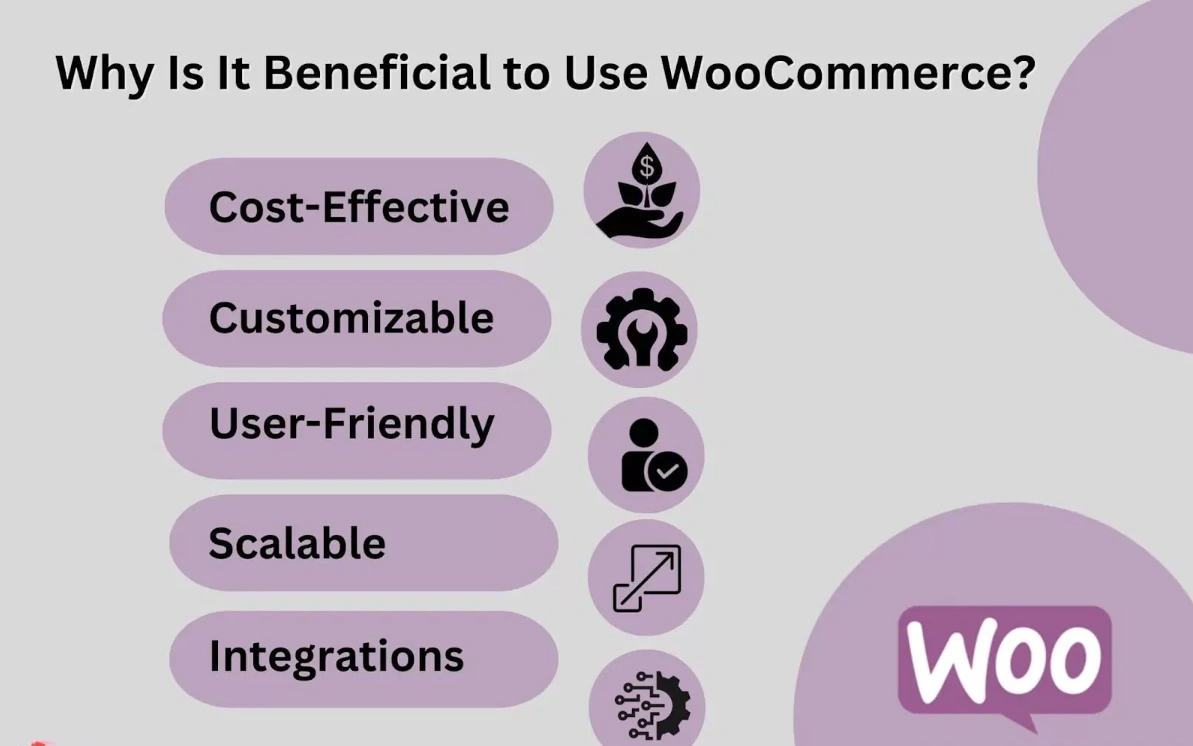
If you're planning to start an online business or upgrade your existing online store, consider WooCommerce.The many benefits of building an online business with WooCommerce are why it's the platform of choice for online businesses large and small.
- Cost-effective
WooCommerce is one of the most cost-effective e-commerce platforms available today.Free to download and useNo monthly subscription fee is required.
The only thing you need to take on isWeb HostingWooCommerce also offersAffordable themes and pluginsIt allows you to optimize your online store at a far lower cost than other e-commerce platforms.
As a result, you save the high cost of creating an eCommerce store on other platforms such as Shopify or BigCommerce.
- customizable
One of the significant benefits of using WooCommerce is the customization features it offers.
WooCommerce is an open source platform, so developers continue to develop new plugins for it. These plugins can add to your online store!Customization Featuresthat makes it stand out.
You can add new features, update existing ones, and maintain the uniqueness of your site at any time. With WooCommerce, you own the design and functionality of your online store.total control。
- user-friendly
WooCommerce is user-friendly and easy to use, especially for those familiar with WordPress.
Even if you don't have e-commerce experience, it's relatively easy to set up and manage.WooCommerce ownsIntuitive installation and setupprocess and is equipped with easy-to-understand features. It also offers customized and responsive templates to meet the needs of your online store. The content management system is easy to navigate at a glance.
- scalable
As your business grows, your online store should grow with it.WooCommerce featuresHighly scalableThe best way to make it easy for you is toManaging store growth。
The platform is capable of handling a large number of products, customers and transactions without affecting the performance of your website. You can add new products, expand your product line and create a multi-vendor marketplace without worrying about any limitations.
WooCommerce is equipped with plugins and tools that make extensions a breeze.
- Integration
WooCommerce integrates seamlessly with other platforms such as social media, accounting software, shipping labels and even Amazon.
You can easily connect your store to a variety of analytics tools, email marketing software, and other popular services. These integrations allowWorkflow automationSimplify the management of your online store by making it easier.
How to get started with WooCommerce
Compared to other e-commerce platforms, getting started with WooCommerce is relatively simple. Here are the basic steps to follow when setting up an eCommerce store with WooCommerce:
- Installing and Setting Up WordPress
The first step in using WooCommerce is to have a WordPress website.WooCommerce is a plugin for WordPress, so you need a WordPress website to use it.
If you already have a WordPress website, great! You can skip this step. If not, head over to the WordPress site and follow the installation instructions.
Once your WordPress site is up and running, it's time to install WooCommerce.
- Install and activate WooCommerce
WooCommerce is a free plugin for WordPress that is very easy to install and activate.
After logging into your WordPress dashboard, go to the “Plugins” section and click “Add New Plugin”. Search for “WooCommerce”.
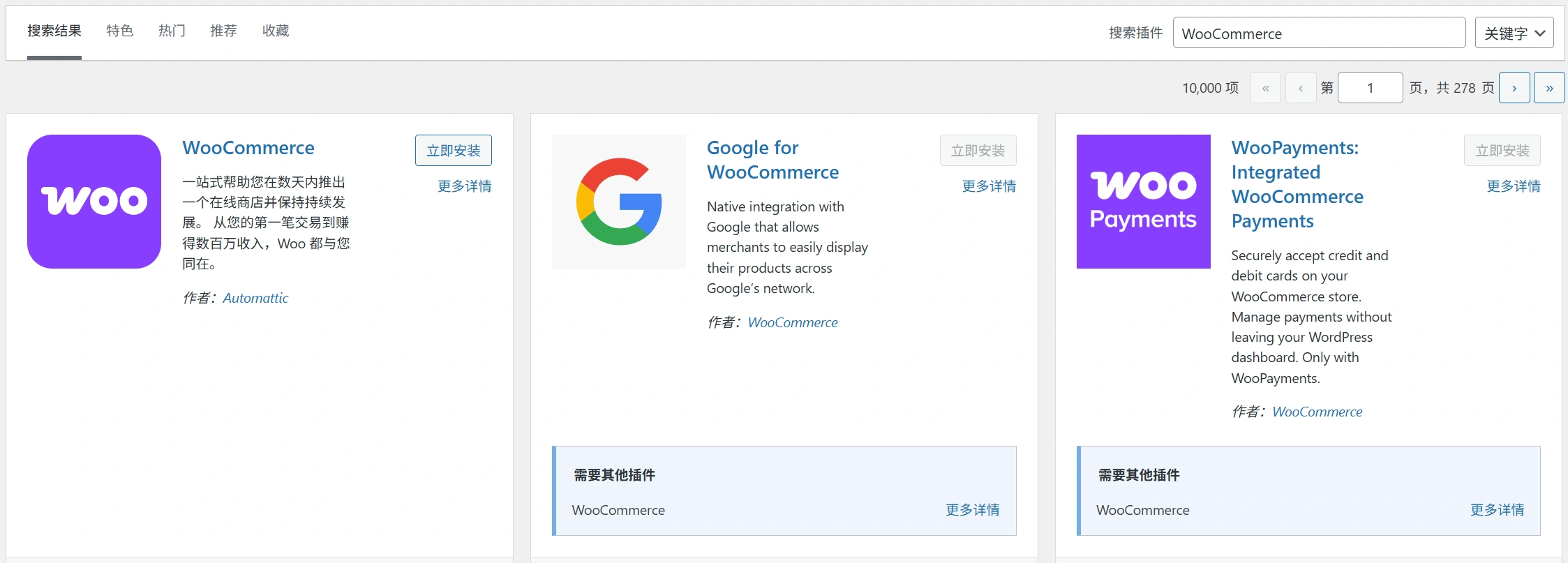
Once you have found the plugin, click “Install”, then “Activate” and follow the setup wizard. The wizard will guide you through the process of setting up store locations, currencies, payment methods and shipping rates.
- Configure your settings
After installing WooCommerce, you will need to configure some settings to customize your store.
In the WooCommerce tab of your WordPress dashboard, go to Settings. Here you can customizeStore Exterior,Payment and Delivery Options, taxes, and any additional features you wish to add.
It's important to configure these settings correctly before adding products to ensure your store runs smoothly from the start.
- Add your product
WooCommerce makes it easy to add products to your online store.
Accessed from the WordPress Dashboard“Product.”and then select“Add new item”. Fill in the required fields, including product name, description, price and image.
After adding your first product, you can continue to add as many products as you want. You can alsoCategorize productsand add tags to improve search convenience.
- Customize your store
WooCommerce offers a wide range of customization options to make your store stand out.
You can pick from a wide range of themes and designs to match your brand image. You can also useCustomizing the design elements.Things like logos and colors ensure that your store accurately communicates your brand's identity.
There are also plugins available forStore Enhancements, such as integration with popular payment gateways, social media sharing, etc.
- Test your store
Before officially launching your store, you should test it to ensure that it is functional and user-friendly. Testing will also help you identify and resolve any issues before the store opens.
Make a test purchase, to make sure your payment and delivery options are working properly. Check that your items are displayed correctly and that your store looks good on desktop and mobile devices.
carry outuser testingIt's also a good idea to check that your navigation, product descriptions and checkout process are intuitive.


WooCommerce Add-ons and Extensions
One of the many reasons why WooCommerce stands out is its vast library of add-ons and extensions. These tools help you extend your store's functionality, enhance the customer experience, and drive sales growth.
Here are some of the most useful WooCommerce add-ons and extensions to take your online store to the next level.
Payment Gateway
Payment gateways are a must-have feature for any online store, and WooCommerce offers a variety of payment gateway options, including PayPal, Stripe, and credit cards.
Integrated payment gateways enableSecure and fast transactions.Reduce shopping cart abandonment and increase customer trust.
With WooCommerce, you can easily configure the payment gateway of your choice and make the checkout process a breeze.
Type of transportation
WooCommerce offers a variety of delivery options from popular carriers such as UPS, USPS, FedEx and DHL.
With these extensions, you can Configure shipping rates by item, weight and destination, even offering free shipping to encourage more purchases.
In addition, you can enable theReal-time freight calculationand tracking information features, allowing customers to shop with peace of mind, thus increasing customer satisfaction.
Product Add-ons
Customization options help make your store stand out from the competition.WooCommerce's Product Add-ons extension allows you to provide store items withCustom Fieldsand options.
With this extension, you can offer engraving, gift wrapping, different color options and much more.
This allows customers to personalize their purchasing choices and develop a stronger sense of belonging to the product, leading to increased satisfaction and loyalty.
Product Bundles
Offering bundled products is a great strategy for driving more sales and enhancing the customer experience.
WooCommerceProduct Bundle ExtensionAllows you to combine different products together and offer them at a discounted price.
This encourages customers to buy multiple items from your store, increasing average order value and promoting cross-selling.
booking
If you offer time-based services, equipment rental, or appointment scheduling, WooCommerce'sBooking ExtensionIt could be revolutionary.
With this extension, you can offer bookable products, set up availability calendars, and even accept partial or full prepayments.
The extension is particularly suitable for hotels, spas, restaurants and rental companies, which provide services that often require reservations.
subscribe to
The Subscription Add-on for WooCommerce lets you offer your customersSubscription-based productsor services.
This is the perfect add-on for online courses, magazines or any product or service that requires regular payments. Customers will subscribe to your products/services and the subscription fee will beAutomatically charge the credit card they have on file。
With this additional feature, you can rest assured that you will always receive your payments on time.
Memberships
The Memberships add-on enables you to createA membership siteThe program offers different access levels and subscription options.
You can restrict content to specific membership levels or make it available to all members. With membership, you have complete control over what content your members can access and the price they pay.
dynamic pricing
With dynamic pricing, you can offer discounts or specials based on different criteria, such as quantity or product category.
This plugin is perfect forPromotion of specific productsOr quickly clear out your inventory. You can even create different pricing rules for wholesale or loyal customers.
Dynamic pricing gives you the flexibility toCustomized pricing structure based on business needs. For example, if you sell apparel, you can create a pricing rule that offers a 10% discount to customers who purchase five or more items.
Product Reviews
Product reviews are vital to any e-commerce site. They help build trust, provide social proof, and give valuable product feedback.
With the help of the Product Reviews plugin, your customers can leaveofferingsTheRatings and Reviewsthat help potential customers make informed buying decisions.
Product Recommendation
The Product Recommendations plugin allows you to show your customers, based on their purchase history or browsing behavior, the Related Productsor cross-selling goods.
By recommending products, you can increase the value of each order and drive sales. In addition, customers will appreciatePersonalized Recommendationsand the ease of finding relevant products in one place.
For example, if a customer buys a coffee maker in your store, the Product Recommendations extension can show them related products such as coffee beans or branded coffee cups.


WooCommerce Success Tips
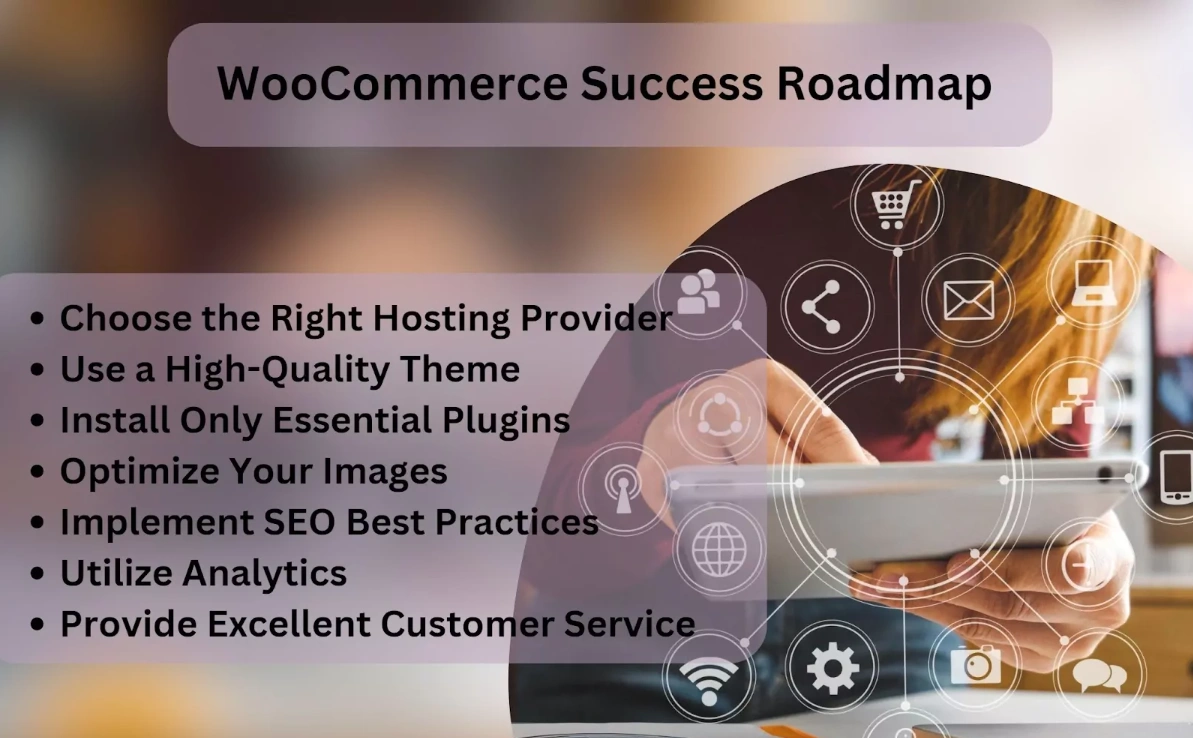
As an online retailer, you want to make sure your WooCommerce store is running smoothly and generating as many sales as possible.
Here are some tips to help you get on track to a profitable online business with WooCommerce.
- Choosing the right hosting provider
As a WooCommerce store owner, one of the most critical decisions you will make is choosing the right hosting provider.
anReliable and Secure Managed Service ProviderCritical to ensuring your online store can handle the traffic and keep customer data safe.
Find a web hosting provider that is within your budget and offers secure servers, fast load times, and 24/7 support.
- Use of high-quality themes
Your online store theme plays a vital role in the success of your business. High-quality themes help enhance the user experience, while poorly designed themes can drive customers away.
When choosing a theme for your WooCommerce store, be sure to pick aResponsive and fast loadingAndOptimized for SEOThe.
- Install only the necessary plug-ins
While the WooCommerce platform offers many useful plugins, installing too many can slow down a site and reduce performance.
Install only those programs that serve theparticular purposeof the necessary plugins. For example, you may need plugins for email marketing, payment processing, or social media integration.
After installing the new plugin, keep a close eye on yourWebsite Speed and Performanceto ensure that it does not affect the performance of your online store.
- Optimize your images
Large images can slow down the loading speed of your online store, so it's crucial to optimize your images for the web environment.
Using a method such asTinyJPGOrCompress JPEGand other free online tools to reduce image size without sacrificing quality.
Another trick is to use lazy loading, a technique that loads images only when the user scrolls down the page.
- Implementing SEO Best Practices
Search Engine Optimization is essential to bringing your WooCommerce storenatural flowIt's critical. Always make sure your product pages and category pages are optimized for relevant keywords.
You can also create a blog board to post useful content related to your products and optimize your blog posts for search engines.
- utilization analysis
Analytics is a powerful tool for understanding how your online store is performing and where improvements can be made.
ConfigurationGoogle AnalyticsAnalytics tools like these provide insight into your site's traffic and user behavior.
You can use this data to make decisions for your store.Data-driven decision-making, such as deciding which products to promote or which pages to optimize.
- Provide excellent customer service
Finally, providing exceptional customer service is critical to keeping customers coming back.
Make sure yourThe FAQ section is thorough and comprehensive, and provide clear contact information and a return policy on the website. You should also consider installingreal time chat softwarein order to provide immediate support to our customers.
reach a verdict
If you are looking for a reliable and easy-to-use e-commerce platform, WooCommerce is undoubtedly the ideal choice. It offers auser-friendly interfaceThe plugin is designed to make it easy for even beginners to set up an online store. In addition, the plugin offers a range of features for managing orders, payments, taxes and logistics.
No matter what kind of products you want to sell, you can't go wrong with WooCommerce!
As an online retailer, it's important to remember to conduct thorough research to choose the right themes and plugins, as well as the rightWooCommerce Hosting Servicesto succeed in the highly competitive world of e-commerce.
Next steps: what to do now?
Now that you understand how to build an eCommerce store using WooCommerce, here are some practical steps you can take from this guide:
- start usingRecommended Cloud Building Tools for E-Commerce Websitesto build your e-commerce website.
- Select the recommended WooCommerce Hosting ServicesGet quality hosting services.
Extended Reading - Useful Resources
Here are more useful resources to help you dive deeper into eCommerce and WooCommerce:
- WordPress documentation for newbies: - Starting from 0, teaching you how to build a professional website by hand!
- How to build a WordPress e-commerce site with Woocommerce plugin
Frequently Asked Questions
What types of products can I sell using WooCommerce?
WooCommerce is designed to accommodate all types of products. Whether you sell physical, digital, or virtual products, WooCommerce can help you build an online store. You can sell physical products such as apparel, electronics, and furniture; digital products such as eBooks, music, and videos; and virtual products such as subscriptions, memberships, and reservation services.
Is WooCommerce free to use?
Yes, WooCommerce is a free plugin. However, you may have to pay for additional features such as payment gateways, shipping options, and premium themes.WooCommerce is an open source platform, which means that developers from all over the world are contributing to its development. Therefore, you can get regular updates and improvements for free.
Do I need to have a WordPress website to use WooCommerce?
Yes, WooCommerce is a WordPress plugin, which means you need a WordPress website to use it. If you don't already have a website, you can create one through WordPress, which is one of the most popular content management systems on the internet. Simply register a domain name, find a WordPress hosting provider, and start building your website.
Can I use WooCommerce in any WordPress theme?
Yes, WooCommerce is compatible with most WordPress themes, both free and paid. But you need to make sure that the chosen theme is optimized for eCommerce. An eCommerce optimized theme should have features like shopping cart, product pages, checkout pages and payment gateways.
Is WooCommerce easy to use for beginners?
Yes, WooCommerce is very beginner friendly. It comes with a setup wizard that guides you through the installation process. Once WooCommerce is installed, you can easily set up your online store, add products, manage orders and customize your store without any coding knowledge.

 English