


















WordPress themes are a combination of stylesheets and templates that give a website an aesthetic appeal and add features to improve its functionality.
Whether you've been using WordPress for a while or you've just recently installed it, it's common to have questions about how to improve your WordPress skills or general queries such as the way WordPress functions, how to customize it, or what a WordPress theme is.
It's okay to have these questions; in fact, all of them are interrelated in some way. We will show you how in this article. Most importantly, we will answer the last question “What is a WordPress theme?
Key Takeaways:
- WordPress themes enable you to create websites without having to write any code from scratch.
- Themes manage how content is presented, but plugins are used to control how a WordPress site behaves and what features are available.
- The 7 things you should consider before choosing a WordPress theme are: website requirements and needs, search engine optimization, compatibility with plugins and browsers, customization features, price and latest updates.
- The WordPress directory categorizes its themes into 3 categories to help users filter them according to specific requirements: layout, functionality and themes.
- Use WordPress Theme Detector, e.g. “What WordPress theme is that?
WordPress Theme Introduction
WordPress themes essentially control the appearance of your website pages. In this context, we refer todevise、color、imageryandcalligraphic style. The right use of a theme can make your brand image unique. Therefore, it is vital to consider its appeal.
Creating quality content should be your primary goal if you want your website to be successful. Therefore, the theme must be related to theYour brand's visual identityRelated. Because they match your brand, your company's logo, fonts and colors.
For example, if your company typically uses warm colors, using cooler colors (such as white, blue, or gray) and more serious language just doesn't look right. People who visit it may even think it's another business' website.
Let's look at an example. Below is the homepage of Netflix.

Here's Netflix's ad campaign for 2020.

The website's layout, colors, fonts, etc. are similar to the ad campaign. As a result, website visitors can immediately recognize the brand.
You should keep this in mind when hiring a developer to design your website or even create it yourself. Make sure that the pre-made theme you choose for your WordPress website is as similar as possible to your business brand. If necessary, listen to your friends and coworkers on whether they considered your company the moment they saw the theme.
What are WordPress Themes?
WordPress themes are a combination of stylesheets and templates that give a website an aesthetic appeal and add features to improve its functionality. The goal of any website is to increase visitor engagement and provide the best possible user experience. Combining well-thought-out concepts with well-written prose and compelling visuals will accomplish this goal.
Since the theme is available on your entire website, there is no need to bother about building new website pages. This is always beneficial for designing a unified user experience.
Choosing a theme for your WordPress website should be one of your first tasks after creation. It is important to remember that it will determine the initial impression of your website visitors.
What can WordPress themes do?
WordPress themes allow you to create websites without writing any code!. After activating the theme, simply upload the theme to your WordPress dashboard. You can do this via the WordPress folder or by purchasing it from a third-party store.
Themes allow you to navigate menus and sidebars, enable custom headers and backgrounds, and more. Usually, the default theme comes pre-installed on a brand new WordPress website. You can apply it or switch to another theme, either a premium theme or a free theme. Free themes are also included in some WordPress hosting providers' packages. Explore ourRecommended WordPress Web Hosting ProvidersThey can improve the performance of your website.
WordPress themes have their own aesthetics and purpose.As a result, they may change significantly if the design components are replaced. For example, some may be suitable for a commercial website, while others are perfect for a simple portfolio.
By default, you can only activate one theme at a time.However, there are some plugins that can be used with multiple WordPress themes.WordPress themes do not have basic functionality, unlike plugins that provide specific functionality for a website. This is mainly because users don't lose key functionality when switching themes.
What's the point of a website theme?
Websites with a theme usually have two characteristics:visuallyandfunctionality。
visually
The theme you choose for your website's visual identity not only allows you to select theInstall it.It's okay.Modify it as needed. Themes usually contain a demo version. This shows how the site will look if the user installs it. But you don't want your site to look exactly like all the others. This means that you must apply modifications to make it stand out.
Sure.Some topics have modification restrictions, especially when it comes to free themes. So if you're spending money on a premium theme to unlock potentially exciting features, that's not a bad idea.
functionality
Now, onto theme functionality. It's not news that themes merge plugins, widgets, and other components in their design to enable websites to perform specific functions.
For example.Divi is a theme with an easy to use drag and drop builder. You can browse their huge library of pre-built sites and templates. There are no ongoing fees when purchasing Divi, as the fee is a one-time only.
Another topic you might consider is ShapelyIt uses plugins like Yoast SEO to optimize content for search engine rankings and Gravity Forms to convert visitors into leads to track the effectiveness of their efforts.
Do I need a WordPress theme?
Business owners, agencies, developers, and bloggers usually need WordPress themes in one way or another. Themes are the fastest way to create a professional website, and in some cases, allow you to build a lovely website in minutes.
Even if you have no a priori design knowledge, you can still create a competent theme-based product. If you are an experienced designer, themes only help to focus on the more important and complex elements of the design.
Often, some businesses may choose for their websiteUnique appearance. In this case, they will need funds toAvoid theme installations and instead hire developers and designers. The design will still utilize some sort of template in order to develop the site.
If you want to utilize WordPress asCoding Training GroundThen you might want to think about going aroundcross-cutting theme. In this case, WordPress is a training tool rather than an end product.
Some users may prefer to use headless WordPress, where the visual elements are created by a JavaScript framework while WordPress handles the back-end data management and publishing process.
What's the difference between a theme and a plugin?
Misunderstandings between plugins and theme features are very frequent.
Themes manage how content is presented, but plugins are used to control how a WordPress site behaves and what features are available.
The theme you design should not contain basic functionality. By doing so, users will lose access to that functionality when they change the theme. For example, if you are creating a theme with e-commerce elements and suddenly switch themes, then people using that theme will also lose that functionality. That's why they change the style of the site by moving key features to plugins while the functionality stays the same.
WordPress Themes and Templates: What's the Difference?
Just as there is confusion between themes and templates, there is confusion between themes and templates.
WordPress themes includetemplate files in addition to other types of files (including stylesheets, scripts, and images). It is not possible toInstall a separate template file.They work in tandem with the other files in your WordPress theme to change the look of your site.
Template files can be modified for all pages or parts of pages.For example, most themes provide different template files for the site's footer, header, sidebar, comments and other elements. The layout of each page and the information within it can be controlled by the template file. The template you use is usually determined by the template hierarchy used by WordPress.
How to choose a WordPress theme?
Choosing a WordPress theme can be overwhelming given the large number of themes on the market. Some people may take days or even weeks to try and choose the best theme for their website. It hurts the brain, doesn't it? Well, to make life easier, there are a few things you can ask yourself before moving on to choosing a WordPress theme for your next website.
Question #1: What do I need this theme for?
Choosing the best WordPress theme involves determining whether the site will fulfill your requirements, whether as a basic blog or an online marketplace, or anything else. They will need a variety of features and designs. For example, an event planning portfolio may need to showcase layouts and animations in order to draw people in, but a minimalist design may be better suited to a content-centered site.
But how can you decide on one?
Try listing what you wantOn the websiteFeatures seen. Some features may be contact options on the homepage itself, translation help, forums, social media options, or e-commerce settings. You can also choose to list your favorite features of an existing WordPress site and then use the “What WordPress theme is that? Details of this tool will be discussed later in this article.
List the type of design and editing you prefer for your website design.While many WordPress themes may have customization features, in order to speed up the development cycle, we recommend choosing the theme that best represents your brand. To facilitate this, one thing you might consider is checking out the demo site for your WordPress theme. Since the demo includes page layouts, unique widgets, and plugin support, you can get an idea of what your WordPress site will look like.
Question 1 TP5T2: How can I optimize my search engine optimization?
Using a WordPress theme can greatly affect the performance of your website, especially its speed and stability, which is crucial for SEO.
refrain fromChoose a theme with too many features and codes.Though attractive, themes with tons of features can make websites load slowly.
“But almost all the themes I've chosen seem to be over stuffed” Well, one thing you can do is to utilize the tags in the theme description to see if they are SEO friendly.
questTheme with tons of plugins and pre-made templates. This is a great way to overpopulate your website.
Eliminate unneeded componentsto prevent your WordPress site from slowing down.
How did this happen?
Install the theme on your empty site to double-check the information and check the page size using a performance testing tool like Pingdom. Several themes also show their speed test results on their official website. For reference purposes, themes with lightweight features typically take up 600KB of page size and 20 HTTP requests.
If this seems onerous to you, try checking the page size of the theme demo site; if it's less than 2080KB, you're good to go.
Question 1 TP5T3: How do I stay within the cost plan?
Although you can choose a premium theme, it is not required. If you are a novice, we would recommend the free theme.
And, if you choose a free theme, stick to the original WordPress theme designer to be on the safe side. To understand the modification possibilities of a theme and resolve issues, you must also determine if the creator exists in the WordPress community or provides documentation.
Question 1 TP5T4: Should I customize my theme?
While a theme is useful to someone, it's not the end of the road for exploring what other features a theme can offer. Some people occasionally find a theme that suits their business, but want to modify it further so that each page reflects their personality.
To see how customizable the theme is, you can start by installing your favorite WordPress theme. Go to the Themes section under the Appearance tab in the dashboard. You must select Live Preview. Then, you will be able to view the WordPress Theme Customizer dashboard. In this way, you can see the site preview on the right side of the left sidebar of the WordPress theme customizer, which lists the design options of the theme.
If you have some kind of experience with WordPress or coding, you can use the Theme Editor to change WordPress theme content from the admin panel, giving them access to a wider range of customization possibilities.
The theme's website is an excellent resource for learning about the customization options they offer. Some themes highlight the design options available in both the free and paid versions. If you're using one of the many popular WordPress themes that include a built-in theme builder such as Divi, try some of the tools to align and get a handle on the modification possibilities.
Question #5: Should I consider responsive design?
Taking into account that globally more than 90% of online consumers accessing the Internet via mobile devices, Google considers mobile-friendliness as a key ranking criterion. In order to make your website attractive and usable on every user's device, you must use a responsive theme.
Responsiveness makes it easier to read text on your website without having to zoom in and scroll anywhere. It allows users to navigate through various parts of your website.
You can use the Google's Mobile-Friendly Testingand other tools to check this. Paste the URL of the theme demo site to see if it is suitable for mobile devices.
Another option is to use the developer tools in Chrome. Simply right-click on the sample site, choose “Inspect” and select the screen size of your choice or use the controls to change it manually. This is a great way to test responsiveness across multiple devices, but not mobile responsiveness.
Question #6: Do I follow current trends?
It's never a bad idea to know how other users of your chosen theme experience it.
Before activating the theme of your choiceView ratings and reviews. Whether you want a free theme or a paid theme, read user reviews and ratings. On the theme marketplace, you can usually find them in the sidebar or at the bottom of the theme page.
Another key factor to consider isDate of the latest update of the theme. Regardless of whether a theme looks good or not, if it hasn't been updated in a while, it could be loading old code and have security vulnerabilities. Security and coding best practices are always evolving. Therefore, in the Updates section it would be useful to choose one that has been updated frequently or within the last 6 months. Outdated versions of WordPress may already be prone to problems and incompatible with them.
While the updated version is great, you maySome security concerns remain.. To check for any dangerous software, malicious code and outdated software, theTheme Checker Plugin for WordPresswill come in handy. You can also use external tools such as Sucuri Site check。
Question #7: How do I handle plug-ins?
Themes help to improve the aesthetics of the site, while plugins provide functionality.
Find a theme that supports the plugins you need to prevent compatibility issues. For more information, see the theme description and its website, or contact the developer.
Here are some popular and useful plugins that can come in handy:
- WooCommerce: WordPress eCommerce Plugin for Online Store Owners
- WPForms: Create contact, order and survey forms
- Yoast SEO: Helps you optimize your website's content and keywords to improve its search engine rankings.
- Elementor Website Builder: A popular drag-and-drop page builder for creating stunning pages.
there areThousands of other pluginsmay be useful for your website. For example, if you have a food blog, then including recipe plugins could be an asset. These recipe plugins include images, videos, ingredient lists, and preparation instructions for posts and pages.
Adding plugins and relaxing isn't the end. You still need toMake sure the theme is compatible with various other browsers. For this purpose, you can try to access the theme's demo website in multiple browsers such as Brave, Microsoft Edge, Yahoo and Google Chrome. This ensures that the functionality and aesthetics of your website look good on different platforms.
If having to install multiple browser sounds seems like a headache, try using an external tool such as Browsershots. This tool takes the URL of the demo site and gives you results for all browsers compatible with it.
Types of WordPress Themes
We've probably made it clear how many themes exist for WordPress, within WordPress, and on the market. Not even counting the themes offered on the marketplace, there are over 9,000 freemium themes in the WordPress Theme Database alone.
The WordPress directory categorizes its themes into 3 categories to help users filter them according to specific requirements:Layout、Functions andthematic。
The layout is based onPage formats (such as a grid or three-column layout) categorize topics.
functionalityare certain qualities that many users search for in a theme, such as footer widgets.
The theme willTopics are categorized into niche and purpose, such as educational topics.
We will now cover some other types of WordPress themes such as multipurpose vs niche, free vs paid parent and child themes, and custom themes.
Multi-purpose and niche themes
For starters, the multipurpose theme supports a variety of website types and niches. Regardless of the focus of the site, it usually offers a variety of page styles, extensions, scripts, widgets and plugins to provide you with more customization possibilities.
While niche-specific themes have customization features, they are usually dedicated to a single theme or industry, such as e-commerce. They won't offer as much modification potential compared to multi-purpose themes, but their streamlined features are usually honed to your exact needs for your website.
All you need to do before deciding on a theme between multipurpose and niche is to understand your needs.
Free Themes vs. Paid Themes
It should be clarified that when we refer to free WordPress themes, we are only referring to the themes listed in the WordPress Themes Directory. They go through a strict and thorough quality control process. There is a possibility that free themes you get from other places may contain corrupted or even dangerous content.
Free TopicsTotally free to use, which is definitely their biggest and most obvious benefit. For beginners who don't mind doing some testing before deciding on a final theme, this could be a good choice.
One advantage is that they usually have a simple design and fewer modification options, making them easier for beginners to use.
The downside is that no one can assure you that the theme you choose will be adequately supported or regularly updated. Also, they are not ideal if your website needs something unique to stand out.
Free themes usually offer a limited set of features, but there are several plugins that can extend the functionality of almost any WordPress site. This can also come in handy if you have some sort of coding experience. However, these themes are also used by a wide range of online sites. As a result, there's a good chance that your site won't be as unique as you'd like it to be.
Paid Topicsor premium themes can be located on various online marketplaces. Most premium WordPress themes not only support the latest WordPress versions and are cross-browser compatible, but also work with most online WordPress plugins!effective integrationalso providesMore features.
The many benefits of the premium theme include design, page builder, widgets, animations and effects, and typography.
- devise: Most premium theme authors give more thought to the design of their themes. They usually make sure that their themes are practical and suitable for the type of business they are intended for.
- page builder: The page builder helps you create WordPress layouts without any coding experience, whether you want to start from scratch or modify the pre-made templates that come with the theme. You can find drag-and-drop functionality in most page builders, which simplifies page creation. Many theme developers include some sort of page builder in their themes to improve the user experience.
- widgets: They are multiple forms of add-ons that provide more functionality to your website and can differentiate it from your competitors. Many premium themes contain predefined widget sections such as headers, sidebars, etc., as well as tons of other widgets.
- Animations and effects: Premium themes often include a variety of animations that enhance the user experience based on their style and functionality. These may include different loading animations, hover animations, animated backgrounds, galleries and slideshows, and utility animations such as toggleable buttons. In addition, many themes have sliders with transition effects, animations and parallax.
- typographical: Premium themes typically offer a wider selection of fonts than free themes, and they are less likely to feature fonts that are difficult to read or don't match the aesthetics of the theme. Theme creators take care to correctly balance any overly demanding or aesthetically pleasing fonts with the rest of the design. As a result, there is no need to change any of the fonts. If you do, you won't need to put in much effort, as most premium themes have built-in font sets.
Parent and child themes
When purchasing or creating a theme, you can use the phrases “parent” and “child” themes. Essentially, we only use parent and child themes where applicable. Themes that you purchase and install only once are neither parent nor child themes.
parent themeProvides most of the site's functionality and basic settings in a parent/child theme portfolio. This parent theme is used as a framework for the site and is usually not as extensively customized as the child theme. In fact, changing the parent theme in any way is a bad idea. When using a parent/child theme combination, the parent theme is applied first.
Then install and open thesubtheme. Since you don't have to write any code or change the files of the parent theme, WordPress child themes provide a degree of extensibility and protection for the site and theme. The stylesheet and functions.php files are two files that every child theme must have.
In fact, most child themes keep their file counts to a minimum. It is necessary to edit the functions.php or stylesheet file to update the child theme. It is also possible to add other files to the same child theme. For example, a single page template document in the parent theme may be replaced by a new template document added to the child theme folder. Many of the parent theme's appearance and functionality can also be modified by modifying the functions and stylesheet files.
For step-by-step instructions, read our article onHow to Create WordPress Child ThemesSpecialized articles
Custom WordPress Themes
Custom themes are a great way to get a unique look and functionality (such as animations). A unique website that matches your business and goals is often the most expensive solution in the near future.
As your company grows, you should modify your templates to meet your organization's changing needs, technological advances, and customer demands. While customizing a premade or free theme can be difficult, maintaining custom templates is much easier for your web developers.
Where can I find good WordPress themes?
WordPress themes can be found in a variety of places to suit different price points and market segments. However, if you're looking for the official location, that's the WordPress Theme Catalog. You can access it from the web or WordPress dashboard.
- Each theme goes through a screening process involving manual verification. Therefore, if you are looking for cheap themes, we suggest you start here.
- For each theme, you can also access information that lets you decide what to do. For example, you can visit the theme's support forum, check the number of current installations of the theme, read user reviews and ratings, and find out when it was last updated.
- You will often see links to the developer's site for a more comprehensive live demo. There is very little risk in installing the theme on your own test site, and doing so allows you to observe the theme in action.
If you don't like the idea of browsing a large catalog, then you can choose to go directly to the source. Although you'll need to do a quality check, most WordPress theme designers list their products directly to the user.
- Let's take Envato's WordPress theme store, ThemeForest, as an example. A wide variety of paid WordPress themes covering almost every genre can be found on this marketplace. While these sites offer a wide range of theme options, you may want to consider other resources.
- For example, the Storefront theme is powered by WooCommerce. This particular eCommerce theme is suitable for Woocommerce. in most cases, searching the internet for a theme in your specific niche will yield a large number of results.
If you have searched extensively for the ideal theme but without success, you can even just hire a developer to develop a custom theme. Of course, custom web development is more expensive than opting for a premium pre-packaged theme.
Which are the most popular WordPress themes?
Extensive customization possibilities, wide range of demos and designs, and premium support are all features of paid themes. We will cover some of the most popular WordPress themes in the following section. Each of them has useful features that can improve your website, from the built-in page builder to unique customization possibilities.
Divi

One of the most popular themes for WordPress isDivi
From Elegant Themes. In fact, Divi hasFront-end visual editorThis is what sets it apart from other WordPress themes in terms of responsiveness, speed and versatility. This means you can edit pages by including call-to-action phrases, adding special effects, or using any of the other 40 elements, while viewing a live preview of the changes.
Divi includes a built-in split-testing mechanism that allows you to test different iterations of page elements to ensure that your site is best suited for visitors. The final feature that sets Divi apart from other themes is its pricing model. By purchasing a single license, you can use Divi on an unlimited number of sites.
Avada
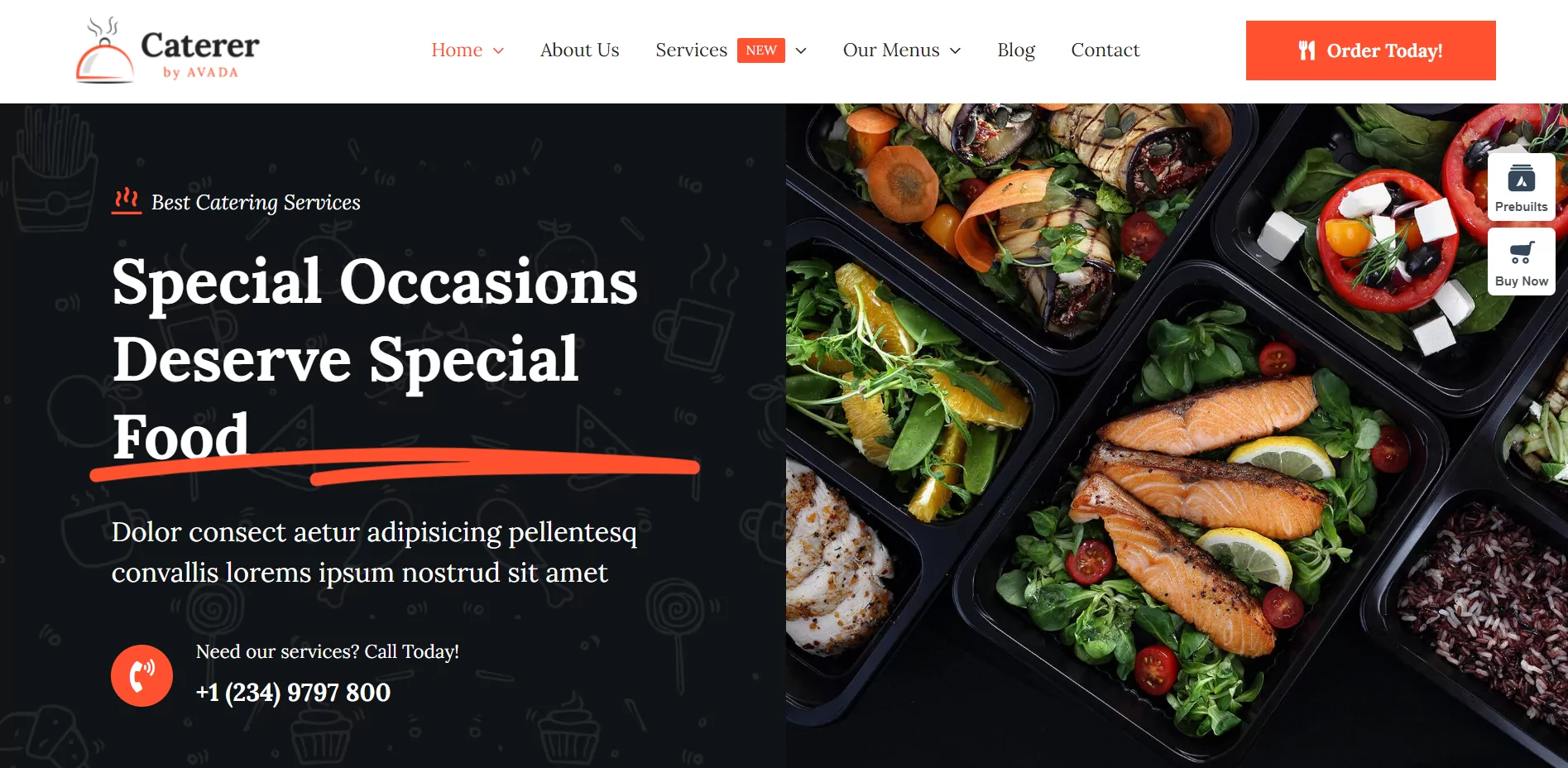
Avada It is a very popularmultipurpose theme, which includes its own drag-and-drop page builderIt has a one-click demo importer and a back-end editor. It has a one-click demo importer and a back-end editor.Avada also has 60 pre-built demo websites that you can import to get your site up and running quickly. This feature is very appealing to novices.Avada has over 70 design components and a built-in page builder that allows more experienced users to select from over 300 pre-built pages and make changes to them.
Enfold

WordPress Community RespondsMulti-purpose theme Enfold Excellent review.Enfold offers demo sites that users can install with a single click to quickly build and launch a variety of sites. It has fewer options than the other two themes - now offering 36 pre-built sites - but still offers a wide range.
The back-end page builder in Enfold works similarly to the back-end page builder in Avada, so you'll need to save changes and then preview them to see how they appear to front-end visitors. Site owners who don't need as much built-in functionality will value the simplicity of the dashboard and user experience.
Porto
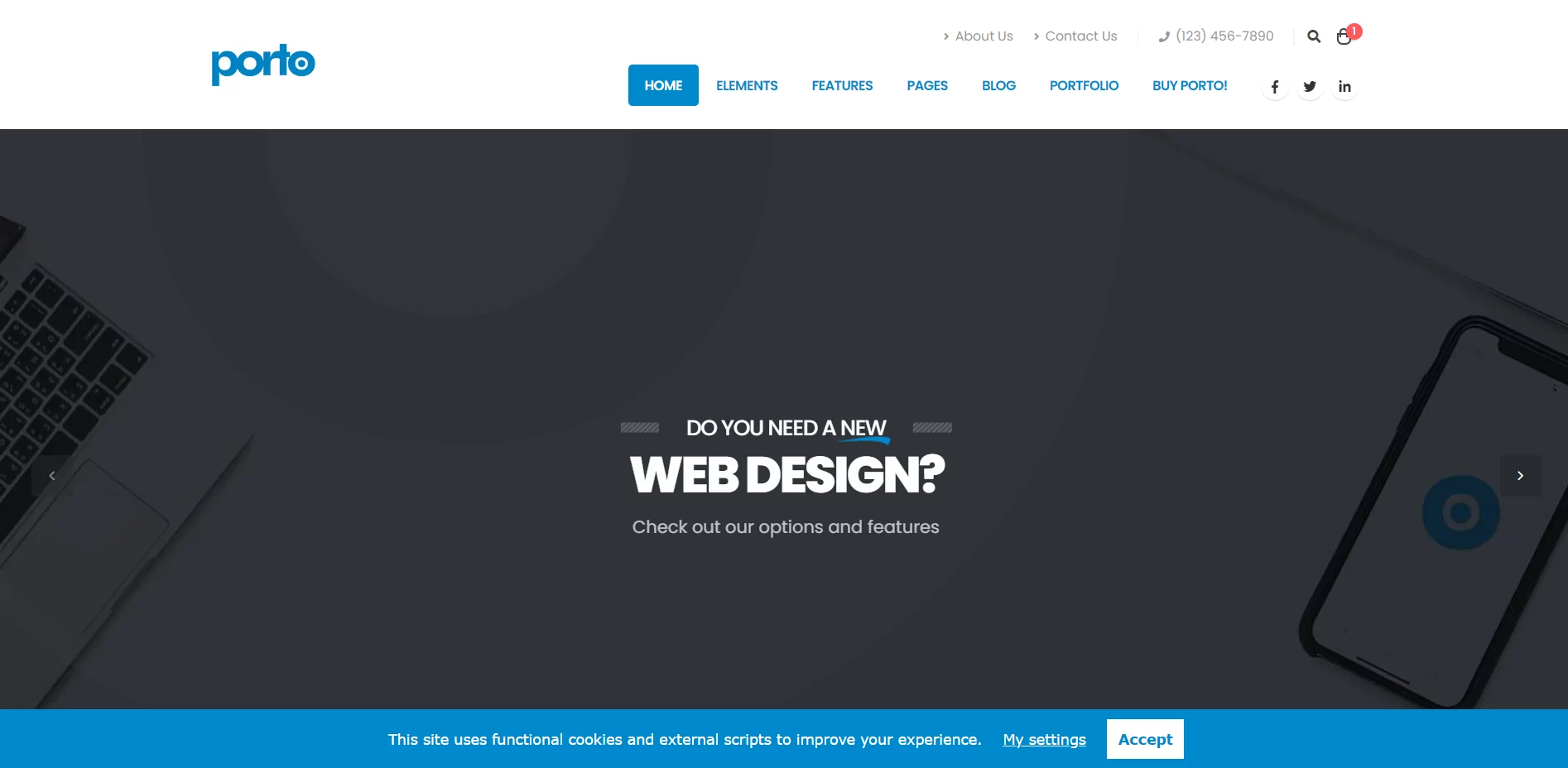
Responsive Theme Porto Great for setting up an online store。PortoOffers features and layouts created specifically for WooCommerce stores, which contrasts with some of the other multipurpose themes that include generic eCommerce features. It includes built-in tools for creating product pages, shortcodes for price lists, numerous options for eCommerce site footers, and more.
More than 30 of Porto's 99 demos have been created specifically for e-commerce sites. what makes Porto's demo installation unique is that you can select and combine components from multiple demos.
Daisy
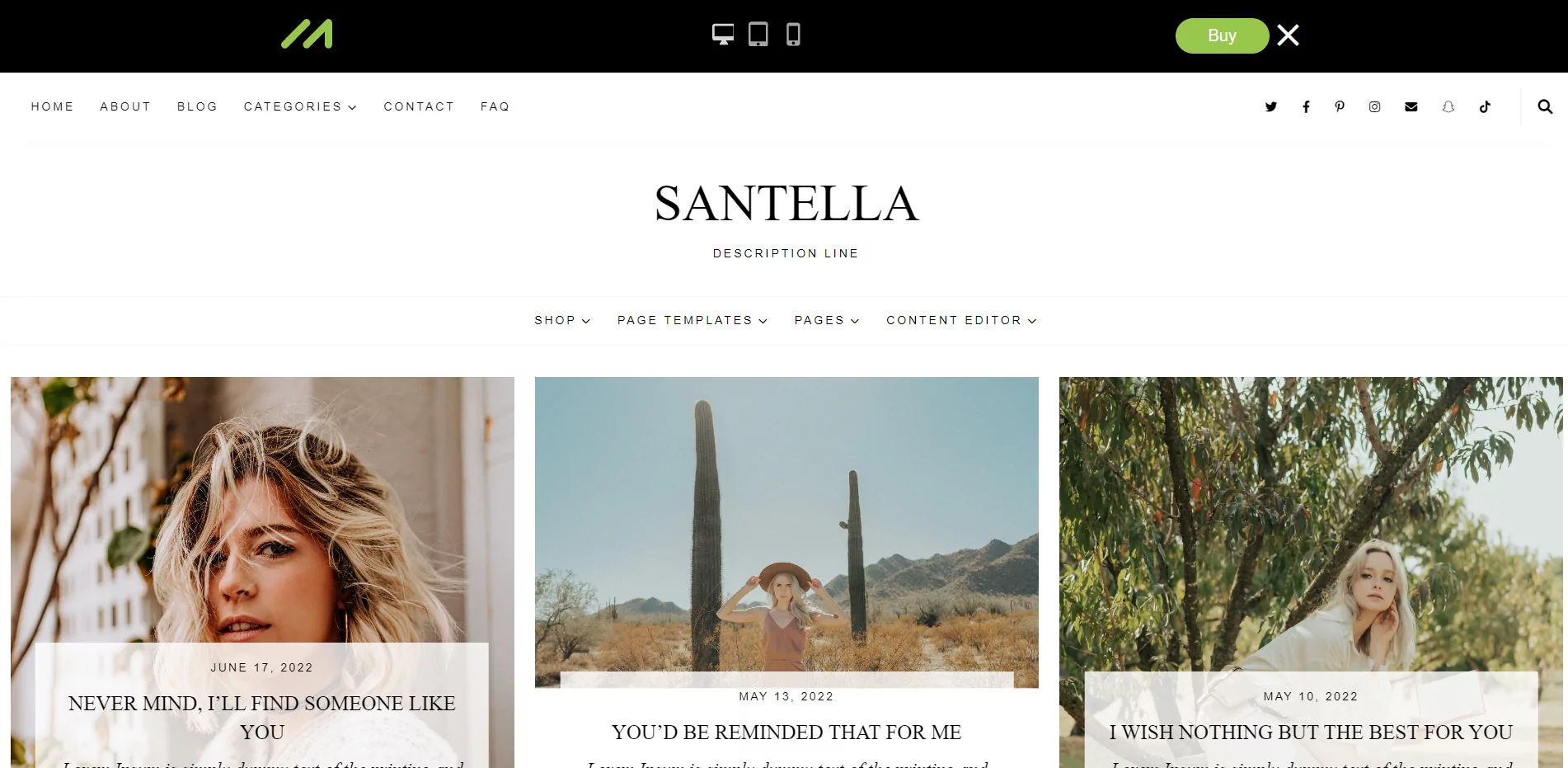
This responsive theme is perfect forblogger, as it has multiple header designs, fifteen blog designs, five post categories and preloaded social media icons.
You will have access to instructional video guides that will walk you through the process of creating your website, including installing Daisy to adjust your SEO settings once you make your purchase. This documentation, coupled with Daisy's simple functionality and clean look, makes the theme recognized for being user and beginner friendly.
Hestia
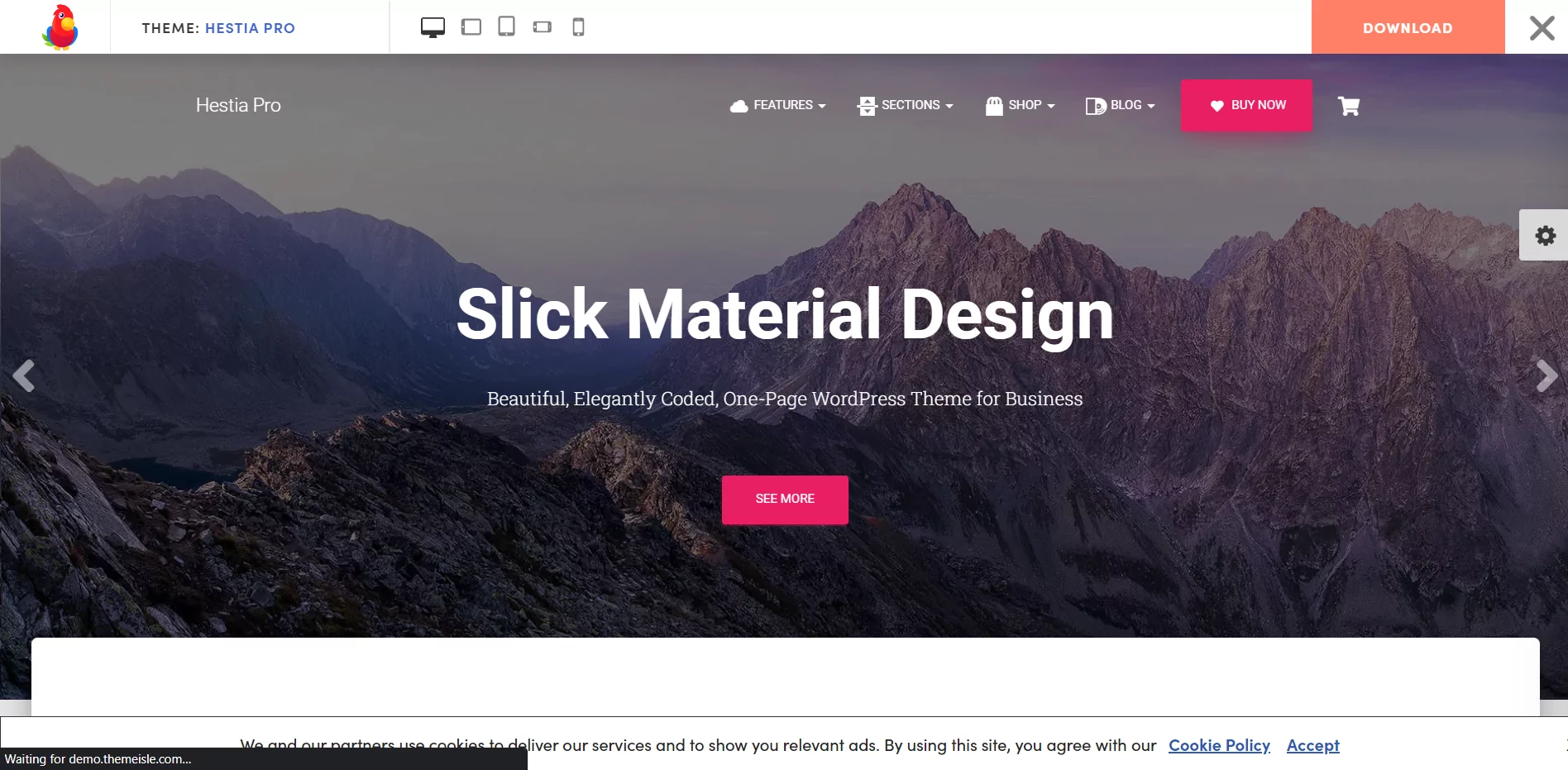
If you want aSimple, user-friendly websiteportrait Hestia Such a responsive one-page theme will be perfect for your needs.
Although Hestia is compliant with the Gutenberg editor, you can also use this theme to personalize your pages with page builders like Elementor. To enable you to quickly design and publish your site, Hestia also includes designated sections for your biography, customer testimonials, store, and other information.
The theme is available on Themeisle in both free and paid versions. If you want to use multiple headers, add video backgrounds and access more features, then you can purchase Hestia Pro.
Hestia is looking to establishPortfolio websiteThe best choice for small businesses and independent contractors who want to showcase their services because it has aUser-friendly design and affordable price。
How to install WordPress themes?
Installing the WordPress theme of your choice on your website is necessary to give it the look you want.
You can install WordPress themes in one of three ways:
- Select it from the WordPress theme catalog.
- Upload custom or premium WordPress.
- Or add a new topic via File Transfer Protocol.
How to customize your WordPress theme?
Depending on the theme you are using, you can make various adjustments to your WordPress site from the admin panel.
Let's start simple and see how to navigate to a WordPress custom page.
Go to the Appearance tab and go to Themes to start customizing. Select the active theme and click on the customization option next to the title.
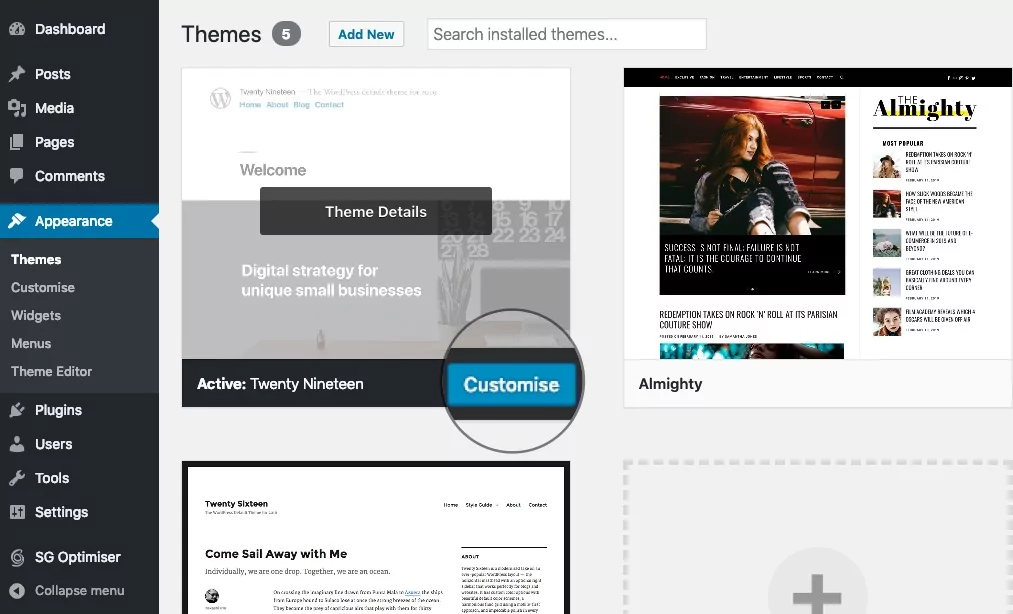
You can change the WordPress theme instantly on the page that appears. The left side shows a list of options and the right side shows a live preview of the site and how the changes will affect it.
You can change your site's title and tagline on the Theme Customization page to instantly see how it appears on your live site. Open the Site Logo group option and change the text there to accomplish this. As you continue typing, the new text will appear in the preview on the right.
Once you are satisfied with the results, click Publish.
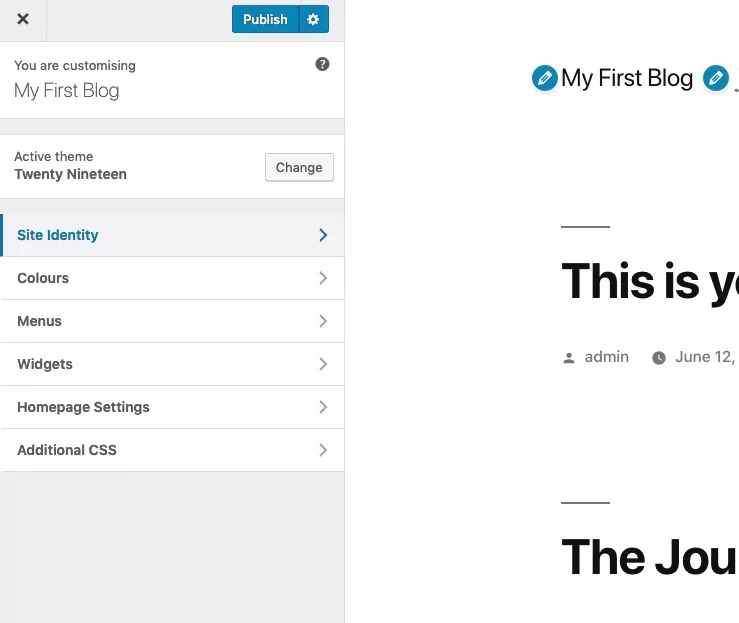
Depending on your theme, there may be additional options on this page. For example, you can change the header image and color scheme, add additional CSS, and more. When you're happy with the results, click Publish to keep the changes.
What is a WordPress theme made of?
If you're a business owner, it's unlikely that you've spent time thinking about creating a WordPress theme. However, if you're a developer, it's important to understand how the theme is structured internally.
A WordPress theme is a set of filesEach file has a specific function and they work together to provide a visually appealing and enhanced web experience. While WordPress theme files are technically located on the server, WordPress themes do have their design components and functionality on the WordPress CMS (Content Management System).
WordPress files have template files. It is called template files because they contain a varying number of files that will change the appearance of your online website without making any changes to the necessary WordPress features.
For example, there are PHP, CSS and GIF/PNG/JPG files.
PHP Documentationwill contain all the necessary code needed to issue instructions to other files on the site. They manage the overall organization of the theme and interact between the CSS and media files, providing them with instructions on how to do so.
CSS filesAllows you to change how the data design is displayed on the web page. Text size, button placement, and column formatting are just a few of the many things that can be adjusted in a CSS file.
What you see in WordPressimage file(GIF, JPG or PNG) are similar to the files you save on your system. The main difference is that they have descriptions that appear in a specific location on your web page and they are grouped together in a website folder.
These file formats are the ones you will see in the template. There are many different file types. In addition, as the site is developed, the number of files increases. Each time an image is uploaded, such as a new blog post, it will be a JPG/PNG file in the theme folder.
WordPress themes have some unique files that provide static material for specific pages. Each time a change is made to one of these files, the modification is reflected on the corresponding page or site URL. These so-called unique files include header.php, footer.php, sidebar.php, page.php, single.php, index.php, functions.php and tag.php.
WordPress Theme Detector: How to search for themes being used on your website?
Have you come across a web design you like and wondered what theme they use?
As you may have guessed, there is also a tool to do just that!
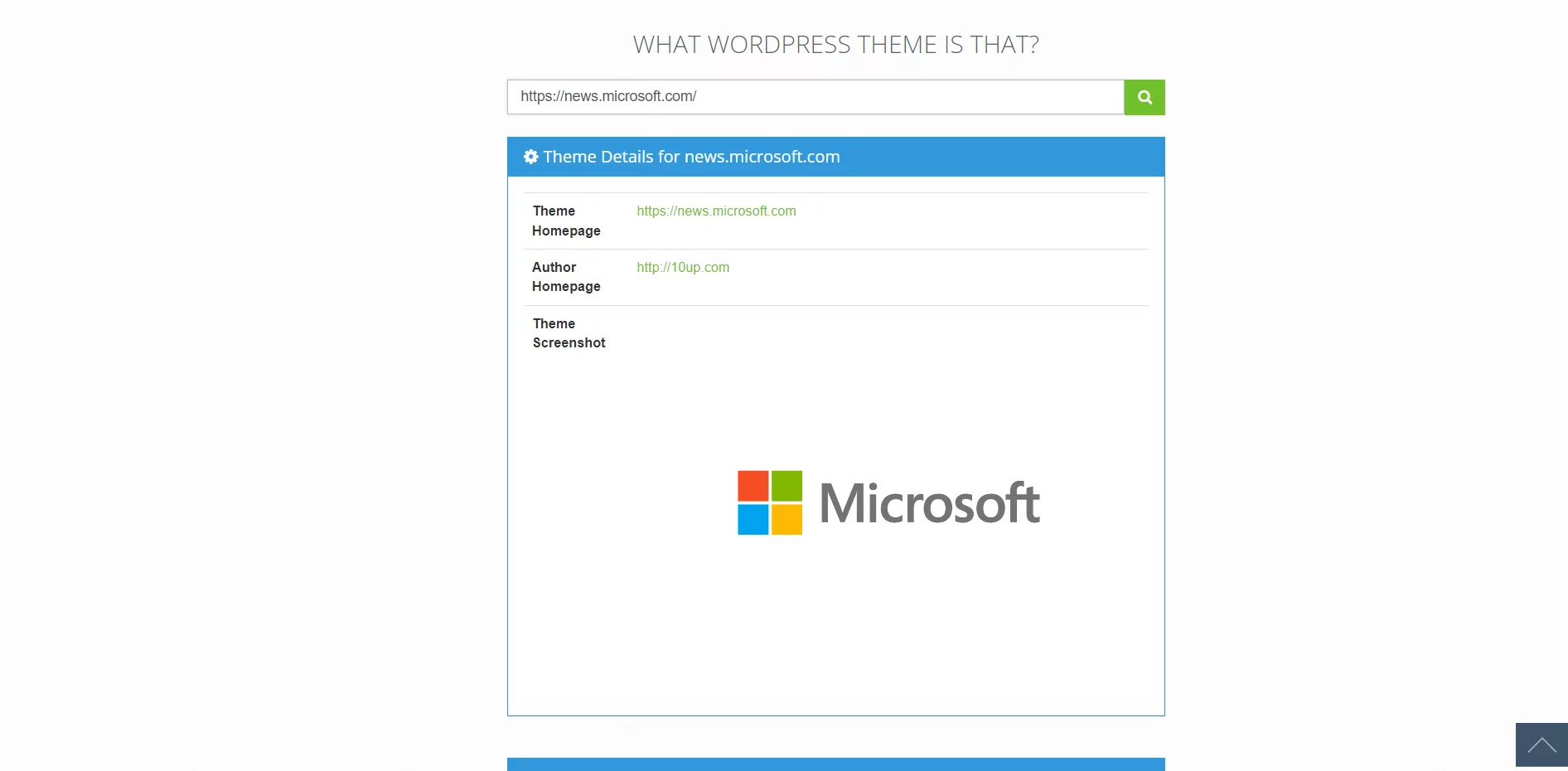
“What WordPress theme is that?”Tool is a WordPress theme detector that makes it easy to determine what WordPress themes are being used on a website.
All you need to do is enter the domain name of the site you think is a WordPress site and click Search. The output will provide you with information about the website's theme homepage, author homepage, and theme screenshots.
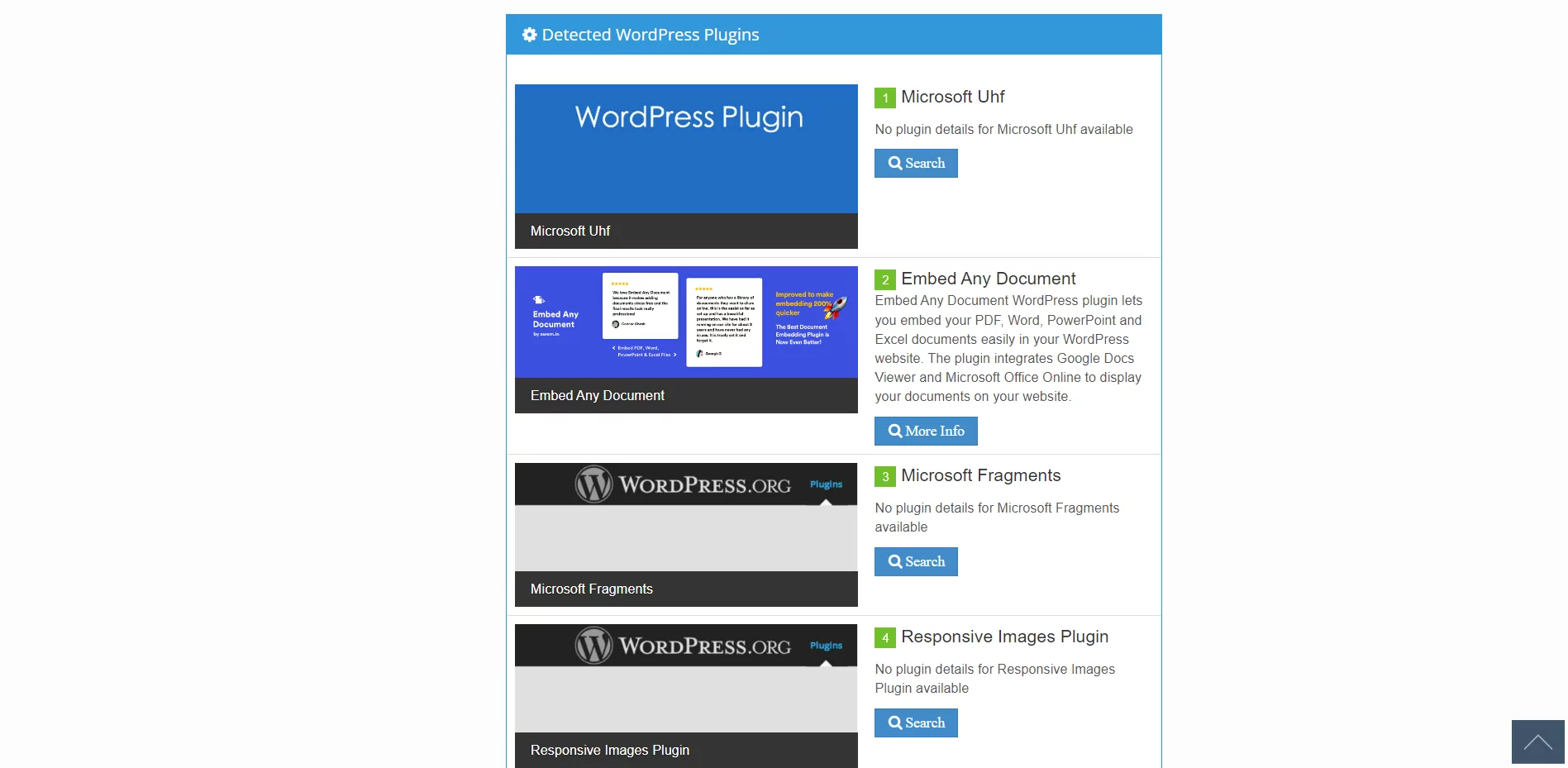
As you scroll down, you will notice more information about the plugins that may be used on the site.
summarize
- WordPress themes are useful extensions that you can use to change and manage the appearance, functionality and style of your WordPress website.
- It gives you the freedom to create anything from an e-commerce platform to a simple blog while maintaining the integrity of basic WordPress functionality.
- Although WordPress themes are created using a variety of necessary files, the typical user can purchase and install a theme without much technical knowledge.
- InRecommended WordPress Web Hosting Service ProvidersImprove your site's speed, security, SEO, and revenue with the help of WordPress-specific support that makes it easy to use.
Frequently Asked Questions
WordPress.com vs WordPress.org - Which is better for eCommerce?
If you are a blogger or business owner selling goods or services, go ahead and use a self-hosted site through WordPress.org. If you just want a free site to test things out or don't need customization or plugins, use WordPress.com.
Can I profit from a free WordPress.com website?
Yes. You can read about theHow to make money on WordPress.comFor more information on the
Can I transfer my WordPress.com website to WordPress.org?
Yes.It's here.Read more about it.

 English