


















Want to customize your WordPress theme while ensuring maximum security? No need to worry. We’ve got you covered. Read the article below, and you’ll be able to customize your WordPress theme using a child theme. The role of a WordPress child theme is to keep your customizations in a separate folder, so updating the parent theme won’t affect them.
What does subtheme mean?
Basically, a child theme is a reflection of any theme. The idea here is that whatever changes you make in the child theme, your parent theme will not be affected, but any changes made in the parent theme will be reflected in the child theme.
Whether you need to use a child theme
Without a doubt, using a child theme is the safest way to modify a theme. The best part is that even if your parent theme is updated, your changes will not be deleted. If you have any problems modifying a child theme, you can easily delete it to return to the parent theme.
Setting up a WordPress child theme
You can set up WordPress child themes manually or with the help of plugins.
One thing you need to remember is that it won't work until your parent theme appears in the Themes page under Appearance.
Method 1: Manually create a child theme
#1: First, you have to create a new folder and name it according to your wishes, e.g. “twentytwentyfour-child”.
#2:Next you must create a file and name it “style.css”, note that this file must exist.
#3:Now you need to open this recently created file and enter the following information in it.
/*
Theme Name:     Twenty Twenty-Four Child
Theme URI:      https://example.com/twentytwentyfour-child/
Description:    This is a child theme for Twenty Twenty-Four, created by me.
Author:         Your Name
Author URI:     https://example.com
Template:       twentytwentyfour
Version:        1.0.0
*/
Key Parameter Explanation.
Theme Name:.(required)The name of your child theme.Template:.(required)this ismost criticalof a line. It mustperfect correspondenceThe directory name of its parent topic. For example, the parent topic istwentytwentyfourHere, fill in the blanks.twentytwentyfour; the parent theme isDiviHere, fill in the blanks.DiviTheCase must be consistent。Description: A short description of the sub-theme.AuthorYour name.Author URI: Your Web site address.Version: The version number of the subtopic.
Although the child theme's CSS is loaded automatically, theIt doesn't automatically inherit all the styles of the parent theme. A very common and recommended practice in order to have a complete and reliable starting point for your subtopics is.First import the full stylesheet of the parent theme。
You can add custom CSS to yourbeforehandUse @import rules to accomplish this.
/*
Theme Name:     Twenty Twenty-Four Child
Theme URI:      https://www.likacloud.com/twentytwentyfour-child/
Description:    This is a child theme for Twenty Twenty-Four, created by me.
Author:         Your Name
Author URI:     https://example.com
Template:       twentytwentyfour
Version:        1.0.0
*/

/* 导入父主题的样式以确保设计基础一致 */
@import url("../twentytwentyfour/style.css");

/* 自定义样式从这里开始 */

/* 1. 更改文章标题颜色 */
.wp-block-post-title {
    color: #1a4f6e;
    font-weight: 700;
}

/* 2. 更改网站背景色 */
body {
    background-color: #f8f9fa;
}

/* 3. 更改主内容区域的宽度 */
.wp-block-group.alignwide {
    max-width: 1280px;
}

/* 4. 自定义链接颜色 */
a {
    color: #d14545;
}
a:hover {
    color: #a23434;
    text-decoration: none;
}
take note of
even though @import is the simplest approach, but it is not optimal from a performance point of view (since it prevents parallel loading). A more advanced approach is to use the wp_enqueue_style() function in the subtopic's functions.php file adds the stylesheet of the parent theme to the queue. However, for starters, using the @import It is completely feasible and easy to understand.
Like this:
<?php
// 确保在正确的钩子上加载样式
add_action('wp_enqueue_scripts', 'enqueue_parent_and_child_styles');

function enqueue_parent_and_child_styles() {
    // 加载父主题样式
    wp_enqueue_style('parent-style', get_template_directory_uri() . 'https://www.likacloud.com/style.css');

    // 加载子主题样式,并指定依赖于父主题样式
    // 这样可以确保子主题样式在父主题样式之后加载,保证样式覆盖生效
    wp_enqueue_style('child-style',
                     get_stylesheet_directory_uri() . 'https://www.likacloud.com/style.css',
                     array('parent-style'), // 依赖关系
                     wp_get_theme()->get('Version') // 版本号,可选
                    );
}
Code Explanation:
add_action('wp_enqueue_scripts', 'enqueue_parent_and_child_styles'): Mounting custom functions to WordPress style loading hooksget_template_directory_uri(): Get the URL of the parent topic directoryget_stylesheet_directory_uri(): Get the URL of the child theme directory (when the child theme is active)array('parent-style'): Declare child theme styles as dependent on parent theme styles to ensure proper loading order
This approach compares @import is more efficient because it allows browsers to load stylesheets in parallel and better manage dependencies between styles.
You can simply add this code to the child theme's functions.php file (or create one if it doesn't exist), while keeping your existing child theme style.css Header annotation information is sufficient.
All other details can be changed to suit your wishes.
Once you've done this, you should go to Appearance >> Themes and check if your child theme has been created. If it is, congratulations, you can activate it to test if it inherits the design of the parent theme.
Method 2: Use plugin to create child theme
If doing this manually doesn't appeal to you, you're free to use a free WordPress plugin to do the work for you. There are tons of free plugins out there that can create child themes for you and save you from having to do all of this manually. We're going to useChild Theme Configuratorplugins, but you are free to use any of the available plugins.
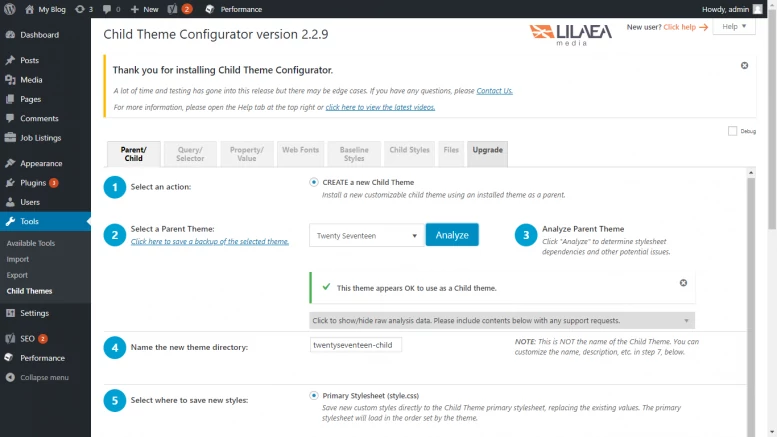
#1: First, you need to download Child Theme Configurator Plug-ins.
#2: Now log in to your website and access your dashboard.
#3: Navigate to Plugins and then the Add New option.
#4:Now, you have to upload the plugin you just downloaded by clicking on the “Upload Plugin” option and then activate it.
#5:It is important to make sure that you activate the theme for which you want to make a child theme.
#6: This can be done by simply navigating to the Tools section and clicking on a subtopic.
#7: Now click on Analyze button and create your child theme as per the settings mentioned in the plugin.
#8: Now you have to click on “Create new child theme” option.
Editing other template files
You must write this function in the child theme in case you wish to add any custom functions to it. Feel free to use the child theme to create any structural or layout changes to the parent theme.
Assuming you created the twentytwentyfour child theme that you wish to change the way it displays single pages. The location of the single page is twentytwentyfour-child/template-parts/content-single.php
#1:In the child theme folder, create a content-single.php. you need to be extra careful with the name and structure. They need to be the same as the parent theme in order to override them.
#2: Next, you'll need to create a new folder and place this file in it, but be particular about the path and make sure it looks exactly the same as the parent theme's path.
#3: That's it. In this step, all you have to do is write your wish code in content-single.php, which will overwrite the parent file.
Caution: Make sure that the file name and folder path must be the same.
We hope you can now easily create child themes. If you have any questions, please addQQ Group 1398231Discussion.

 English