











VPS, or Virtual Private Server,is a hosting solution that bridges the gap between cost-effective shared hosting and resource-rich dedicated servers. In VPS hosting, multiple independent virtual servers operate within a single physical server. It offersmedium-sized businessesandhigh-traffic websitesthe possibility of obtaining powerful functionality and flexibility akin to a dedicated server at a lower cost.

Consider upgrading to a VPS when you:
- Experience traffic surges that exceed the capacity of shared hosting
- Seek advanced customization and stricter security controls
- Prepare your website for scalable growth and wish to ensure consistent performance
From emerging startups and passionate bloggers to demanding e-commerce sites and data-intensive platforms, VPS provides the infrastructure and dedicated resources to ensure every digital venture runs seamlessly.
Ready to experience the benefits of VPS?Start with our recommendedVPS hosting plansand elevate your website performance immediately! UltaHost is currently our top-recommended VPS service provider.


pivot
- 当您遇到高流量或需要托管多个网站时,切换到 VPS 主机是明智之选,因为它提供快速速度、可扩展资源和增强的安全性。
- 选择 VPS 方案时,关键因素包括理解托管与非托管主机的区别,考量服务器性能参数(CPU、内存、带宽),并通过运行时间保证来验证其可靠性。
- 考虑评估服务、资源、能力、安全性、备份功能、客户支持质量及方案成本。
- VPS,即虚拟专用服务器,是介于共享主机与独立主机之间的中间解决方案,以更经济实惠的成本提供更丰富的资源和控制权限。
- VPS 托管允许在一台服务器上创建私有分区,随着需求增长,可实现定制化和扩展性。
How does VPS work?
VPS utilizes specializedvirtualization technologyto partition a single physical server into multiple virtual servers. We use the term“virtual”because these partitions exist only at the internet level. On the hardware side, a single server provides resource support for numerous virtual servers.
“The ”private"element is introduced because each user's resources are allocated to their own isolated partition. Other users cannot access their resources, nor can they access the resources of others.
Using a VPS is akin to renting a suite in a building.The entire building (physical server) houses multiple suites (virtual servers), but each suite is independent, offering tenants (websites) privacy, exclusive resources, and the freedom to decorate (customize) as they wish.
- A VPS server is private, allowing you to reconfigure the hosting environment, install preferred applications, and make changes at the root level.
- Hosting service providers offer various types of VPS packages, each with unique features to attract different segments of VPS users with varying needs.
- If the resources allocated to a user's virtual server are insufficient, they can request additional resources from the VPS provider.
- If demands exceed the capacity of the partitioned virtual server and the budget allows, upgrading to a dedicated server is a viable option.
Advantages and Disadvantages of Virtual Private Servers
Advantages
- Dedicated resources within a shared environment
- Consistent performance and speeds superior to shared hosting
- More affordable than dedicated servers
- Excellent cost-effectiveness
- Security and data protection in an isolated environment
- High level of control over the server (root access)
- Multiple customization options
- Easily scalable services
Disadvantages
- More expensive than shared hosting
- Unmanaged VPS requires extensive technical knowledge
- Improper server configuration may pose security risks
1. VPS vs. Shared Hosting
Shared HostingShared hosting is a web hosting service where a single physical server is allocated for use by multiple users. Each user will utilize the same operating system and server configuration as other users and must share the same resources provided on the server with others.
Advantages
- Most economical and easiest to manage
- Perfect hosting service for beginners
- Websites require minimal resources and no server customization
Cons
- Offers minimal flexibility and highest risk
- Server resource consumption
- Inability to configure your server environment or install preferred applications
anVPS hosting planscan eliminate these risks.
- You will receive your own dedicated server compartment along with the allocated resources within it.
- It is more expensive than shared hosting, but the benefits often outweigh the cost.
Therefore, in the comparison between VPS and shared hosting, VPS hosting clearly wins due to its dedicated resources, customization options, and enhanced security.
2. Dedicated Server vs. VPS Hosting
Dedicated (stand-alone) serversDedicated servers represent the top-tier choice in website hosting solutions, offeringexceptional performance and security, allowing users to exclusively enjoy all the advantages of a single physical server. They come at a high price, with businesses typically payinghundreds to tens of thousands per month.。
Although some businesses may consider switching to dedicated servers,many VPS hosting plans today offer ample resources, including: sufficient storage space, customization options, and powerful CPU cores, all at a lower cost.
Dedicated servers offer unparalleled security and freedom, but for most businesses and individuals,VPS hosting is sufficient to provide ample flexibility.Even large e-commerce platforms and web-based applications can run efficiently on high-quality VPS hosting.
In the comparison between VPS and dedicated servers, VPS comes out on top. If your focus is solely on acquiring more resources without paying the high costs of dedicated hosting, opting forpremium VPS hostingwould be a wiser decision.
3. Cloud Hosting vs. VPS Hosting
Cloud Hostinginvolves using multiple cloud servers to host a single website. Each cloud server holds the latest version of the website. When a visitor accesses the site, the provider automatically directs them to a server with lower utilization. This results in faster website loading speeds and an excellent user experience for visitors.
The comparison between VPS and cloud hosting can be complex, as the lines are not always clearly defined. In fact,some providers offer VPS hosting services on cloud infrastructure,meaning your website is powered by a cluster of virtual servers.
Cloud VPS Hosting:This option supportsresource allocation on demand,thereby enhancing website performance and reliability. It employs apay-as-you-go model,which can lead to increased costs during traffic surges or periods of high resource demand.
Traditional VPS:In this setup, your monthly resources are pre-allocated based on the chosen plan. If you need additional resources, you must contact your service provider and pay extra fees.
In the debate between VPS and cloud hosting, the cloud VPS hosting solution emerges as the clear winner due to its superior reliability, performance, and scalability.
4. VDS Hosting vs. VPS Hosting
As mentioned earlier, a VPS is an isolated partition on a physical hardware server. A VPS has its own allocated resource limits and offers flexibility.
VDS—Virtual Dedicated Server—is a type of virtual server that encompasses an entire server. You receive all the server's resources along with the virtualization layer.
The main advantage is zero latency in performancebecause you get dedicated server resources as needed. It's akin to having a dedicated server managed by the provider. This is the preferred solution for companies and individuals looking to host large-scale applications and high-traffic websites.
The biggest drawback of VDS hosting is its higher cost.Since the provider cannot create another virtual server on the same hardware, they pass on the full maintenance costs to your plan.
If you desire a dedicated server without the need to manage it yourself, VDS hosting is the ideal solution for you. However, unless you require massive hosting resources, the costs associated with VDS may outweigh its benefits.
After comparing VPS and VDS, we still consider VPS to be the better choice. While VDS is a good option, VPS hosting is sufficient for the needs of most businesses.
5. VPS vs. WordPress Hosting
WordPress hosting plans are service packages specifically designed for hosting WordPress websites. These plans typically feature one-click installation, support for WordPress plugins, and the WP command-line interface. They are favored by WordPress site owners because the environment is pre-configured for WordPress.
A Virtual Private Server operates in an open environment, so you can use a VPS for your WordPress website. You simply need to configure the server environment according to your site's requirements and then follow the step-by-step guide on how to install WordPress on a VPS.If you are looking for a hosting location pre-configured for WordPress websites, you should check out
cloud hosting offers.However, these plans may not provide sufficient resources to run large e-commerce stores, applications, and high-traffic websites.When Should You Switch to VPS?
Generally, you should consider switching to VPS hosting when your server needs exceed the resources provided by a shared hosting plan. Beyond resources, VPS hosting plans offer several unique advantages, including:
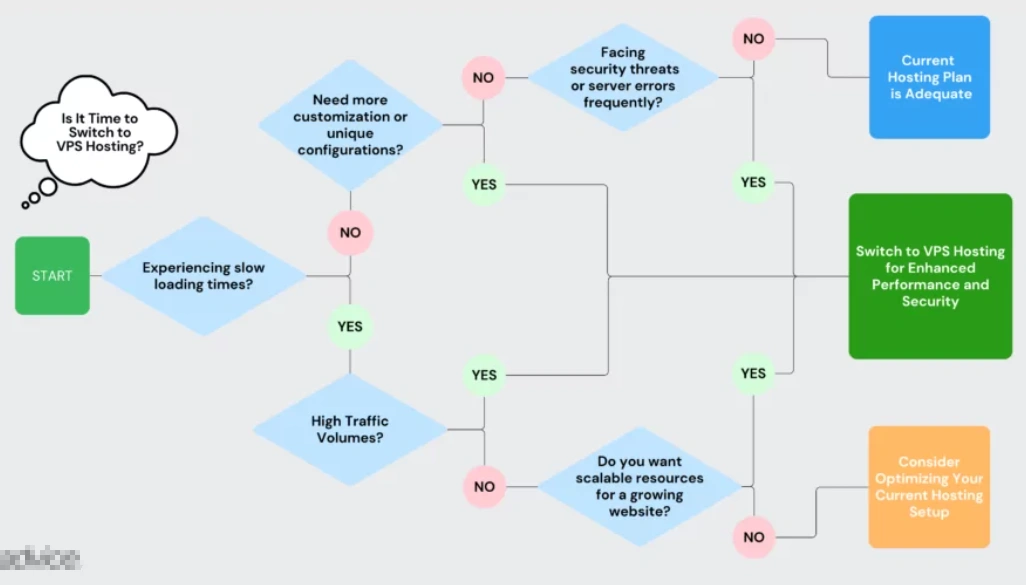
Fast Loading Speeds:
- If your website slows down during high-traffic periods, you need more resources than your current plan provides. Scalable Hosting Resources:
- As you add features to your website, it consumes more resources. VPS hosting allows you to seamlessly scale your website's memory, storage, processing power, and bandwidth to avoid performance lag. Hosting More Websites:
- If you wish to run multiple websites on a single hosting plan, VPS hosting is the "minimum" hosting solution you should consider.Security:
- The primary security threat in shared hosting comes from other users sharing the server with you. If they inadvertently download malware onto the server, it could also affect your website, making you vulnerable to hacking, viruses, data breaches, and other harmful incidents. VPS completely eliminates these risks.Managed VPS plansfurther integrate enhanced security features to protect against more powerful and sophisticated attacks.Customization:
- If you need to configure your hosting environment according to unique requirements, you should choose VPS. It grants you the freedom and permissions for comprehensive customization within the server environment. Eliminating Server Errors:
- If you encounter server errors on a shared hosting plan, it means someone on the server is overusing resources, perhaps running too many background processes or using highly specialized antivirus programs. It could even be you consuming too many server resources. VPS provides ample resources to run all your applications and security software while shielding you from the activities of other users. Cost-Effectiveness:
- Dedicated servers offer significant advantages in all the above scenarios but can be prohibitively expensive. VPS is a cost-effective alternative that allows you to enjoy all these benefits without the high costs. What to Look for When Choosing a VPS Plan
The quality of your VPS hosting will significantly impact your website's performance, customization, security, and user experience. You need to ensure the hosting provider offers all necessary features.
While you might be looking for specific qualities like ease of use, server performance, or reliability, we recommend finding a provider with a balanced set of qualities across the board.
To guide you in the right direction, we have listed some key considerations when choosing a VPS hosting service provider.
1. Managed VPS vs. Unmanaged VPS
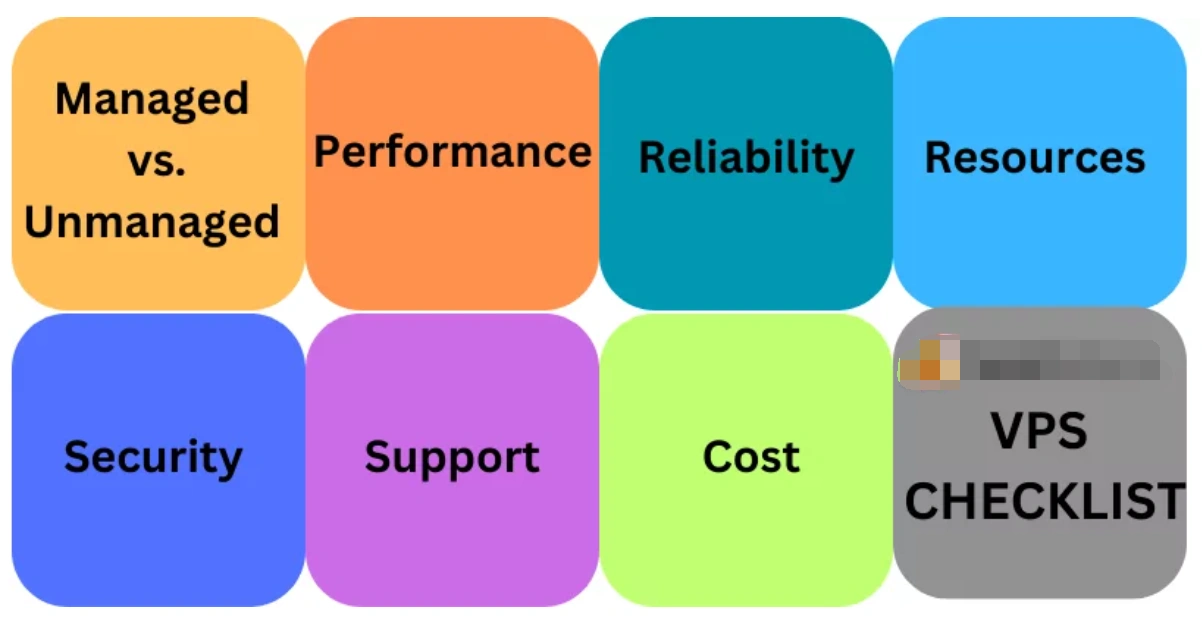
First, you need to decide whether to choose managed or unmanaged VPS hosting.
Managed VPS Hosting
非托管 VPS 托管(Also known as self-managed VPS hosting) is a cost-effective option where you are responsible for managing and monitoring your virtual server space. Although the initial cost may be low, dealing with major security threats can be expensive. Therefore, unless you possess both the technical expertise and sufficient time, we do not recommend choosing a self-managed VPS hosting plan.
Semi-managed VPS Hostingis a middle-ground option. The provider handles some server management tasks, while the rest are your responsibility. As you might expect, its cost is lower than that of a fully managed VPS plan, while also sharing some of the responsibilities with you. Tech enthusiasts with the time and tools to handle server tasks may choose this option. For beginners and busy business owners, we highly recommend fully managed VPS solutions.
2. Performance
The second key factor is server performance. Your VPS performance depends on several factors, with the three most important being CPU, memory, and bandwidth capacity.
- CPU:When selecting a processor, do not be misled by its speed. Prioritize processors that offer more cores. The more cores a processor has, the more processes it can run simultaneously.
- Memory:Regarding RAM, there is no upper limit. However, if you need to scale down the configuration due to cost considerations, ensure the allocated memory is sufficient to support your workload requirements.
- Bandwidth Capacity:Your bandwidth capacity determines how frequently website visitors can access your site. For a medium to large website expecting around 100,000 page views per month, you should aim for approximately 5 GB of bandwidth. Large e-commerce websites and web-based applications should not have less than 1 TB of bandwidth capacity.
3. Reliability
You need to know that your server will remain operational at all times. Most VPS providers offer uptime guarantees. An uptime guarantee tells you the percentage of time you can expect your server to be running within a year.
For example:If the server uptime is 99.5%, the maximum possible downtime per month could be 3.65 hours. This figure translates to a cumulative downtime of 1.83 days per year.
Remember, uptime guarantees are only estimates. Some servers can run continuously for long periods without expected downtime. However, sometimes service providers must perform scheduled maintenance or upgrade servers to protect against threats.
If downtime in a given month exceeds the period specified in their uptime guarantee, some providers offer credits or refund the monthly fee. UseUptime Tracking Softwareto measure downtime during the month to determine if you qualify for a refund. You can also use this data to decide whether you need to switch to a more reliable VPS provider.
draw attention to sth.
通常来说,应避免选择服务可用性保证低于 99.5%的 VPS 提供商。
我们还建议您查阅关于其运行时间保证的专家评测和用户评价。
4. Services, Resources & Capabilities
Once you are satisfied with the hosting type, performance, and reliability, you can look at the other resources offered by the hosting provider. Also, pay attention to the additional services included in each plan. Some of these services are free, while others are add-ons that require extra payment.
As a general rule of thumb, you should ensure the provider can supply all the resources you need now and in the foreseeable future. While switching providers is possible, choosing one that can support your business growth continuously will be more convenient in the long run.
Additionally, you need toensure the hosting plan is compatible with your preferred operating system. You will choose between Linux VPS and Windows VPS.
- Linux-based VPS hosting plans are the most popular and are excellent for building websites based on MySQL and PHP.
- Windows VPS hosting solutions are suitable when your workloads require Microsoft SQL Server and ASP.Net.
5. Security & Backups
Website security is a top priority that no one should compromise on. The first step is to check the security features of the VPS hosting plan, such as Cloudflare CDN, regular backups, and DDoS attack protection.
- Understand whether backups areautomatic ormanual.
- Consider the location of the backups. Some providers offerremote backups, which provide an extra layer of security.
- If using a self-managed VPS hosting plan, confirm if there areadditional charges for backups, and assess the ease of performing and restoring backups.
6. Customer Support
Whether you are a complete novice in server management or have an in-house team of experts, customer support always comes in handy.
- The goal is to provide round-the-clock support
- available via email, phone, ticketing system, and live chat.
However, some providers may only support two or three of these channels. Others might offer human assistance only during specific hours on weekdays.
There are two ways to understand how convenient and effective a provider's support channels are. One is to proactively contact their customer service during a free trial or money-back guarantee period; the other is to read reviews from HostAdvice experts and users.
7. VPS Cost
When comparing VPS prices, you need to pay attention to several key elements that will help you determine whether a VPS hosting plan offers good value for money. These mainly include:
- Renewal price
- Features in each plan
- Cost of downgrading or upgrading plans
- Cost of essential add-on features
Price vs. Quality: Which is More Important?We recommend prioritizing quality. Many VPS providers attract users with low prices but deliver poor performance. However, a high price does not always guarantee good performance either.
It is advisable to look for a hosting provider or plan that meets your specific needs and offers convenient scalability. Once these are determined, you can compare their prices to choose the option that best fits your requirements.
warnings
- 要警惕那些提供“无限”功能的计划,因为通常都存在限制。
- 免费 VPS 方案要么是付费方案的体验版,要么是独立方案。我们不推荐使用,因为它们性能有限,可能对您网站的 SEO 和用户体验产生负面影响。若您预算紧张,请查看我们推荐的最佳廉价 VPS 主机。.
What is a VPS Used For?
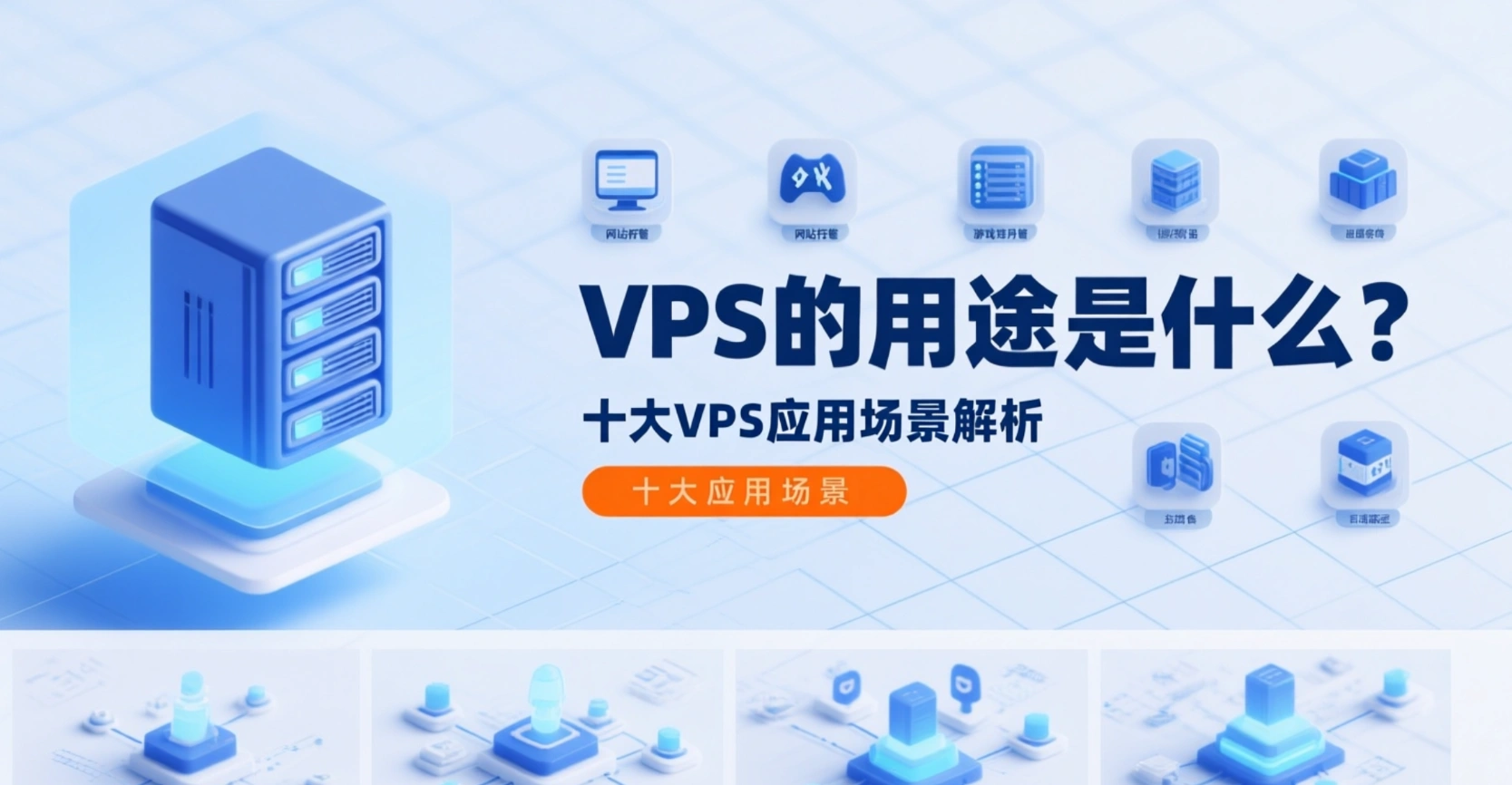
A Virtual Private Server occupies the ideal middle ground between basic shared hosting and high-end dedicated servers. Besides hosting websites, VPS has numerous additional use cases.
The following are the main use cases for VPS, but for an in-depth understanding, please refer to our detailed article onVPS Uses Explained: Top 10 Key Applications.
- Hosting High-Traffic Websites
- VPS Gaming Server
- Developing and Testing Code & Applications
- API Flexibility
- Access to Multiple Domains and IP Addresses
- Encrypted Wireless Connection
- Image Server
- Ethical Hacking Tools
- VPS Seedbox
- Offshore VPS
Here is an example:Developers can run Android virtual devices on a VPS for testing. In fact, some VPS Android emulator hosting solutions are well-suited for mobile application testing in the cloud.
Final Decision
虚拟专用服务器(VPS)融合了共享主机方案的经济性与专用服务器的优势,是那些寻求可靠私有资源又不想花费过多的用户的最佳选择。
当然,选择合适的 VPS 提供商至关重要,因为错误的 VPS 托管方案会侵蚀所有优势,给您留下苦涩的余味。在选择 VPS 主机提供商时,您应关注 VPS 托管的类型、性能与可靠性、功能以及客户支持。在找到三到四个优秀选项后,您应选择性价比最高的方案。
虚拟专用服务器(VPS)或许正是您的网站或应用程序提升性能、吸引更多网络流量所需的选择。多数服务商提供退款保证或试用期,让您能测试首选方案,并最终确定最符合您需求与技能水平的服务。
Next Steps:
- From ourRecommended VPS ProvidersSelect a VPS Plan
- View Domain Activity
- View Popular Cloud Website Building Services
Frequently Asked Questions
What is the Difference Between VPS and Reseller Hosting?
Reseller hosting refers to the process of leasing web hosting resources from a hosting provider and then reselling them to third-party clients for a fee. Essentially, you can become a web hosting provider without owning the hardware or software required to host websites.
What is Root Access in Web Hosting?
Root access refers to administrator-level control. A person with root access to a server has the authority to modify other users' access permissions, read or write any files on the system, perform upgrades, and install or uninstall software. This privilege is only available with higher-tier web hosting services, such as VPS, VDS, and dedicated server hosting.
When is Shared Hosting Better Than VPS Hosting?
The only aspect where shared hosting is superior to VPS hosting is price. Overall, shared hosting is significantly cheaper than VPS hosting. However, a lower price does not always mean better value. Shared hosting plans have limitations in terms of resources, flexibility, and support. Once your needs exceed the scope of a shared hosting package, an upgrade is necessary regardless of the price.
When and How to Migrate from Shared Hosting to VPS Hosting?
If you require root access to the server, more bandwidth and disk space, or if your website is running slowly, then considering a migration from a shared plan is a good option. Please follow the step-by-step guide for migrating from shared hosting to VPS hosting.
What Makes VPS Hosting So Flexible?
The flexibility of VPS hosting stems from its mode of operation. Unlike shared hosting plans, where users cannot guarantee the amount of resources available, VPS allocates dedicated hosting resources to each server partition. Users are free to utilize the allocated storage space, memory, and processing power according to their individual needs. They can also install their own software, implement special configurations and security features, and flexibly scale resources based on business growth.
Who is VPS Hosting Suitable For?
VPS hosting is an ideal choice for any company or individual seeking reliable and cost-effective website hosting services. Although it is not the cheapest type of website hosting, it is the most cost-effective option due to its excellent hosting features, flexibility, and affordability. It is an excellent choice for users who need a cheap hosting solution that can scale as their server requirements grow.
However, specific market segments will find VPS to be their only reasonable web hosting choice. These segments include rapidly growing web applications, managed service resellers, emerging websites, small businesses, and budding startups.
What is the Difference Between VPS and RDP?
RDP stands for Remote Desktop Protocol, which allows users to connect to a remote computer from different locations, with the aim of enhancing security, data transfer, and encryption capabilities. VPS, on the other hand, enables users to run multiple virtual server operating systems on the same physical server. For more details, please refer to our ultimate comparison of VPS vs. RDP.



 English