











Site Map (Sitemap) is a "navigation directory" of all the pages of a website, which can actively tell the search engine: "My website has these contents, please include them as soon as possible". For new websites or frequently updated websites, submitting a sitemap is a great way to makeInternet search engineYoast SEO can automatically generate sitemaps, and this section takes Bing as an example to take you through the whole process from generation to submission, suitable for global users or Chinese users who are used to using Bing.
I. What is a sitemap? Why should I submit it?
A sitemap is like an 'instruction manual' to the search engines, listing all the pages in the site that need to be included (articles, pages, categories, etc.).
The 3 main benefits of submitting:
- Accelerated Inclusion: Newly published content is found faster (what might have taken days can be crawled in a few hours after submission).
- Avoidance of omissions: Ensure that important pages (e.g., home page, core articles) are not ignored by search engines because of the deep hierarchy.
- weighting: Tell search engines which pages are more important (e.g., home page is weighted higher than regular articles) through the map structure.
Yoast SEO generates maps in XML format (with the suffix .xml), which is a format common to all search engines and requires no modification.
Step 1: Generate a sitemap with Yoast SEO
Yoast SEO automatically generates and updates the sitemap in real time, no need to create it manually, just get the address:
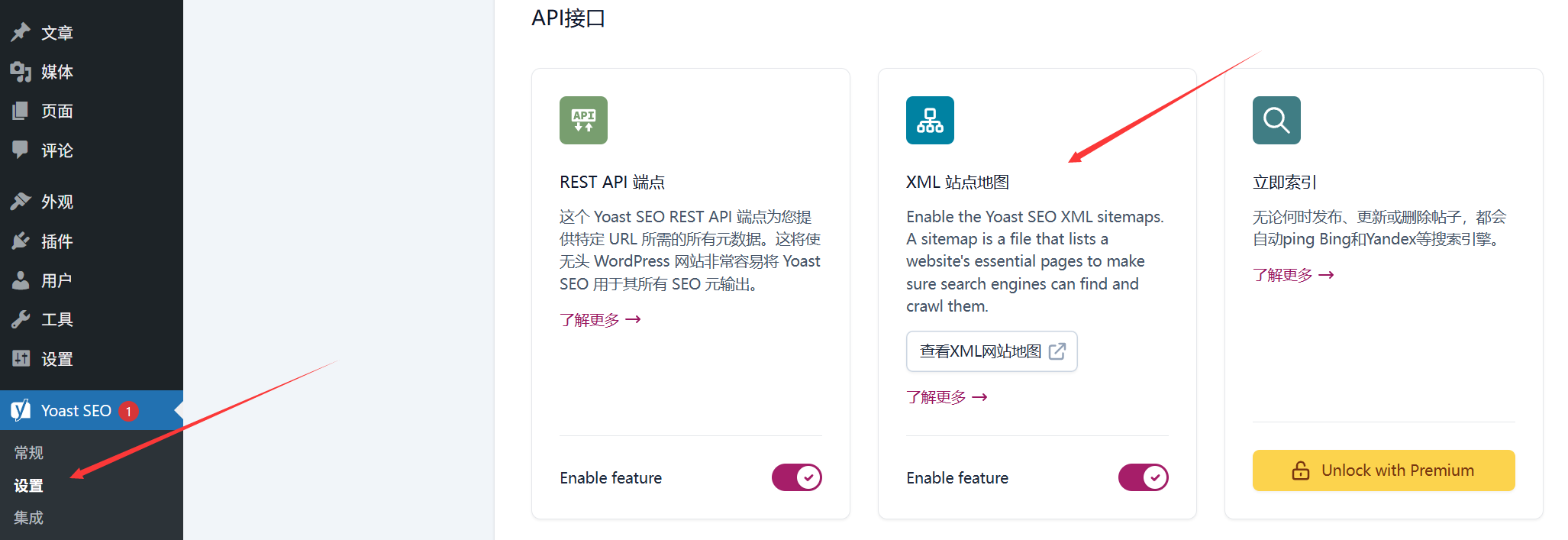
- Log in to the WordPress backend and click "SEO" → "Tools" on the left menu.
- By selecting the "Site Map" tab, the system will display an automatically generated "Site Map Index" (similar to "Directory of Directories") containing sub-maps for different types of content:
post-sitemap.xml: All published articlespage-sitemap.xml: All pages (e.g. "About Us")category-sitemap.xml: Classifiedspost_tag-sitemap.xmlTags.
- Copy map address: When you click "View XML sitemap", the URL in the address bar of your browser will be the map address (format):
https://你的域名/sitemap_index.xml), copy the spare.
Step 2: Submit to Bing (Bing)
Bing is the world's second largest search engine and the default search tool for Microsoft ecosystems such as Edge Browser, and submitting boosts exposure on Bing and partner platforms.
Prerequisites: Registration and verification of the site

- Open it Bing Webmaster ToolsIf you have a Microsoft account (Hotmail/Outlook, etc.), you can sign in with your Microsoft account.
- Click "Add Site" in the upper right corner and enter your website domain name (e.g.
https://example.com), click "Add".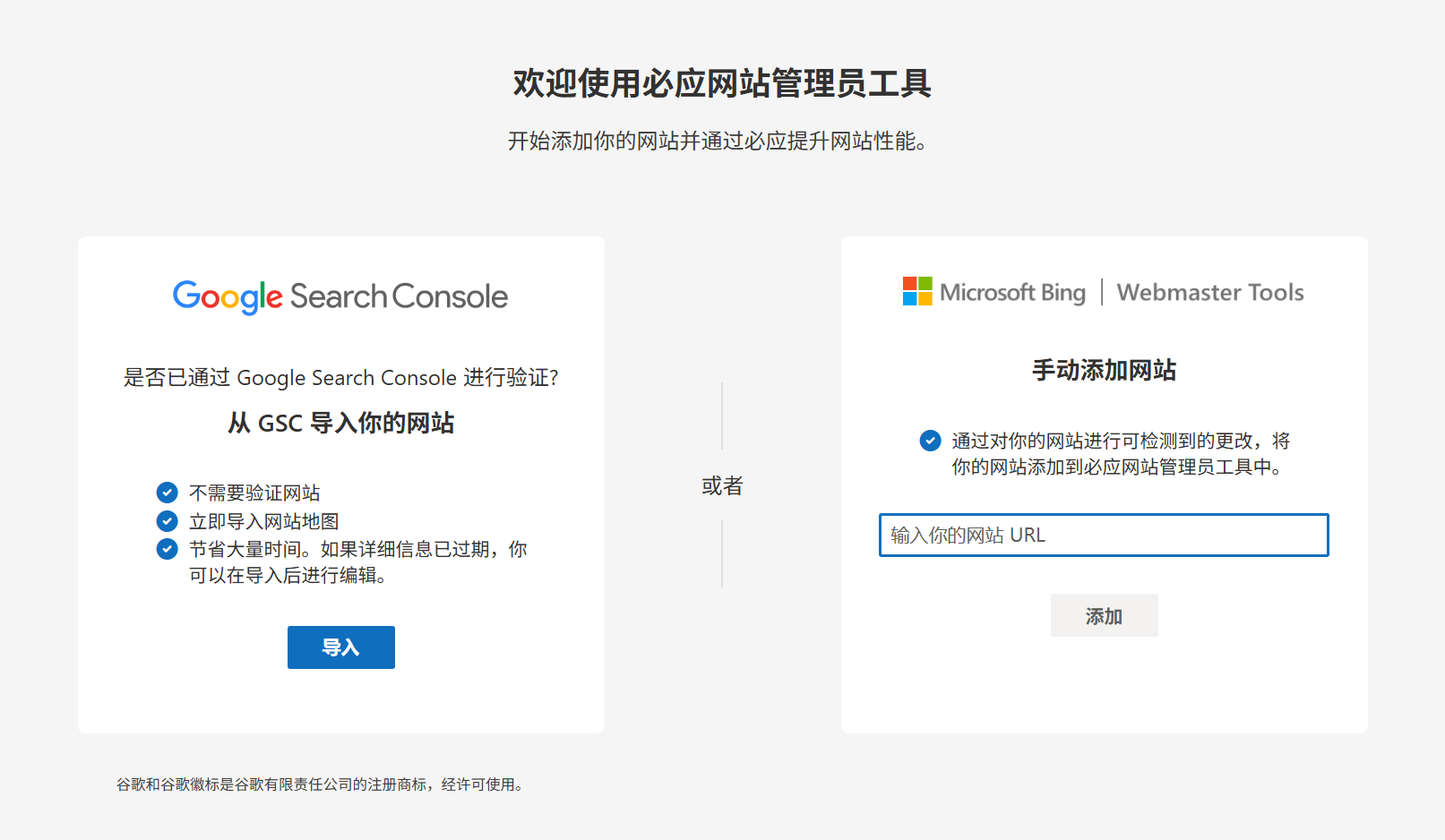
- Complete the website validation (we recommend "HTML meta tags" validation for easy operation):
- Copy the meta-tagging code provided by Bing (similar to
<meta name="msvalidate.01" content="XXXXXXXXXX" />)。 - Go back to the WordPress backend, click "SEO" → "Search Appearance" → "Site Verification", paste the code into the "Bing Webmaster Tools" input box and click "Save Changes".
- Go back to the Bing Verification page, click "Verify" and "Verified" will be prompted to complete the process.
- Copy the meta-tagging code provided by Bing (similar to
Submit a site map:
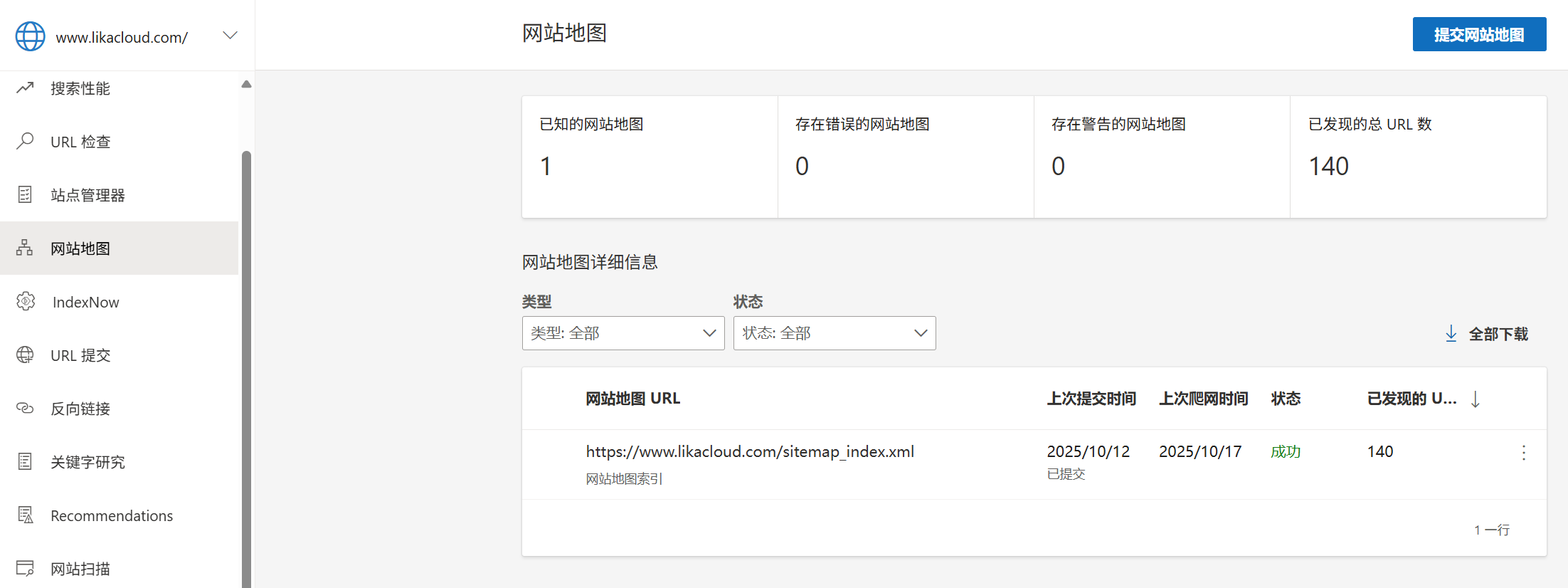
- After verification, click on "Sitemaps" in the left menu.
- In the "Submit Sitemap" input box, paste the previously copied sitemap address (e.g.
https://example.com/sitemap_index.xml)。 - Click "Submit" and Bing will display "Submit Successful" and start crawling the links in the map.
IV. Step 3: Submission to Google (optional, for international users)
If the site needs to reach a global audience, it can be synchronized and submitted to Google Search Console:
- Open it Google Search Console, sign in to your Google account.
- Click "Add Attribute", enter the domain name and complete the validation (similar to Bing).
- Select "Sitemaps" from the left menu and enter the map address (e.g.
sitemap_index.xml), just click "Submit".
V. Post-submission considerations
1. No need for frequent submissions
- The sitemap is updated automatically (Yoast updates the map in real time after posting new content).
- Search engines regularly crawl submitted maps, so there is no need to repeat the submission unless the map address changes.
2. Check the inclusion status
- On the "Sitemaps" page of Bing Webmaster Tools:
- "Submitted": number of successfully submitted links
- "Indexed": number of links indexed by Bing
- Error message: If "Cannot access" or "Format error" is displayed, you need to check whether the map address is correct (e.g., whether it contains the
https)。
3. Tips for accelerating the inclusion of new articles
- In addition to relying on the map, links to new articles can be submitted manually:
- Click on "URL Submit" on the left side of Bing Admin Tools, paste the new article URL and submit it.
- Google can manually request indexing through the URL Checker tool.
VI. Solutions to common problems
1. What is the message "Site Map is not accessible"?
- Check that the address is correct (it must contain the full domain name and the
https://)。 - Confirm that the server is not blocking search engine crawling (you can test this by temporarily disabling the firewall).
- If using a CDN, make sure the map address is not blocked by the cache.
2. Does the map contain unwanted links (e.g. drafts)?
- Yoast automatically excludes drafts, private pages, and deleted content, so there's no need to worry.
- To exclude a specific page: Edit page → Scroll to Yoast module → "Advanced" → Check "Do not allow search engines to index this page" and the page will be removed from the map.
3. Is the map too large (more than 50MB or 50,000 links)?
- Yoast automatically splits large maps into multiple sub-maps without affecting the submission.
- When there is too much content (e.g., 100,000+ articles), you can submit only the core sub-maps (e.g., submit only the
post-sitemap.xml)。
wrap-up
Submitting a sitemap is an efficient way for search engines to find content quickly, especially for new websites. With Bing, for example, once you've made a submission, the system automatically tracks updates to your site, so all you need to do is check the status periodically. If you're targeting an international audience, synchronizing your submission with Google can extend your reach even further.
After completing this step, your website content will appear faster in search results, setting the stage for subsequent promotion.
 English