











Want your website to rank higher in search engines like Baidu and Google and be found by more people?SEO (Search Engine Optimization) is the key. But for newbies, SEO terminology (such as “meta description”, “keyword density”, “XML sitemap”) may seem like astronomy. While Yoast SEO Plugins can turn complex SEO tasks into “fill-in-the-blank” questions, so that even if you're not technically savvy, you can optimize your website step-by-step to make search engines “like” your content more.
A. Why Yoast SEO is the first choice for newbies?
Yoast SEO is the oldest SEO plugin for WordPress (with over 5 million installs) and has been called the “savior of SEO geeks”, with the core advantage of:
- Translate specialized knowledge into simple operations.You don't need to know SEO principles, just follow the plugin's prompts to fill in the content and change the formatting;
- Comprehensive coverage of basic SEO needs: From single post optimization to entire site restructuring, one plugin takes care of it;
- Real-time feedback on optimization suggestions: writing articles will tell you in real time “where to improve” (such as “too few keywords” “paragraph is too long”), like a “SEO teacher ” at the side of the guidance.
Simply put: with Yoast SEO, newbies don't have to memorize SEO rules, they can follow the plugin's “green light tips” to achieve basic optimization results.
Second, Yoast SEO installation and basic settings (free version enough)
Step 1: Install and activate the plugin
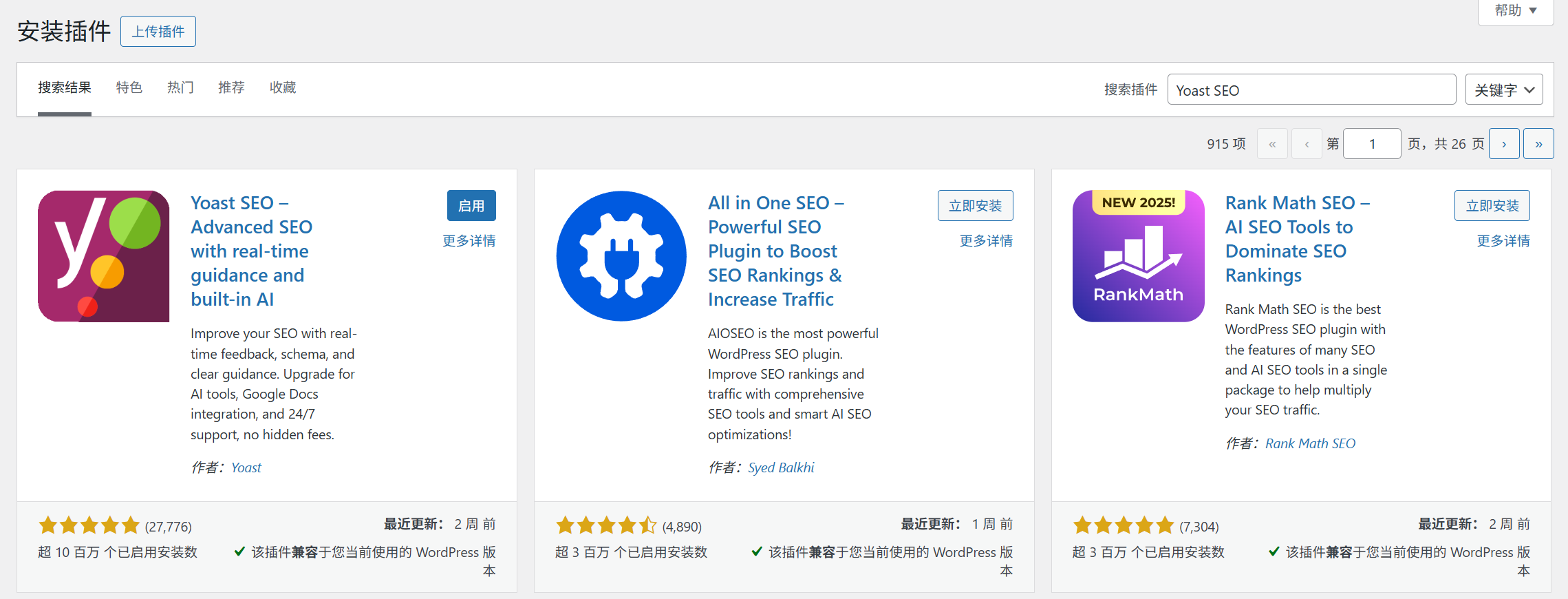
- Backend [Plugin] → [Install Plugin], search for “Yoast SEO”;
- Click [Install Now] and click [Activate] when finished.
- The first time you activate it, the “Setup Wizard” will pop up, and it is recommended to follow the wizard (about 5 minutes to help you with the basic configuration).
Step 2: The 3 Core Settings That Must Be Done (Affects the SEO of the Entire Site)
1. Configure basic site information (tell search engines “who you are”)
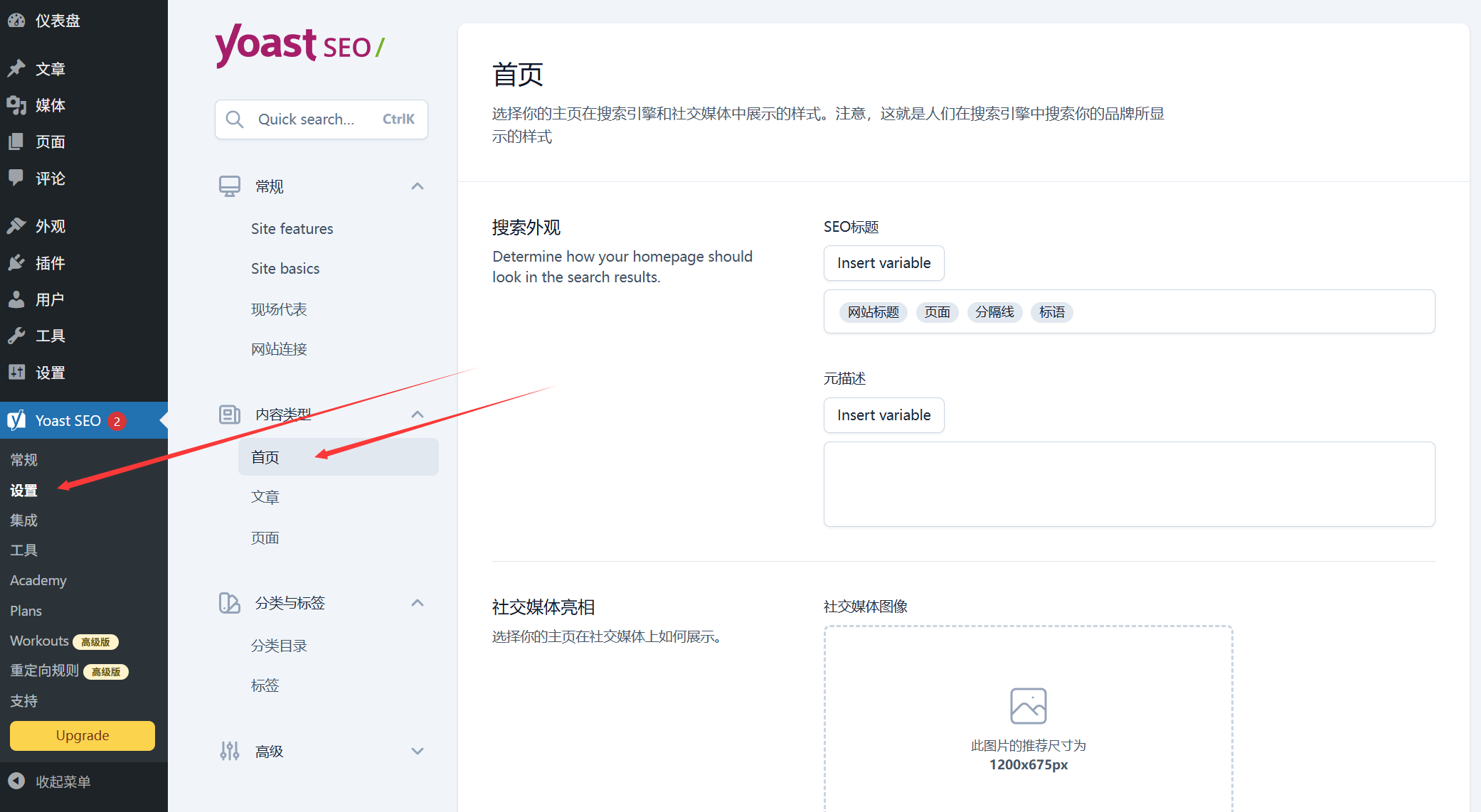
- After activation, [SEO] will appear on the left menu, click [SEO] → [Settings] → [Site Information];
- Fill in the “Site Name” and “Site Description” (which will be displayed in search engine results, such as the title and profile of Baidu search results);
- Example: Website name “Xiao Ming's Photography Blog”, description “sharing travel photography tips, post retouching tutorials, a photography learning platform for newbies”;
- Select “Website Type” (e.g. “Blog” “Corporate” “E-commerce”) and “Organization / Individual” (select “Individual” for personal blogs and “Organization” for company websites and upload a logo).
Function: Help search engines quickly understand your site's theme and positioning.
2. Formatting titles (making search results more attractive)
The “title” displayed by search engines (e.g., the blue text in Baidu search results) is not randomly generated and needs to be manually formatted:
- Click [SEO] → [Search Appearance] → [Title & Meta Description];
- Focus on setting the title format of “Home”, “Articles”, and “Pages”:
- Home page title: Recommended “Site Name | Site Description” (e.g. “Ming's Photography Blog | Beginner Photography Tutorial”);
- Article title: “%% title%% | %% sitename%%” is recommended (%% title%% stands for the title of the article, the %% sitename%% stands for the website name, which is automatically replaced);
- Meta description template (optional): you can set the default description format (e.g. “%% excerpt%%” to automatically extract the article summary) or set it individually in a single article.
skill: The title and description should contain core keywords (e.g., “photography tips” “retouching tutorials” for a photography blog), but don't pile on (natural flow is most important).
3. Generate and submit XML sitemaps (tell search engines “what pages are on the site”)
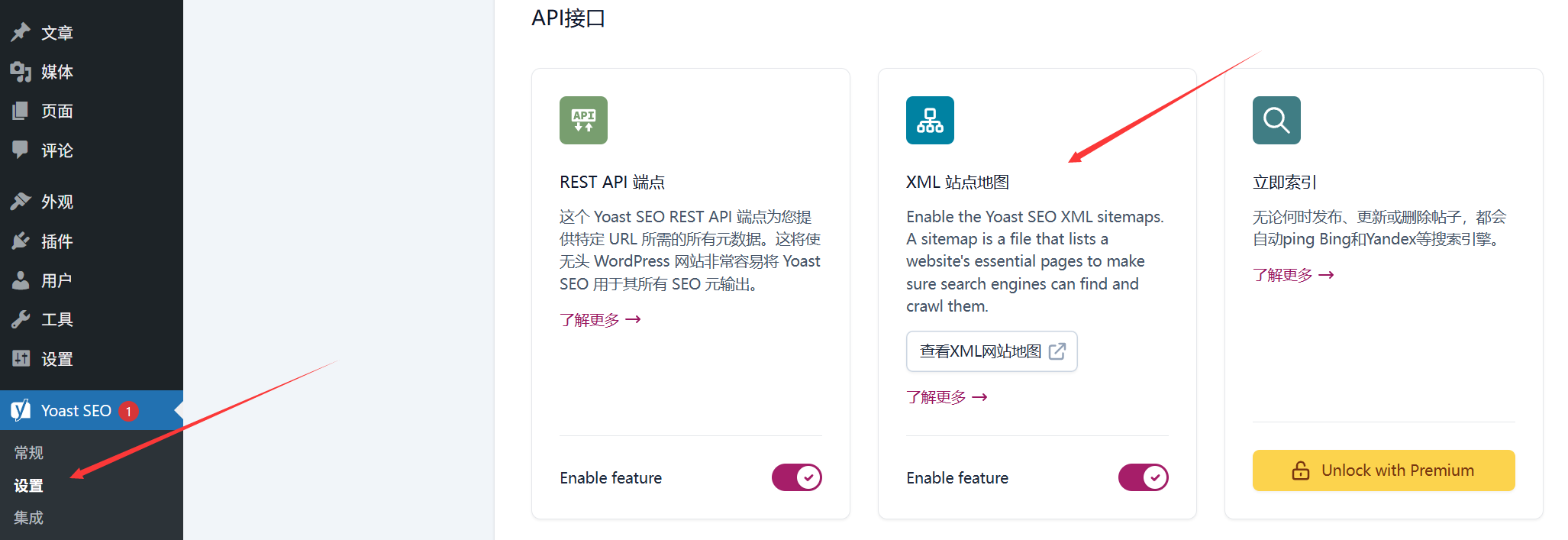
“A ”sitemap“ is a ”table of contents" for your website that lists links to all your pages and articles to help search engines quickly index your content:
- Click [Settings] → [API Interface] → [XML Site Map] to enable “XML Site Map Function” (enabled by default);
- Click on “View XML sitemap” and you will see something like this
https://你的域名/sitemap_index.xmlof the link, copy this link; - Submit to search engines (Baidu for example):
- Login to [Baidu Resource Platform] (you need to register and verify the website first);
- Go to “Site Management” → Your Site → “Site Map” → Paste the link you just copied and click “Submit”.
Function: Let Baidu and Google find your new articles faster and reduce the time to index (from “weeks” to “days or even hours”).
Third, the SEO optimization of a single article / page (focus! Follow the “traffic light”)
The most useful feature of Yoast SEO is “Single Content Optimization” - when writing a post, the plugin analyzes the content in real time and gives “stoplight” prompts (green means optimization is is in place, red means it needs improvement).
Step-by-step procedure (using the article as an example):
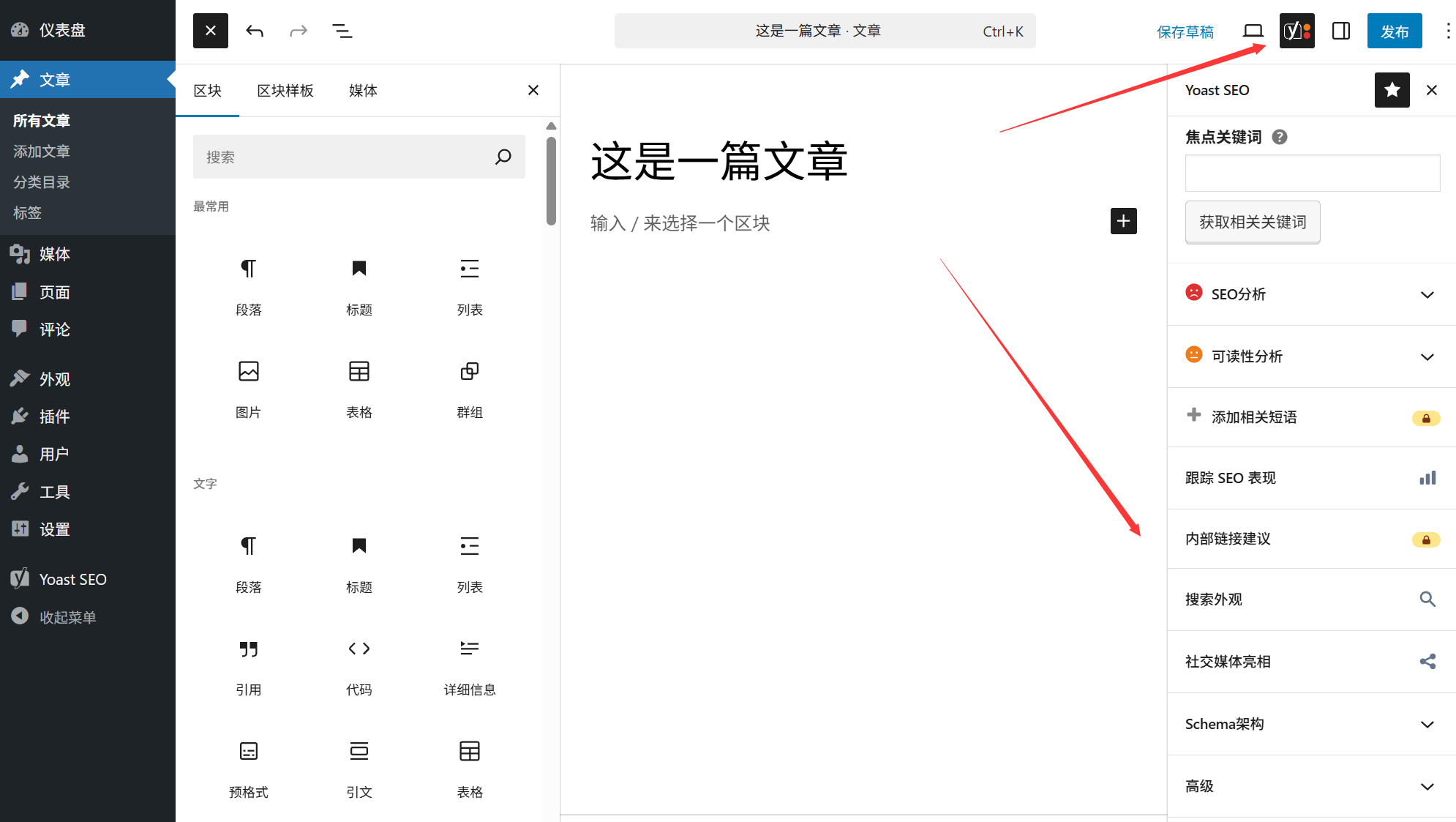
- Go to the article editing page ([Article] → [Add New]), write the content and scroll down to the “Yoast SEO” module at the bottom of the page;
- In the “Focus Keywords” box, enter the core keywords for this post (e.g., if you are writing about “Cell Phone Photography Tips,” put in “Cell Phone Photography Tips”);
- The plugin automatically analyzes it and gives recommendations in “SEO Analysis” and “Readability Analysis”:
- SEO Analytics (influencing search engine rankings):
- Green items: optimized (e.g., “focus keyword appears in title” “meta description contains keyword”);
- Red / yellow items: need to improve (e.g. “keyword density is too low” → appropriate in the text more than a few times; “picture lacks alt tags” → add alt tags to the picture, including keywords).
- Readability analysis (affects visitor experience, indirectly affects rankings):
- Green items: good reading experience (e.g., “paragraph length is appropriate,” “uses transition words”);
- Red / Yellow items: need to be adjusted (e.g. “sentence too long” → split into shorter sentences; “no subheadings” → use H2, H3 tags for paragraphs).
- SEO Analytics (influencing search engine rankings):
- Optimize point-by-point until both “SEO Analysis” and “Readability Analysis” becomegreener(at least the SEO analysis should be green) before publishing the article.
Fourth, the free version vs paid version: how to choose the newbie?
- free version: Includes the core SEO functions (title settings, site map, single content analysis, keyword optimization), fully able to meet the basic needs of personal blogs, corporate display station (80% novice with the free version is enough).
- Paid version (Yoast SEO Premium): about 99 euros / year, with more “multi-keyword optimization” (optimize a post for multiple keywords), “internal link suggestions” (automatically recommend related articles), “redirection management ” (to avoid dead links) and other features, suitable for bloggers or businesses that rely on their website to monetize.
Beginner's Conclusion: Install the free version first to master single-article optimization and basic settings; if you want to target optimization of multiple keywords or manage a large amount of content at a later stage, then consider upgrading the paid version.
Fifth, the novice common misunderstanding: these operations will make SEO counterproductive
- “The more keywords you stack, the better you rank.”? Wrong! Yoast SEO will suggest that “keyword density is too high” (red warning), stacking keywords will be determined by the search engine as “cheating”, but lower rankings. Natural integration of keywords can be (such as the title 1 time + 2-3 times in the paragraph + image alt tags 1 time).
- “As long as the plug-in shows a green light, it's sure to be number one.”? Re! The green light is only “basic optimization up to standard”, rankings are also affected by the quality of content, site weight, competitors and other factors. Plug-ins are “auxiliary tools”, not “ranking guarantee”.
- “Don't fill in the meta description, the search engine will automatically extract it, don't worry about it”? Not recommended! Automatically extracted content may be incomplete (e.g. only half a sentence is cut off), manually filling in the meta-description (120-160 words) is more attractive for users to click on it (and a high number of clicks will also improve your ranking).
To sum up: the core of SEO optimization is “users first”
The essence of the Yoast SEO plugin is to help you “optimize content from the perspective of both search engines and users” - search engines like clear, organized content, users like easy-to-read, valuable content, and the two are really connected.
For newcomers, do not have to pursue the “perfect SEO”, first do: each article set 1 core keywords, write a good title and meta-description, the content is clearly segmented, pictures plus alt tags. Adhere to these basic operations, with the accumulation of content, site ranking will slowly improve. Remember: SEO is a long-term work, plug-ins can help you less detours, but quality content is fundamental.
 English