


















Registered your domain name (your website address), purchased your server (your website house), and now you need to tell the world.“Hello! My home (website) is at this new address (server IP), please follow this new address to me!”This process of “showing the way” is calleddomain name resolution。
Don't be intimidated by the terminology, it's very simple in nature. Let's understand it step by step.
First, the core concept: what is domain name resolution?
Imagine the address book of the Internet world:
- Domain.Hi. Friend's name.“Zhang San”(Good to remember, but I don't know where he is).
- Server IP address.Zhang San'sActual door number “XX City, XX Road, No. XX.”(Exact location, but hard to remember).
- Domain name resolution.It's accessing the address book, based on the name“Zhang San”Find his house.“XX City, XX Road, No. XX.”The process.
On a technical level, this process is accomplished by modifying a program calledDNS recordsDNS (Domain Name System) is the global “Internet super address book”.
To summarize: domain name resolution is the operation of pointing your easy-to-remember domain name to a server IP address.
Second, what do you need to prepare before parsing?
Before you begin, make sure you have the following two key pieces of information on hand:
- Your domain name.for example
likacloud.com。 - Your server's IP address.This is usually provided to you by the hosting provider via email or on the backend after you purchase web hosting. It looks like a string of numbers, for example
192.0.2.1。- Attention.What you need is the server'sIP address, rather than the host's backend login address.
Third, the detailed steps of domain name resolution (Tencent Cloud as an example)
The vast majority of domain name registrars have similar interfaces. This tutorial takes the most commonly used domestic Tencent Cloud as an example.
Step 1: Log in to the domain management backend
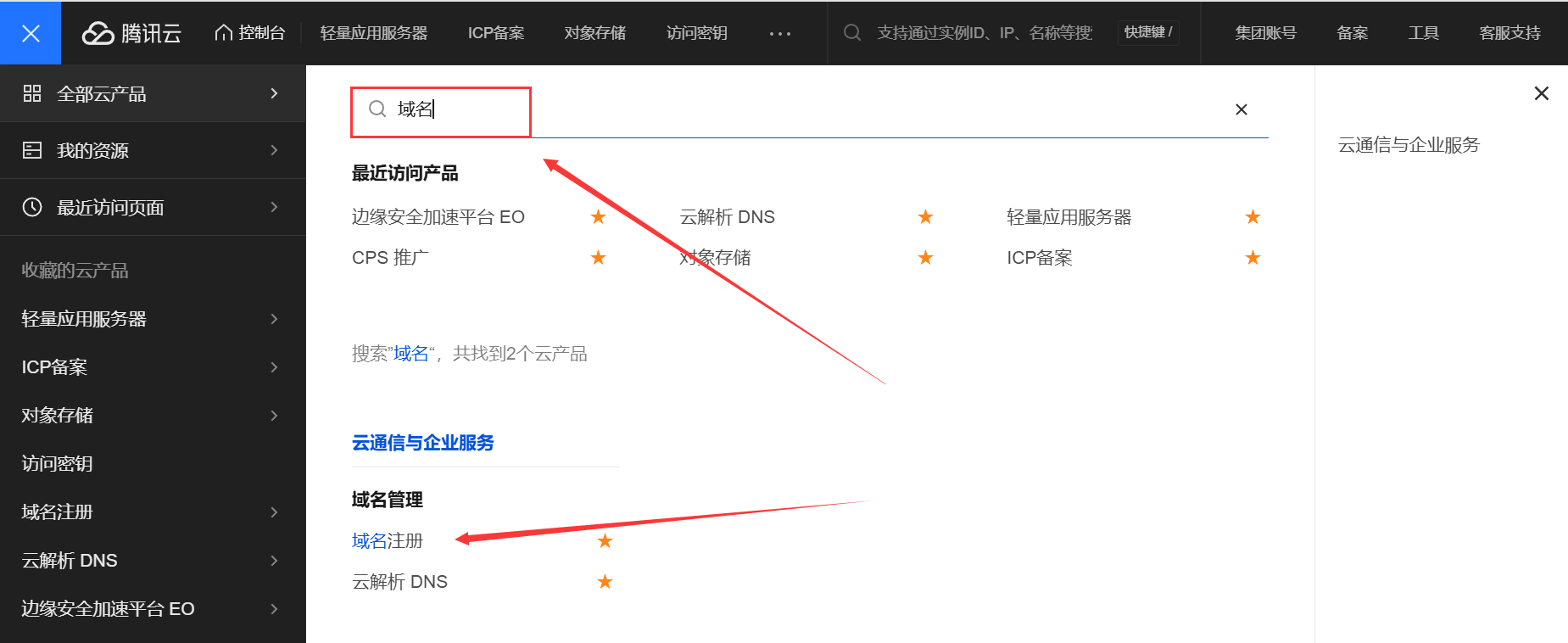
- Log in to your Tencent Cloud console.
- Find “Domain Registration or Cloud DNS” in the top navigation bar and select “Domain”.
- In the “Domain List”, find the domain name you need to resolve and click “Resolve” on the right side.
Step 2: Add a resolution record
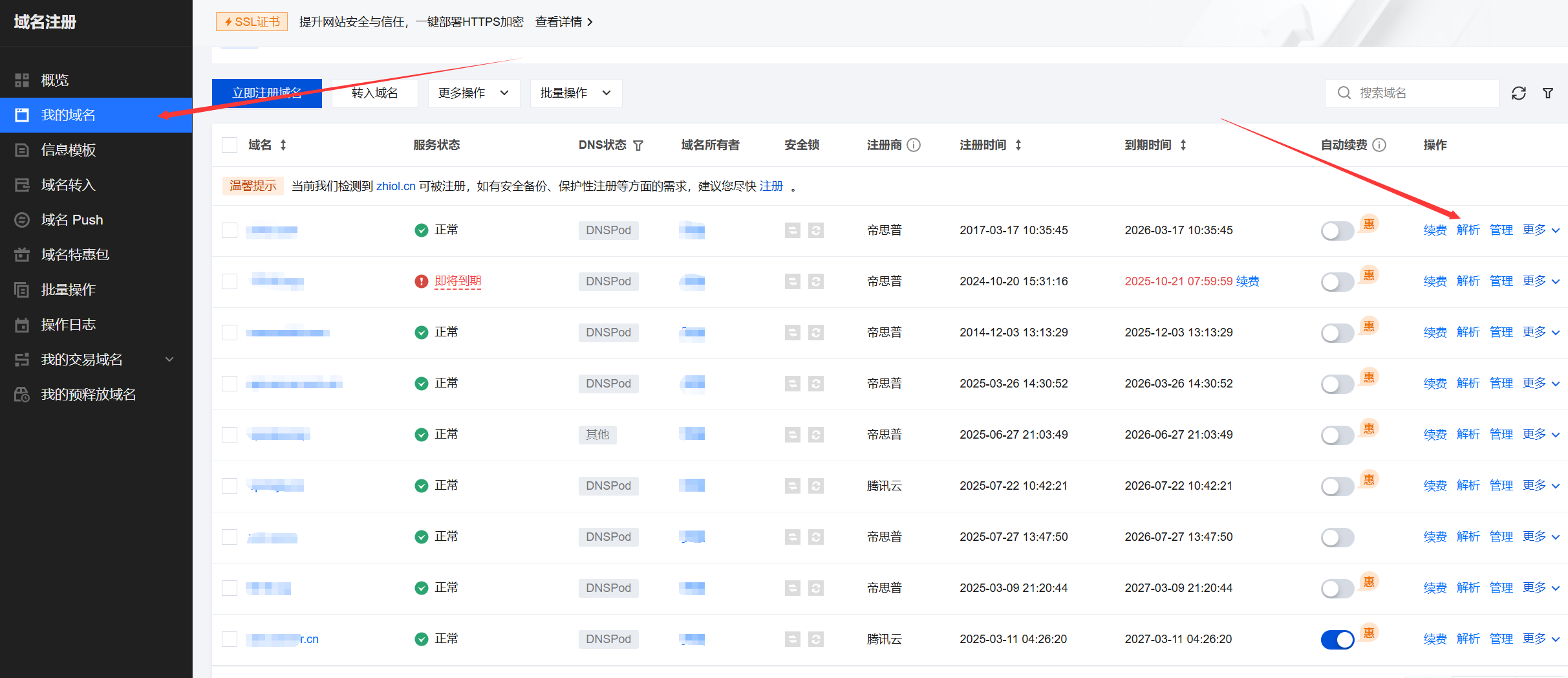
After clicking “Resolve”, you will be taken to the DNS resolution settings page. Now you need to add one of the most important records.A records。
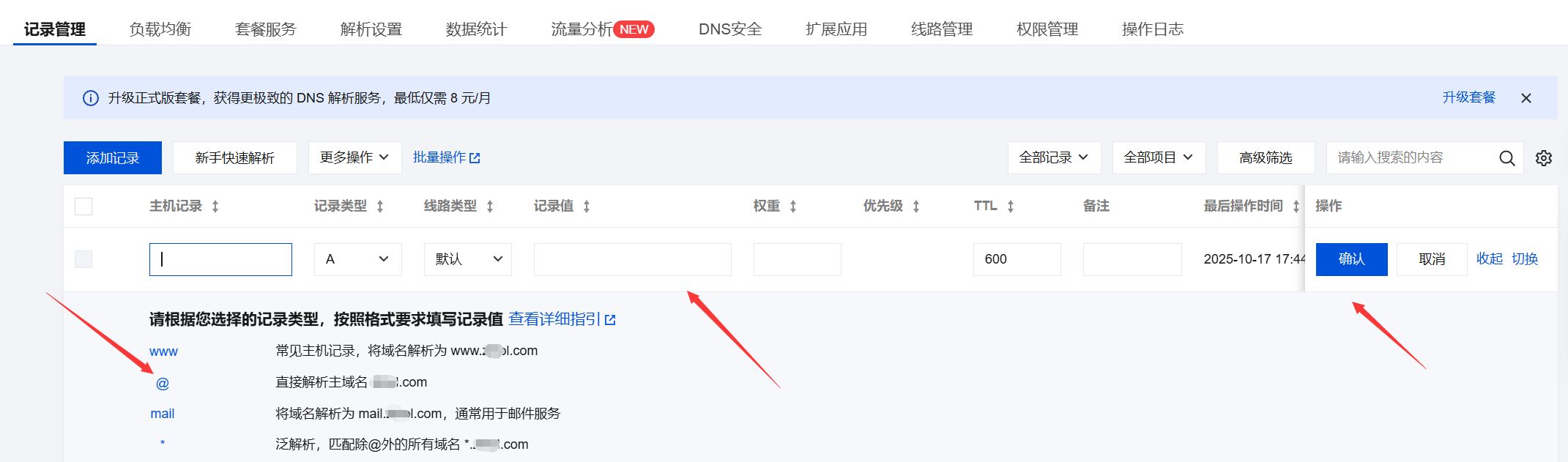
- Click on “Add record”Button.
- A setup window will pop up and you will need to fill in the following key fields:
- Record Type.option
AA record is a domain name that points directly to an IPV4 address. - Host Records.Fill in the domain prefix here.
- If you want to make
www.example.comTo visit your website, just fill in thewww。 - If you want to make
example.com(without www) to visit your site, just fill in the@。 - (Typically, we parse both
wwwand@(Two records to the same IP)
- If you want to make
- Recorded values.Fill in yourserver IP address(the string of numbers provided by the hosting provider).
- TTL.Just keep the default (usually 10 minutes). It indicates how long it takes for the global DNS servers to refresh this record.
- Record Type.option
Step 3: Save and wait for it to take effect
- After filling out the form correctly, click “Confirm” to save the record.
- Similarly, add another record that will
@The host record also points to your server IP address.
At this point, your parsing setup is complete!
IV. Important Notes and Frequently Asked Questions
- It takes time for parsing to take effect.
- It takes some time for DNS records to take effect globally, a process calledDNS propagation。
- Usually takes 10 minutes to 2 hours.It varies and can sometimes be longer (up to 72 hours, but usually very fast).
- During this time, some places may be accessible and some may not, this is normal. Please be patient.
- How can I check if parsing is in effect?
- Method 1 (simple).On your computer press
Win + Rkey, entercmdOpen a command prompt. Enter the commandping yourdomain.com(将yourdomain.com(Replace it with your domain name). If the returned IP address is the IP of the server you set up, it means the resolution has taken effect. - Method 2 (online tool).Use the “DNS Lookup” online tool (e.g.
17ce.comOrboce.com), enter your domain name and see if it resolves to the correct IP across the country.
- Method 1 (simple).On your computer press
- What if I use a foreign platform (like Namecheap)?
- The process is exactly the same! Only the operation interface is in English.
- Login to Namecheap backend -> left menu
Domain List-> Click on your domain name after theManage-> FindNAMESERVERSguaranteeNamecheap BasicDNS-> Then find theADVANCED DNSTab -> Add NewA Record. Fill out the form in the same way as AliCloud.
- What if the hosting provider provides a CNAME?
- Some hosts (especially foreign ones such as SiteGround) do not provide an IP, but instead provide an IP address such as
xxx.sitemground.netThe URL. - At this point, you need to add notA recordsRatherCNAME records。
- Type of recordoption
CNAME(math.) genusrecorded valueFill in that URL provided by the hosting provider.The A record points to the IP and the CNAME record points to another domain name.
- Some hosts (especially foreign ones such as SiteGround) do not provide an IP, but instead provide an IP address such as
summarize
The essence of domain name resolution isAdd an A record (or CNAME record) in the domain name backend to associate your domain name with your server's IP address。
Your list of operations.
- Get the server IP address.
- Log in to the domain name registrar's back office.
- Find the domain name resolution settings.
- Add two A records: one host record for
wwwOne of them is@The record values are all filled in with your server's IP. - Save it and wait patiently for it to take effect.
After completing this step, your domain name and server have successfully “joined hands”. Next, you can install WordPress on the server and access the website through your domain name!
Domain Name Service Provider Recommendation
LikaCloud has collected recent domain name activities, such as Tencent Cloud $0/first year, Western Digital transfer 50% off, etc., and shared it in the hope that it can save you some time to repeatedly find information about domain name registration, check theDomain Name Selection Tips
 English