


















The SEO optimization of a single article has a direct impact on its ranking in search engines and the number of clicks it receives. Even if a website is well set up globally, if each article lacks targeted optimization, it will still be difficult to get the desired traffic. Yoast SEO plugin provides intuitive "Keyword Setting" and "Readability Analysis" tools, which make article optimization easy for newbies. This section will explain in detail how to use these two features to improve the quality and search performance of a single article.
First, the keywords set: let the search engine "understand" your article
Keywords are the query words that users enter in search engines (e.g. "WordPress Tutorial", "Mobile Photography Tips"), and they are also the core basis for search engines to determine the subject of the article. Correctly set keywords can make your articles accurately match users' search needs.
Step 1: Identify core keywords (prerequisite for optimization)
Before setting keywords, the core keywords of the article need to be defined -- that is, which term you want users to find the article by searching for. A novice can determine this by doing the following:
- Thinking about user needs: If you were a reader, what words would you search for to find what this article is about?
- Reference to similar articles: Search for related topics and see what words are included in the titles of the top-ranking articles.
- control number: A single article focusing on 1 core keywords can be, to avoid too many keywords lead to the theme of dispersion.typical example: If the article is "5 Tips for Photographing the Starry Sky with Your Cell Phone", the core keyword can be "tips for photographing the starry sky with your cell phone".
Step 2: Setting up Core Keywords in Yoast SEO
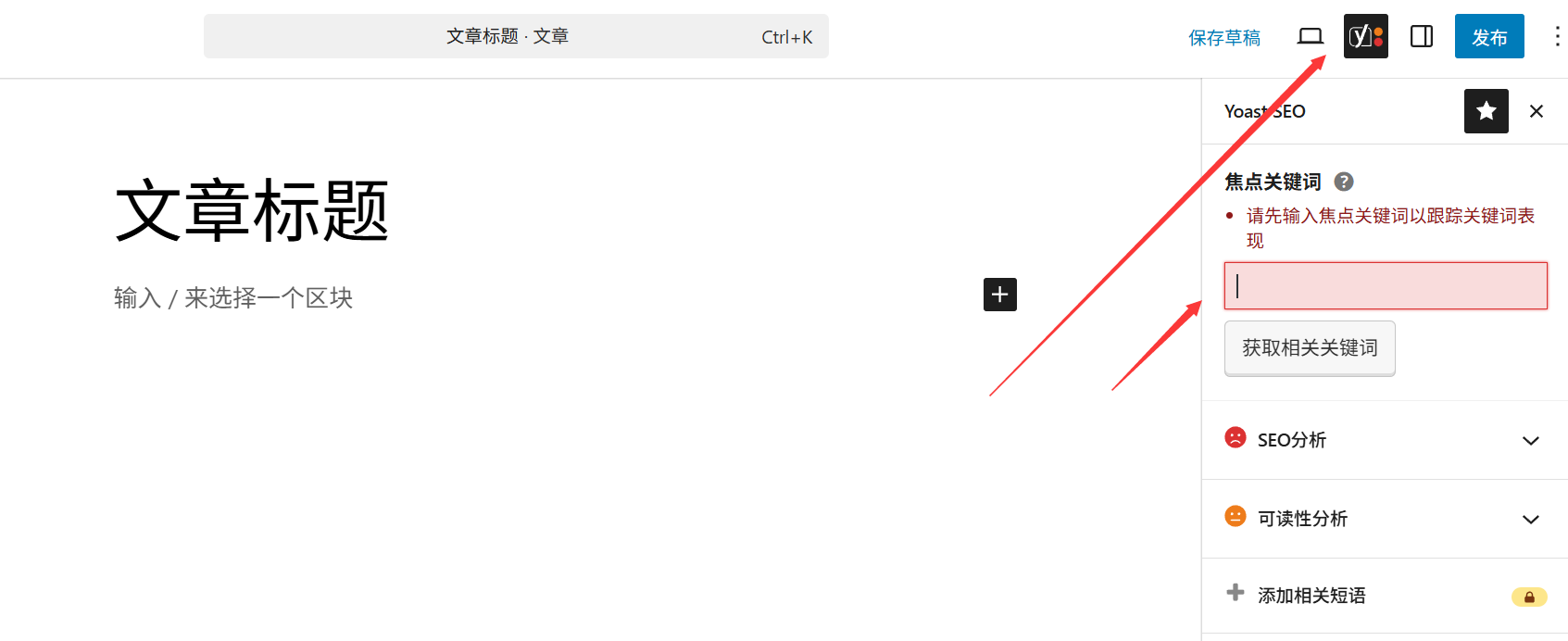
- Edit the article (create a new one or modify an existing one) and scroll to the "Yoast SEO" module at the bottom of the page (if it is not shown, click on "Settings" → "Panel" in the upper right corner and check "Yoast SEO").
- In the "Focus Keywords" input box, fill in the core keywords you have identified (e.g. "Tips for shooting stars with your cell phone").
Step 3: Optimize Keyword Layout Based on SEO Analysis
After setting keywords, Yoast will automatically analyze the use of keywords in the article and give you a score in the "SEO Analysis" tab (green is excellent, yellow is to be optimized, red is to be improved). Newbies should focus on the following optimization points:
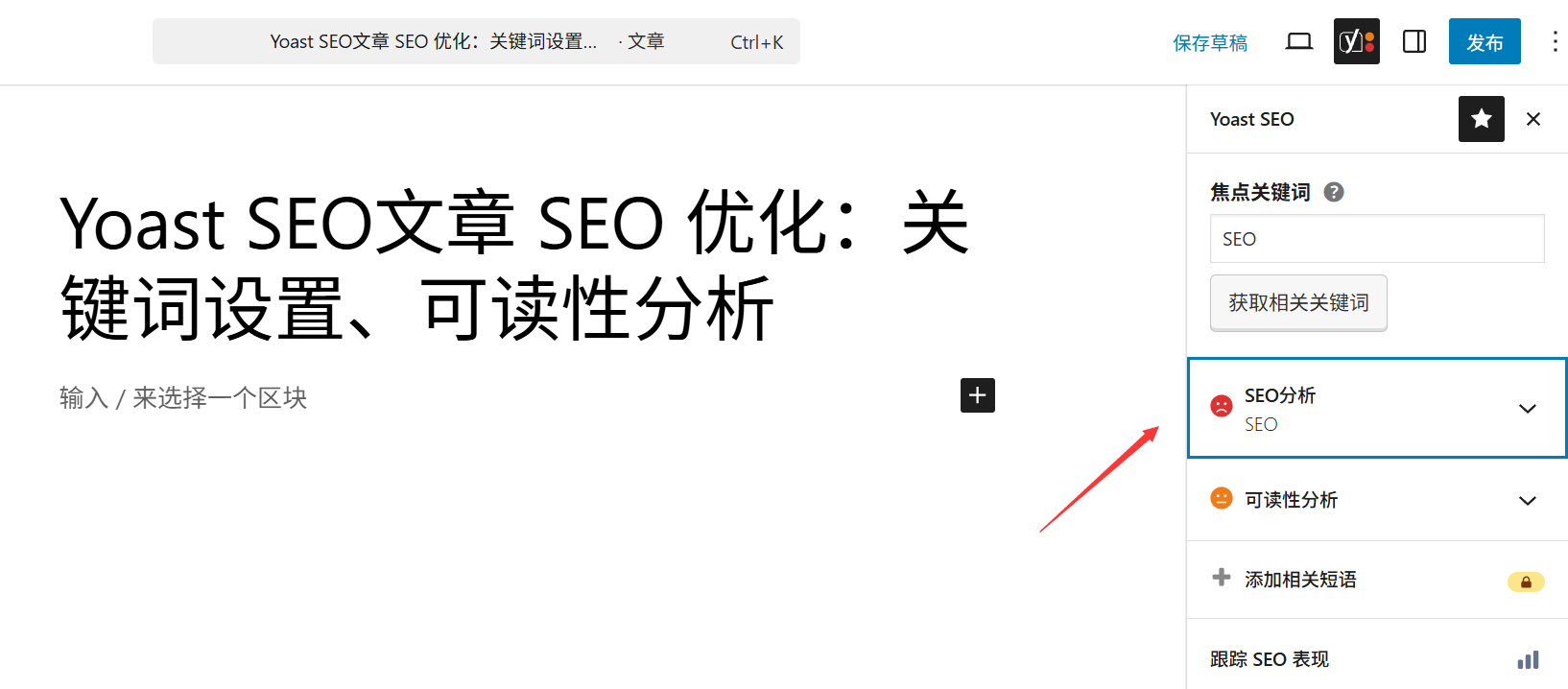
- Keywords in the title
- Requirement: In the title of the article (
h1The first half of the tag (e.g., the title "Tips for shooting the stars with your cell phone: 5 steps to a great Milky Way shot") naturally incorporates the keyword.) - Example of error: The title only contains "How to take photos of the starry sky", and the core keyword "cell phone" does not appear.
- Requirement: In the title of the article (
- Keywords appear in the first paragraph
- Requirement: Use the keyword naturally once within the first 100 words of the article (for search engines to quickly recognize the topic).
- Example of error: The keyword is not mentioned in the first half of the text and appears only at the end.
- Rational distribution of keywords
- Requirements: In the body of the article (especially subheadings)
h2/h3The keywords are naturally inserted at the beginning and end of the paragraph, avoiding stacking (keyword density is recommended to be 2%-5%, i.e., 20-50 times in a 1000-word article). - Example of error: forced repetition of keywords (e.g. "cell phone tips for shooting stars, cell phone tips for shooting stars are very useful...") .
- Requirements: In the body of the article (especially subheadings)
- Image alt tags contain keywords
- Requirement: Incorporate keywords (e.g., the image description "Parameter Settings for Mobile Phone Star Photography") when adding "alternative text" (alt tags) to the images in the article.
Second, readability analysis: let the user "easy to read" your article
Search engines are paying more and more attention to the user experience -- an article that is hard to read, even if it is well optimized for keywords, will be difficult to get high rankings.Yoast's "Readability Analysis" feature will evaluate the readability of the article in several dimensions, helping you make the content more popular with users and search engines.
Step 1: View Readability Scores
In the Yoast SEO module, clicking on the "Readability Analysis" tab displays the readability score and specific recommendations for the current article (again, identified in green, yellow, and red).
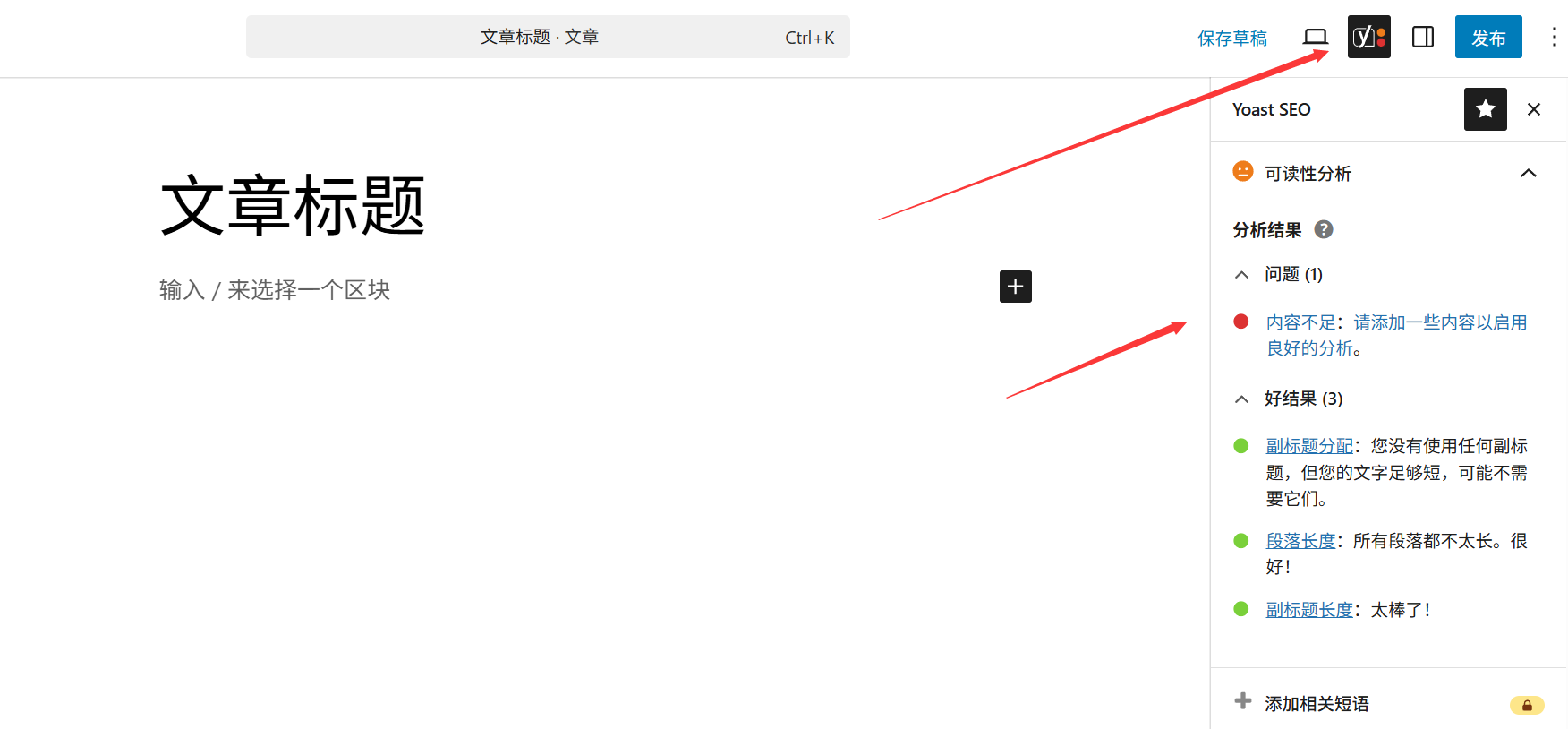
Step 2: Key Readability Optimization Points (must change for newbies)
- Controlling paragraph length
- Problem: Long paragraphs (more than 4-5 lines) can fatigue the reader.
- Optimization: only one point per paragraph, line breaks if more than 3 lines (more friendly when reading on mobile).
- Simplify sentence structure
- Problem: Long, complex sentences (with multiple commas and semicolons) can make comprehension more difficult.
- Optimize: Split long sentences into shorter ones (e.g. "It's a nice day for a walk in the park, and you can take some photos along the way." can be split into "It's a nice day for a walk in the park. It's a nice day for a walk in the park, and you can take some pictures along the way.") .
- Layering using subheadings
- Problem: no subheadings throughout the text (
h2/h3), the content is disorganized. - Optimize: Use subheadings to divide the article into multiple sections (e.g. "Preparation" "Shooting Steps" "Post Retouching"), with the content under each subheading focusing on a single topic.
- Problem: no subheadings throughout the text (
- Avoiding out-of-the-way words and jargon
- Problem: Excessive use of industry jargon (e.g., the 'three elements of exposure' in photography are not explained), which is not understandable to novice readers.
- Optimize: Explain specialized words in layman's terms or replace them with common expressions (e.g., replace "exposure compensation" with "brightness adjustment").
- Proper use of transition words
- Problem: Lack of connecting words between sentences and logical incoherence.
- Optimization: Add transition words such as "first", "in addition", "therefore", "however", etc. to make the rhythm of the article more fluent.
III. Frequently Asked Questions and Practical Tips
1. is it necessary to have both the SEO score and the readability score in the green?
- Not necessary! Green is ideal, but the actual optimization is more 'natural':
- If the attempt to cobble together keywords results in a stilted statement, rather accept a yellow rating.
- Readability takes precedence over SEO ratings - it's no use ranking high for articles that users can't read.
2. Can I set more than one keyword for an article?
- Yoast Premium supports setting multiple keywords, but it tends to lead to fragmented optimization.
- Correct practice: each article focuses on 1 core keyword, if the content is rich, you can naturally incorporate 1-2 related words (e.g., the core word is "cell phone photography", and the related word is "cell phone retouching").
3. Do old articles need to be re-optimized?
- Need! Older articles with low traffic, in particular, can often rank significantly better by modifying keyword layouts and improving readability.
- Operation: Edit old articles, set keywords and optimize readability according to the methods in this section, and search engines will recrawl them after the update.
wrap-up
At the heart of SEO optimization for a single post is "balancing search engines and users": keyword setup to help search engines understand the topic of the post, and readability analysis to ensure that users can easily access the information. Remember, the ultimate goal of optimization is to get "target users" to find and like your content, not just to chase plugin ratings.
As you practice more, you will gradually master the skill of balancing "natural incorporation of keywords" and "writing fluent content".
 English