











The title, subtitle and description of the site is the first impression of visitors to the site, but also the core basis for search engines to determine the content of the site - they have a direct impact on whether users can find your site in Baidu, Google and other platforms. As a novice, the correct setting of these three pieces of information is the first step in good SEO, the operation is simple but need to pay attention to the skills. This section will take you to master the specific steps and optimization points.
First, understand: what are these three pieces of information? What are they for?
Before modification, clarify the positioning and role of each message to avoid blind settings:
| Type of information | Definition and display location | Impact on SEO |
|---|---|---|
| Site Title | The core name of the site, which is displayed in browser tabs, in search engine result titles (e.g. “My Travel Blog”) | Key information prioritized by search engines, which directly affects keyword rankings (e.g., a title containing “travel tips” is more likely to be found by users searching for “travel tips”) |
| Website Subtitle | Additional description of the title, usually displayed under the logo at the top of the site or in a homepage banner (e.g., “Sharing Practical Tips for Traveling the World”) | To help visitors quickly understand the site's theme, some search engines will crawl the content of the subheading as a complementary |
| Site Description | A paragraph summarizing the content of the site (about 100-150 words), mainly displayed below the headline in search engine results. | Influence users' willingness to click (users are more likely to click on a description if it is written in an appealing way), and the inclusion of keywords improves relevance |
II. Modification steps: 3 steps to complete the basic settings
Changing the title, subtitle and description of your website is very simple and is done in the WordPress backend, no code is required:
Step 1: Go to the Settings page
- Log in to the WordPress backend (address:
域名/wp-admin)。 - Find "Settings" on the left menu bar, click to expand it and select "General" to enter the General Settings page.
Step 2: Fill in or Change Information
On the General Settings screen, find the corresponding input box and fill in the information:
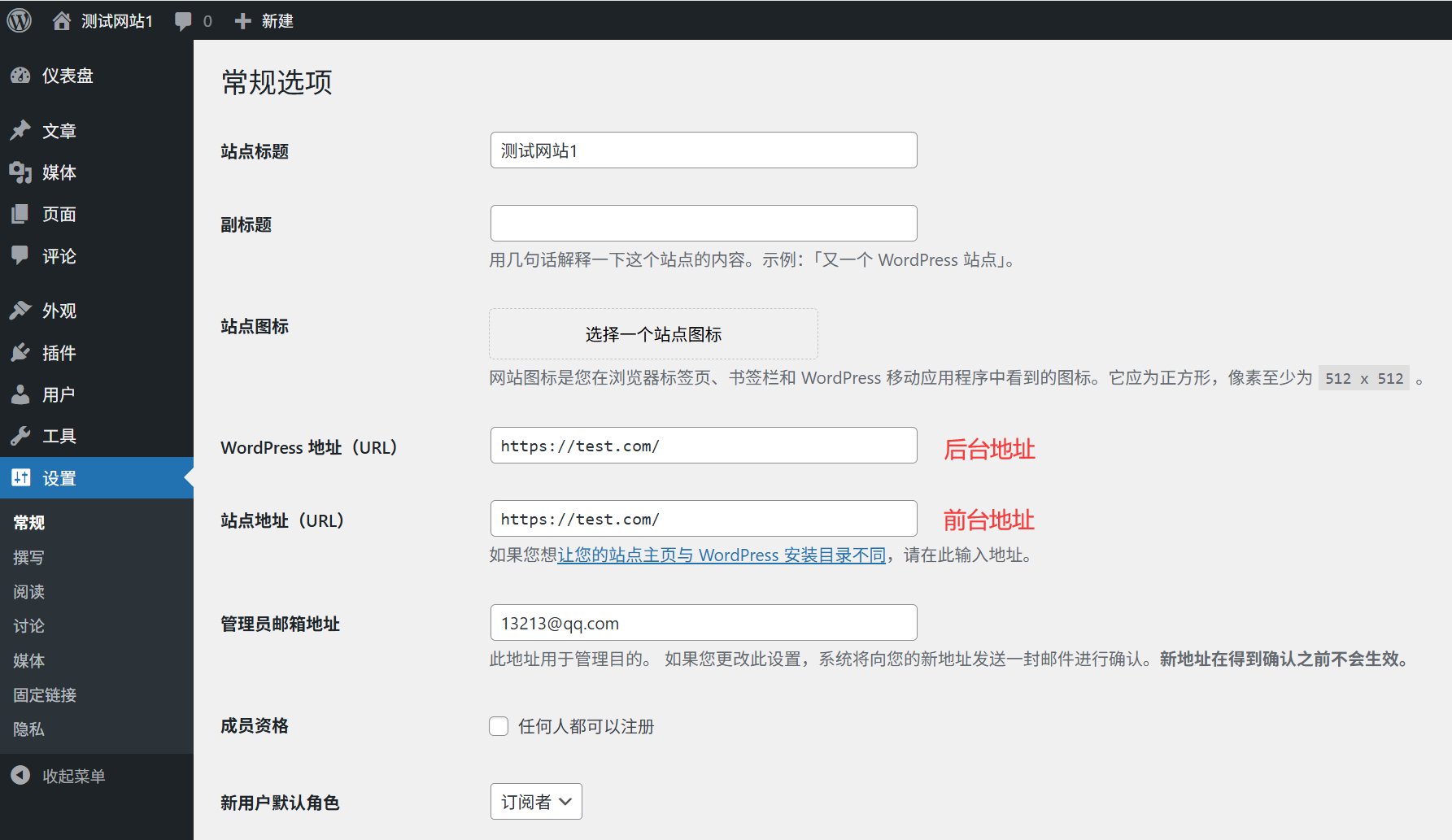
- Site Title: Enter the core name of your website (e.g. “Gourmet Chef” “Workplace Growth Guide”), it is recommended to include 1-2 core keywords (e.g. for a food website you can add “ recipes ” “home cooking”).
- subheading: Additional description of the content of the site (e.g., “a daily practice of home cooking”), concise and clear can be, not mandatory to fill in.
- Site Description: It will be easier to set up the SEO plugin (e.g. Yoast SEO) when it's installed later, so you can leave it blank or simply fill it in (we'll talk about optimization tips in detail later).take note of: The title and sub-title should not be too long (no more than 30 words for the title and 50 words for the sub-title are recommended) or they will be truncated by browsers or search engines.
Step 3: Save Settings
Once you've filled out the form, scroll to the bottom of the page and click the "Save Changes" button. At this point, your changes will take effect immediately.
Third, view the effect of modification: two ways to verify
1. View on the front end of the website
- When you open your site's home page, the title and sub-title are usually displayed on the top navigation bar or next to the logo (the exact location is determined by the theme).
- If it is not displayed, it may be a theme design problem, you can find “Site Logo” related settings in "Appearance→Customize" to adjust the display mode.
2. View in browser tab
- When you open the website, check the tab at the top of your browser, it will show the "Site Title" you set (some browsers will automatically add a subtitle).
- Example: If the title is “Travel Diary”, the tab may show “Travel Diary - Browser Name”.
Fourth, SEO optimization skills: let the title and description of more “eye-catching”
For the same content, good titles and descriptions can lead to higher search engine rankings and 2-3 times more user clicks. Remember the following optimization principles:
1. Title: contains core keywords, highlighting uniqueness
- Required Keywords: Think about what words users will search for to find your site (e.g. “Zero-Basic Learning WordPress” “Beijing Parent-Child Travel Tips”), and put that word in the title.
- Avoid generic names: Instead of vague titles like “My Website” and “Personal Blog”, read “Ming's Photography Blog” and “Growth Notes for Newcomers to the Job Market ”.
- Control length: Search engines usually only show the first 50-60 characters (about 25-30 Chinese characters), and any longer than that will be truncated (showing “...”). : Search engines usually show only the first 50-60 characters (about 25-30 Chinese characters).counter-example: “My Blog”standard practice: “Zero-Base WordPress Website Building Tutorial - Even Newbies Can Learn”
2. Description: summarizes value and attracts clicks
Although the description does not directly affect the ranking, but will significantly affect whether the user clicks on your site (search engine results, the same ranking, a good description can enhance the number of clicks more than 50%).
- Contains keywords: Repeat the core keywords in the title 1-2 times (such as the title is “handmade soap making tutorial”, the description can be written “share natural handmade soap making tutorials, from material selection to molding steps, suitable for novice learners to learn handmade soap practice”).
- Description of user values: Tell users “what they can get by visiting your website” (e.g. “Download 100+ CV templates for free with different versions for fresher / career professionals”).
- Control length: 100-150 words (about 200-300 characters) are recommended; anything beyond that will be truncated by search engines.counter-example: “It's a website about food with lots of recipes.”standard practice:: “Focus on home easy recipes sharing, 30 minutes to make good home cooking, baking and dessert tutorials, with detailed steps and ingredient lists, suitable for office workers and kitchen novices.”
V. Common problem solving
1. The new title is not displayed in the frontend after modification?
- Reason: The theme may have cached old data or set a fixed title.
- Solution:
- Press <
Ctrl+F5Forces a browser page refresh. - Go to “Appearance→Customize→Site Logo” and make sure that "Use custom title" is checked, and if it is, change it to the title you set.
- Press <
2. Do search engines show the same old titles?
- Reason: It takes time for search engines to crawl a website (usually 1-7 days), and they don't update it in real time.
- Solution:
- Wait patiently for search engines to recrawl (you can speed up the frequency of crawling by posting new articles).
- Updates can be submitted manually to search engines after installing the Yoast SEO plugin (see section 20.3 for details).
3. What if I don't want the subtitle to appear on the website?
- Go to “Appearance→Customize”, find “Site Logo” or “Title Settings”, and uncheck "Show Subtitle" (the name of the option may be different for different themes).
wrap-up
Site title and description is the SEO “facade”, spend 5 minutes to do this step, can make the subsequent promotion twice as much. Remember the core principles: the title contains the core keywords, the description of the user value, both should be concise and clear.
Modified without frequent changes (search engines like stable information), if the subsequent positioning of the site to adjust, and then modify the same steps can be.
 English