











Site Map (Sitemap) is a "bridge" connecting a website with search engines - it is like a detailed "website directory" that clearly lists the addresses and update times of all pages, telling search engines that "my website has these contents, come and include them". For new sites, submitting a sitemap can shorten the inclusion time from weeks to days, and is a key step in getting search traffic quickly. This section will teach you to use plug-ins to automatically generate sitemaps and submit them to Baidu and Bing search engines, the entire visual operation, novice no code knowledge.
First, why is the sitemap so important?
Without a site map, search engines can only be like "blind men feeling an elephant", through the links between the pages to slowly discover your content, may miss important pages (such as buried in the multi-level directory of articles). And with a site map:
- Inclusion Speed Improvement 50%: Search engines get all page addresses at once, without having to crawl them one by one.
- Prioritize important content: With the updated timestamp of the sitemap, search engines will prioritize crawling newly published or modified pages.
- Reducing the impact of dead links: If the page has been deleted, the site map will be updated in a timely manner to avoid repeated crawling of invalid addresses by search engines.
Data show that: the average inclusion rate of a new website that has submitted a site map is 70% higher than that of a website that has not submitted one, and the effect is more obvious especially for websites with more than 50 articles in the number of pages.
Second, step 1: automatic generation of sitemaps with plug-ins (preferred by novices)
Creating a sitemap manually requires code knowledge, and we recommend using the "Yoast SEO" plugin (refer to the mounting) Automatic generation, support for real-time updates (automatically added to the map after publishing new articles).
Step 1: Verify that Yoast SEO is installed and enabled
- Log in to the WordPress backend, go to "Plugins→Installed Plugins", make sure "Yoast SEO" is enabled (if it is not installed, refer to Installation and activation)。
Step 2: Enable and generate a sitemap
- Go to the "SEO→General→Sitemap" page (the setup portal for Yoast SEO).
- Find the "Enable Site Map Function" option and make sure the switch is "On" (it is on by default).
- Click "Save Changes" and the plugin will automatically generate a sitemap (no need to do this manually).
Step 3: Getting the Sitemap Address
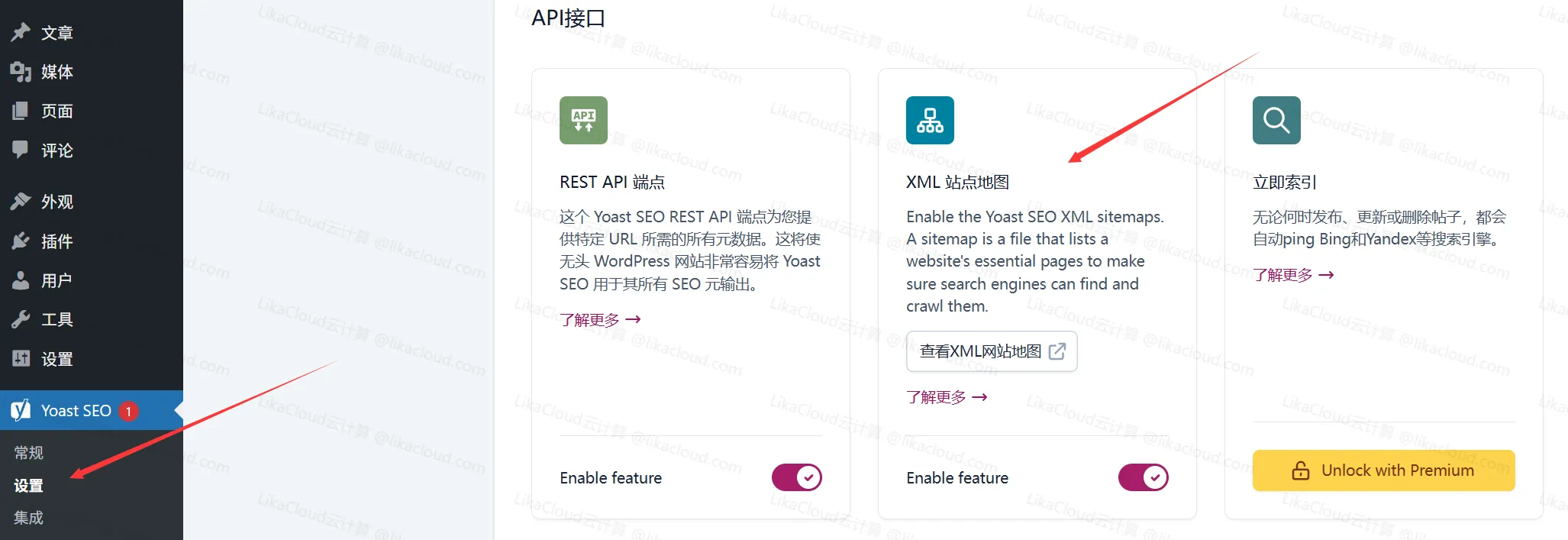
- When turned on, the page displays the sitemap index address in the usual format:
https://你的域名/sitemap_index.xml(e.g.https://example.com/sitemap_index.xml) - Clicking on the address opens an XML-formatted page showing the categories of the sitemap (e.g., articles, pages, classifieds, etc.), indicating that the generation was successful.Tip: If you can't open it, it may be caused by cache, you can click "Delete Cache" in the cache plugin and retry.
Step 2: Submit a Sitemap to Baidu Resource Platform
Submit your sitemap to Baidu so that Baidu can quickly find and include your pages:
Step 1: Login to Baidu Resource Platform
Open the official website of Baidu Resource Platform (https://ziyuan.baidu.com), log in with a registered account (refer to the Register for Baidu Webmaster Platform), go to your website management page.
Step 2: Submit a sitemap
- In the left menu, find "Link Submission→Site Map" and click to enter the submission page.
- In the "Add sitemap" input box, paste your sitemap address (e.g.
https://example.com/sitemap_index.xml)。 - Click the "Submit" button, the system will display "Submit Successfully" and start parsing the page address in the map.
Step 3: Check Submission Status
- After submission, the page will show "Submitted" and "Resolved" status (it takes 1-2 days to resolve).
- After parsing, you can see the "Number of Included URLs" (the total number of pages in the sitemap) and the "Number of Included URLs" (the number of pages that Baidu has included).
take note of
Currently Baidu has closed the map submission for new websites, it is recommended to use the automatic push
Step 3: Submitting a sitemap to the Bing Webmaster Platform
Bing submissions work in a similar way, ensuring that overseas users can find your site through Bing search:
Step 1: Login to Bing Webmaster Platform
Open the official website of Bing Webmaster Platform (https://www.bing.com/webmasters), log in with your registered account and go to your site administration page.
Step 2: Submit a sitemap
- In the left menu, click on 'Sitemaps' to go to the submission page.
- Click the "Submit sitemap" button and paste the sitemap address (same as the one you submitted to Baidu) in the input box.
- Click "Submit" and it will show "Sitemap submitted successfully".
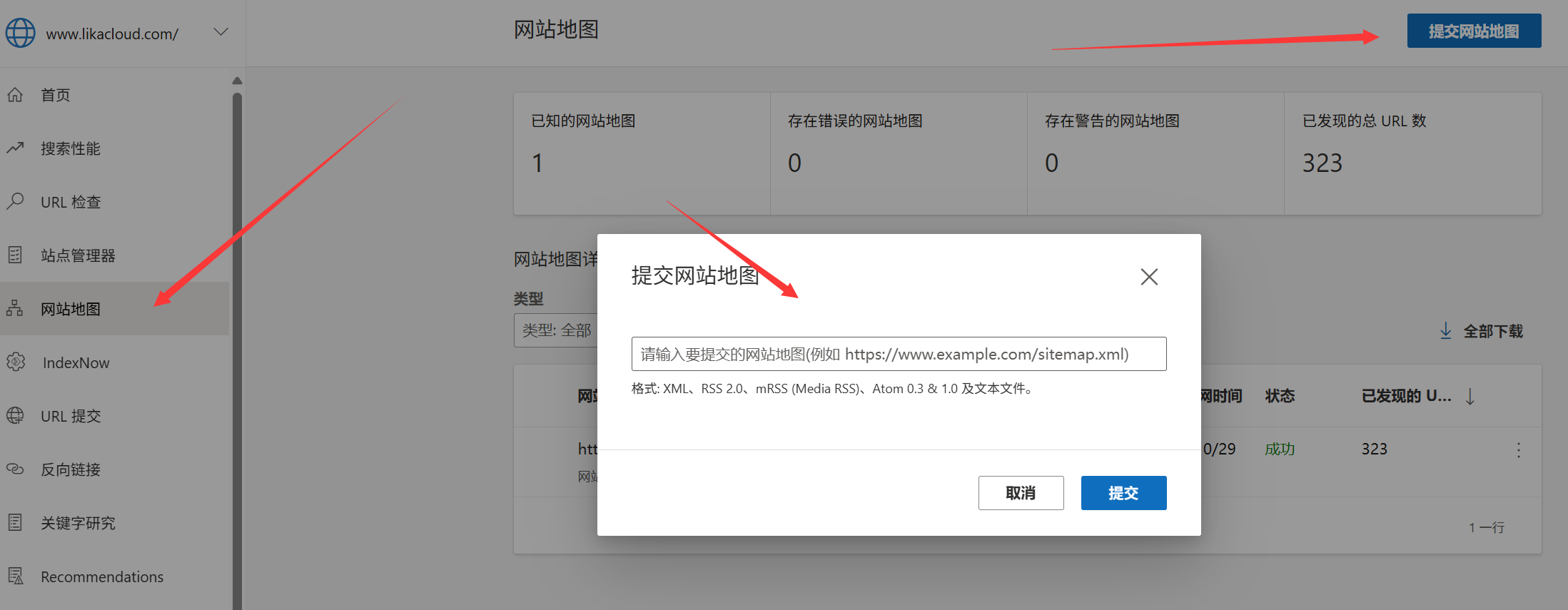
Step 3: Monitor Bing Inclusion Status
- After submission, you can check the map status (e.g. "Pending" is under review, "Success" has been successful) on the "Sitemaps" page.
- Click on the map address to see the number of pages Bing has found and the progress of inclusion.
Fifth, the novice must know the site map maintenance skills
1. Regular updating of the sitemap (no need to do it manually)
- Yoast SEO automatically updates the sitemap: after posting a new article or modifying a page, the map will add or update the corresponding URL in real time, without having to regenerate it.
- Search engines crawl the sitemap regularly (usually once a day) to automatically fetch new content.
2. Common problems in dealing with failed submissions
| Failure Tips | Possible causes | cure |
|---|---|---|
| "Wrong URL format." | Wrong sitemap address (e.g. omitting "sitemap") | Re-copy the map address displayed by Yoast SEO to make sure it matches the address that is actually open |
| "Cannot access this URL." | The web server is temporarily unstable, or the map address is blocked | Check that the site opens properly; open the map address in your browser and make sure you can access it! |
| "contains a large number of dead links" | Pages on the site that have been deleted but not removed from the map | Remove invalid pages in the WordPress backend; or exclude dead links in Yoast SEO ("SEO→Site Map→Exclusions") |
3. Do not submit too much duplicate content
- The sitemap should contain only valuable pages (e.g. articles, pages, categorized directories), and avoid adding irrelevant addresses such as login pages and 404 pages.
- Yoast SEO already excludes these pages by default, so newbies don't need to adjust them manually.
4. New articles can be submitted separately after publication
If you publish an important article (e.g., content recommended on the homepage), you can manually submit a single URL on both platforms, in addition to waiting for the sitemap to update automatically:
- Baidu: Go to "Link Submission→Manual Submission" and paste the address of the article (e.g.
https://example.com/xxxThe number of entries is limited to 50 per day. - Bing: Go to "URL Submission" and paste the address of the article, you can submit up to 10 articles per day.
Six, how long can I see the effect of inclusion?
- new station: 1-4 weeks after the submission will begin to be included (Baidu may be slightly slower than Bing), the initial inclusion of a small number (may be only the first page), is a normal phenomenon.
- Websites that are updated frequentlyIf you publish 1-2 articles per week, the indexing rate (indexed pages/total pages) should reach more than 50% after 1-2 months.
- Ways to Check Inclusion: Type in the search engine
site:你的域名(For example,site:example.com) to see the total number of indexed pages.
wrap-up
Submitting a sitemap is the most effective way to let search engines "systematically know" about your website, and it takes only 10 minutes to generate it automatically through Yoast SEO and submit it to Baidu and Bing respectively. The core is to ensure that the sitemap address is correct and accessible, and the plugin will automatically maintain and update it.
Remember: inclusion is a gradual process, the new station does not have to be included in the initial less anxious, adhere to the release of quality content and monitor the status of the platform through the webmaster, 3-6 months after the inclusion of the amount of gradual growth.
 English