











When a website completes search engine submission, natural search traffic growth alone is slow. And social media is the website traffic diversion "free traffic pool" - WeChat's social fission, microblogging topic dissemination, jittery voice short video diversion, can let your content in a short period of time to reach tens of thousands of potential users. For the novice, without complex operation skills, just need to first complete the website and mainstream social media "connection", add sharing buttons, optimize the sharing effect, you can let visitors actively help you spread. This section will teach you to use plug-ins to realize the social media sharing function, and for WeChat, Weibo, Jieyin three mainstream platforms to give adaptation skills.
I. Why is it necessary to do social media sharing?
Many newbies mistakenly think that "if you make a good website, someone will look at it", but the reality is that the new site has few search engine entries at the beginning, and the natural traffic is extremely limited. And social media sharing can solve this pain point:
- Low-cost attraction: No need to pay for placement, as long as the content is valuable, a single share by a visitor can bring hundreds or thousands of potential visits (e.g., a quality article forwarded by a WeChat friend to a circle of friends may trigger a chain of shares).
- Enhance brand exposure: Hanging links to websites through Weibo topics and Shakeology short videos allows brands to reach user groups outside of search engines (e.g., Shakeology's young user group may rarely use Baidu search).
- Enhance user trust: When users see website content shared by their friends on social media, or see the continued operation of a brand's official account, it dramatically increases trust in the website (compared to unfamiliar search results, acquaintance referrals have a higher conversion rate).
- feed into search rankings: A lot of sharing on social media increases the number of external links to a website (e.g. website links in a WeChat post), which search engines consider 'more valuable' and thus boost rankings.
Data show that: configured with the social media sharing function of the site, the average number of visits than the site is not configured high 60%, of which the share of diversion from WeChat accounted for 45%, is the most core social diversion channels.
Second, the core tools: social media sharing plug-ins preferred by novices
Adding share buttons manually requires code knowledge, and newbies are recommended to realize it with plugins - just install and activate them, and add multi-platform share buttons to posts and pages with simple configuration. Below are 3 plugins adapted to WeChat, Weibo, Jieyin and other platforms, sorted by "newbie friendliness":
1. First choice for free: Social Sharing Buttons (easy to use, no ads)
This plugin is the best choice for novice beginners, support WeChat, Weibo, QQ and other domestic mainstream platforms, simple interface, no redundant features, will not slow down the site.
- Core Advantages: Completely free, Chinese language support, responsive design (mobile display normal), customizable button positions and styles.
- Supported Platforms: 12 mainstream platforms such as WeChat (friends/friends circle), Weibo, QQ (friends/space), Douban, Zhihu and so on.
2. Advanced functionality: Easy Social Share Buttons (with statistics)
This plugin is the first choice if you need to know which content is shared the most. It provides detailed sharing statistics and also supports link mount adaptation for short video platforms such as Jitterbug.
- Core Advantages: Includes share count statistics, support for 40+ social platforms, 22 button display positions (e.g., side hover, top/bottom of post), and support for customized share copy.
- ImprintThere is a free version and a paid version (annual fee of about $100). The free version is enough for newbies, and you can upgrade to the paid version to get advanced statistical features.
3. Image exclusivity: social image hovering (to increase image sharing)
For websites with more images (e.g. photography blogs, design stations), this plugin enables images to bring their own sharing features - when the user's mouse hovers over an image, it will display the sharing buttons for WeChat, Weibo, Pinterest and other platforms, dramatically boosting the sharing rate of image-based content.
- Core Advantages: Automatically adapts to all images, supports button position customization (four corners/center), contains cool animation effects, does not affect the image loading speed.
Third, step-by-step teaching: the use of plug-ins to achieve social media sharing (as an example of the free version)
Take "Social Sharing Buttons" as an example, it will teach you to complete the whole process from installation to configuration in 5 minutes:
Stage 1: Installation and activation of the plug-in
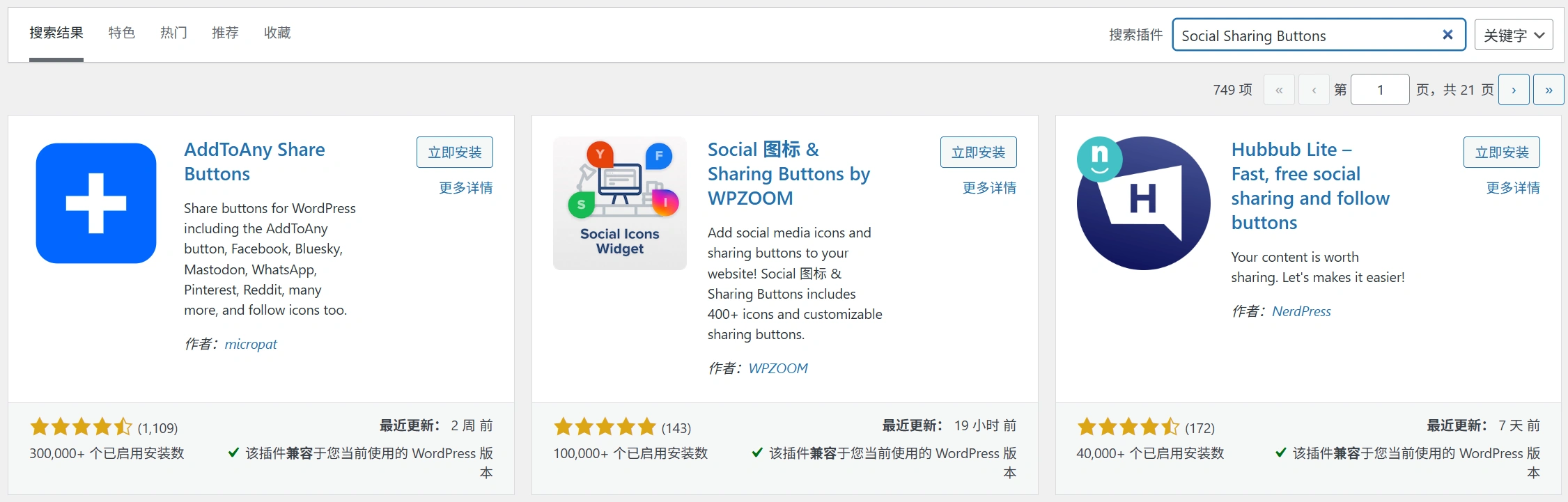
- Log in to the WordPress backend and go to the "Plugins→Install Plugins" page.
- Type "Social Sharing Buttons" in the search box, find the plugin and click "Install Now".
- Click "Activate" after the installation is complete, a new "Social Sharing" menu will be added in the background.
Stage 2: Core configuration (focus on adapting WeChat and Weibo)
Go to the "Social Sharing→Settings" page and configure the settings as follows (newbies are advised to apply the default settings directly and fine-tune them later):
- Select the platform to display: In the "Enabled Social Networks" list, check "WeChat Friends," "WeChat Friends," "Weibo," and "Qzone" (these are the most common platforms used by domestic users).
- Drag the platform name to adjust the button display order (it is recommended to put WeChat Friend Circle in the first place).
- Setting the button display position: In "Display Position", check "Top of Article" and "Bottom of Article" (these two positions are the most visible to users when browsing).
- Check the "Page" option if you want to display the share button on a page (e.g. About Us page).
- Customize Button Styles: In "Button Style", select "Flat" (simple and compatible with most themes).
- In "Button Size", select "Medium" (suitable for both mobile and computer display).
- Setting up sharing copy (to boost appeal): In "Share Text", fill in the default sharing text (e.g. "I found a super useful article: {title}, recommend it to you! where {title} will be automatically replaced with the title of the article).
- WeChat Exclusive Settings: Check "Enable WeChat Sharing Image" and upload a 1200×600px cover image (this image will be displayed when WeChat sharing, which is more attractive to click than the default image).
- Click "Save Changes" at the bottom of the page to complete the configuration.
Stage 3: Testing the effectiveness of sharing
- Go to the frontend of the website, open any article and make sure that the top/bottom has displayed the sharing buttons for WeChat, Weibo, etc.
- Click the "WeChat Friend Circle" button and scan the QR code with WeChat after it pops up to see the preview effect of sharing: Check if the customized cover image and sharing copy are displayed.
- Click on the link in the preview to confirm that you can jump to the website article page properly.
- Similarly test microblog sharing: click the button to jump to the microblog posting page, confirm that the article title and link are correct.
Fourth, sub-platform optimization techniques: doubling the effect of attracting traffic
Different social media have different user habits, and targeted optimization of sharing content can significantly increase the click conversion rate. The following are the adaptation techniques for the three core platforms of WeChat, Weibo and Shake:
1. WeChat (core attraction channel): do these 3 points to improve the forwarding rate
- Cover Image Optimization: Size requirements: must be 1200×600px (WeChat official recommended ratio, to avoid stretching deformation).
- Content principles: combination of graphics and text, highlighting the core selling points (such as tutorial articles with "step-by-step disassembly + results charts", product category with "product photos + discount information").
- Tools recommended: made with Canva (can draw), built-in WeChat cover picture templates, novice can also quickly out of the picture.
Share Copywriting TipsPain point: the beginning of the point out the user needs (such as "want to do personal blog but do not know how to build a website? This tutorial will help you do it in 30 minutes!) This tutorial will help you do it in minutes!
Add a guide: Add a forwarding guide at the end (e.g. "If you find it useful, forward it to a friend who needs it~").
Leveraging the WeChat ecosystem for fission: Add "QR Code of WeChat Public Number" to the website, guide to share and then pay attention to the public number to get more resources (e.g. "Share this article to your circle of friends, take a screenshot and send it to the public number to get the toolkit for building a website").
Use WeChat small program associated with the website: If you have the conditions to develop a small program, you can embed the core content of the website in the small program to realize the closed loop of "small program diversion → website conversion".
2. Microblogging: leveraging topical traffic to increase exposure
- Keyword and Topic Matching: Share the copy to add industry keywords and hot topics (e.g., website building articles can be added "#WordPress Building Station #" "# Newbie Website Building Tips #").
- Topic Selection: Prioritize vertical topics with 100,000+ followers, avoid big hot topics (too much competition and easy to be flooded).
Multi-image sharing is more eye-catching: Weibo users are more sensitive to pictures, it is recommended to attach 3-4 screenshots of the website content (e.g. tutorial step-by-step diagrams, finished website diagrams) when sharing.
Using the plugin "Social Image Hover" enables individual sharing of single images, making it easy for users to pick the most appealing images to repost.
@Related Accounts Increase Interaction: When sharing @ industry famous account (e.g. "@WordPress Chinese Community"), if it is retweeted, it can bring a lot of accurate traffic.
3. Jitterbugs: using short video mounted links to attract traffic
Jitterbug can't add website links directly in the video, it needs to be realized through "Jitterbug Small Program" or "Enterprise Mount", which is suitable for newbies who have some operation foundation:
- Newbie program: Enterprise mounted links: Register Jitterbug Enterprise (free, business license is required), you can add a website link to the "Home Profile" after completing the certification.
- Operational Tip: Publish short videos related to the content of your website (e.g. "30 seconds to teach you to add share buttons with WordPress"), and guide in the video copy "To get the full tutorial, click the homepage link to view it".
Advanced program: small program jump: Develop simple Shakeology applets, embed core website content (e.g., tutorials, product introductions) into the applets, and mount the applets in the video so that users can be indirectly directed to the website after clicking on them.
V. Common problems and solutions for novices
1. WeChat sharing does not show the cover image?
Common causes: The cover image size does not meet the requirements (not 1200×600px), the image is in the wrong format (JPG format is recommended), and the microsoft cache is not updated.
cure: 1. 重新制作1200×600px的JPG格式封面图,在插件设置中替换; 2. 用微信「开发者工具」清理缓存:打开微信公众平台官网,进入「工具→微信JS接口调试工具」,输入文章链接点击「调试」,刷新缓存后重新测试。
2. Share button not showing?
Common causes: Plugins conflicting with themes/other plugins, wrong button position settings, site cache not updated.
cure: 1. 先禁用其他插件(尤其是缓存插件),测试分享按钮是否显示,若显示则逐个启用插件找到冲突插件; 2. 进入插件「显示位置」设置,确认已勾选「文章」或「页面」选项; 3. 按Ctrl+F5强制刷新网站前台页面,清除浏览器缓存。
3. How can I view the sharing data?
Free program: Use the free version of "Easy Social Share Buttons" and go to the plugin's "Statistics" page to view the number of shares by platform (only basic data is supported).
advanced program: Combined with Baidu Statistics (Baidu Statistics code needs to be installed on the website), view detailed data such as the number of visits and user behavior from each platform in "Source Analysis→Social Networks".
4. Must all platforms be configured?
Not necessary! Newbies are advised to prioritize focusing on 1-2 core platforms:
- For domestic individual users (e.g., bloggers, self-media): focus on WeChat + Weibo.
- For enterprise customers (such as enterprise official website, service station): focus on WeChat (circle of friends + public number).
- For young users (e.g., trend information, creative design): focus on WeChat + Jitterbug.
Sixth, operation tips: so that the amount of sharing continues to grow
- Content is the core: Only valuable content (e.g., practical tutorials, exclusive information, emotionally resonant articles) will be actively shared by users, avoiding the publication of meaningless running content.
- Active Leadership Sharing: At the end of the article to add a guide (such as "This site tutorial took me 3 days to organize, feel useful if the trouble forwarded to support ~"), to enhance the user's willingness to share.
- Regular sharing activitiesFor example, if you share this article with your friends, send the screenshot to customer service to receive a WordPress theme gift package, and use the small benefits to motivate users to share.
- Monitoring Data Optimization Strategy: Check the sharing data every week, focus on "content types with high sharing volume", and then publish more similar content (e.g., if you find that tutorial articles have high sharing volume, continue to update the new website tutorials).
wrap-up
Social media sharing is a key means of low-cost traffic diversion for new stations, and the core is to quickly add sharing buttons through plug-ins and optimize the sharing content for WeChat, Weibo, Shake, and other platforms for user habits. Newbies do not need to pursue the full coverage of multiple platforms, first focus on WeChat as a core channel, and do a good job of optimizing the cover image and copy, you can achieve initial traffic growth.
After completing the social media sharing configuration, in the next section we will learn about 'Link Exchange' - by recommending each other with similar websites.
 English